GPT Image 2.6 Flare vs Sunburst: which one to use, with side-by-side tests
GPT Image 2.6 comes as two models at one price: gpt-image-2.6-flare, which OpenAI describes as image generation and editing for fast iteration, and gpt-image-2.6-sunburst, for detailed visual work. They take the same settings and formats, so the choice comes down to speed and to how literally each follows your layout. We ran the same prompts and edits on both to find out where the difference shows.
Use Flare by default. It costs the same as Sunburst, was about three times faster through OpenAI's API on launch night, and in our tests spelled every word just as correctly. Switch to Sunburst when the image is about arrangement rather than atmosphere: app screens, packaging, infographics and edits that must change one thing and nothing else. In our side-by-side tests Sunburst followed instructions more literally, reproducing an info card word for word and clearing a background exactly as described, while Flare added extra labels and kept objects we had asked to replace.
Flare vs Sunburst at a glance
| Flare | Sunburst | |
|---|---|---|
| API model ID | gpt-image-2.6-flare | gpt-image-2.6-sunburst |
| OpenAI's description | Image generation and editing for fast iteration | Image generation and editing for detailed visual work |
| Price | Same token rates | Same token rates and token counts |
| Settings and formats | Quality low to max, complexity, GIF, SVG, markup | The same |
| API time, four prompts (CellCog) | 5.6–8.0 s | 14.5–25.4 s |
| API time, 12-frame GIF (CellCog) | 11.0 s | 22.0 s |
| Time on GPT Image Hub, four prompts | 16.9–27.1 s | 13.8–24.8 s |
| Text spelling in our tests | Every requested word correct | Every requested word correct |
| Following layout instructions | Adds its own touches (extra labels, kept props) | Literal: what you list is what you get |
| Best for | Posters, product shots, social graphics, drafts, GIFs | UI screens, packaging, infographics, precise edits |
Speed: Flare is about three times faster in the API
In CellCog's launch-night test through OpenAI's API, Flare beat Sunburst on every prompt, by 2.6 to 3.5 times. A GIF took twice as long on Sunburst for no visible gain.
| 2.6 Flare | 2.6 Sunburst | |
|---|---|---|
| Data graphic (1536×1024, high) | 6.8 s | 23.8 s |
| Event poster (1024×1536, high) | 8.0 s | 25.4 s |
| Mascot (1024×1024, medium) | 6.2 s | 16.9 s |
| Pictogram (1024×1024, low) | 5.6 s | 14.5 s |
Through GPT Image Hub's Saver route the gap mostly disappears, because queueing and delivery take more time than generation. On 5 November 2026 the two were within a few seconds of each other, and Sunburst was faster on two of four prompts:
| 2.6 Flare | 2.6 Sunburst | |
|---|---|---|
| Text-heavy event poster (1024x1536, high) | 17.7 s | 24.8 s |
| Six-step infographic (1024x1536, high) | 17.7 s | 17.8 s |
| Mobile app screen (1024x1536, high) | 27.1 s | 22.5 s |
| Product photo (1536x1024, high) | 16.9 s | 13.8 s |
So speed matters most if you call OpenAI's API yourself and generate many images; on the Hub, choose by result.
Same prompts on Flare and Sunburst
Each pair below used the same prompt, size and quality. The full prompts are in our GPT Image 2.6 prompt guide.
App screen: Sunburst follows the brief, Flare embellishes it
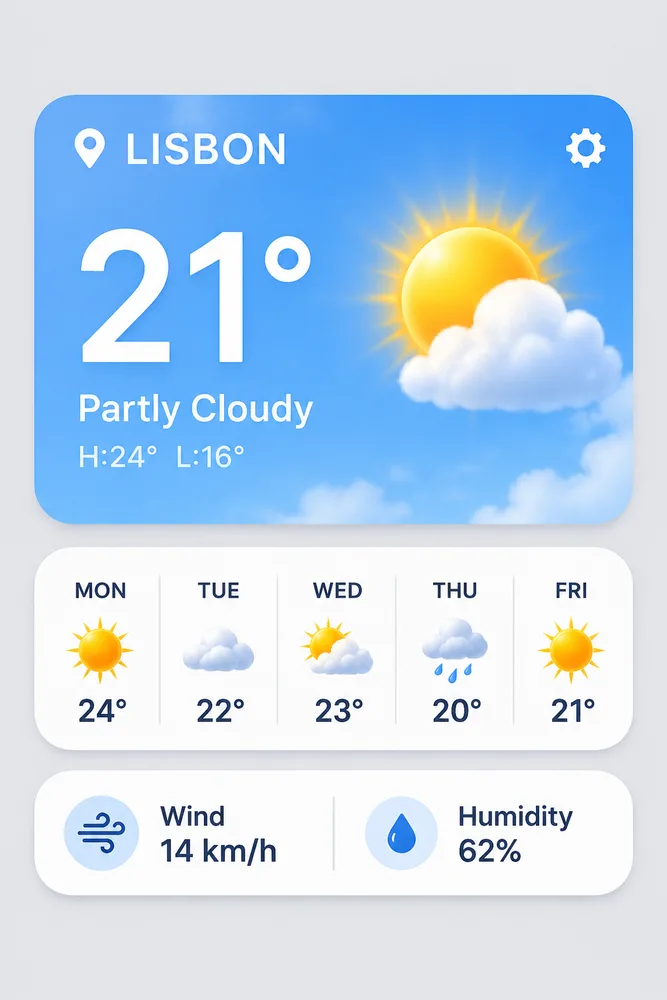
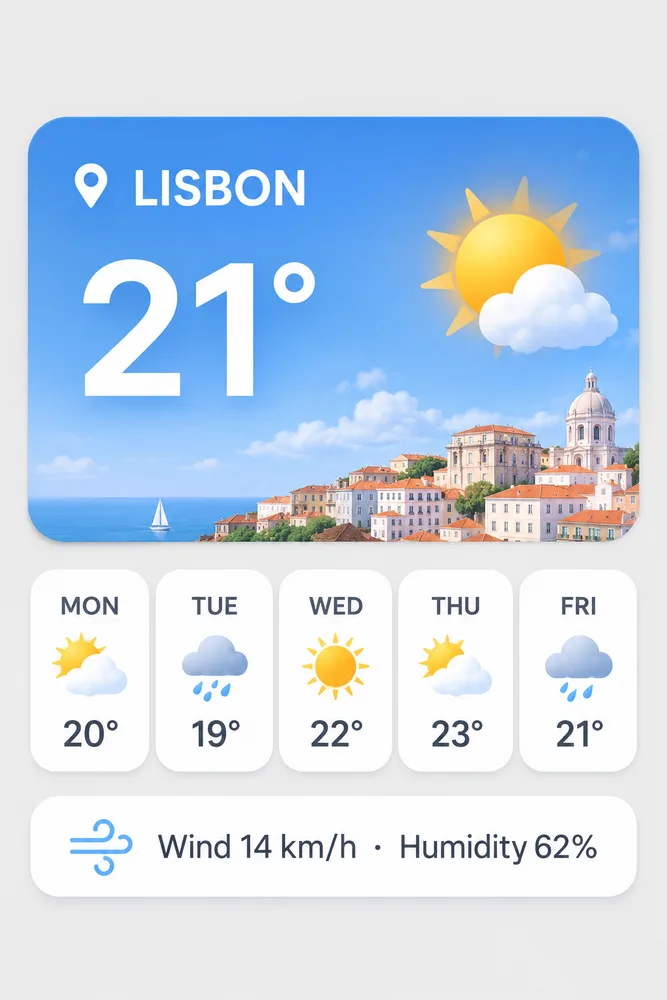
Both got every requested string right. Flare added a weather description, a high and low temperature and a settings icon nobody asked for, and split the wind and humidity card into two blocks. Sunburst drew exactly the screen in the prompt, with the card reading "Wind 14 km/h · Humidity 62%" word for word. For UI mockups, where every label has to be one you wrote, that literalness is the point.
Infographic: Sunburst lays it out more cleanly
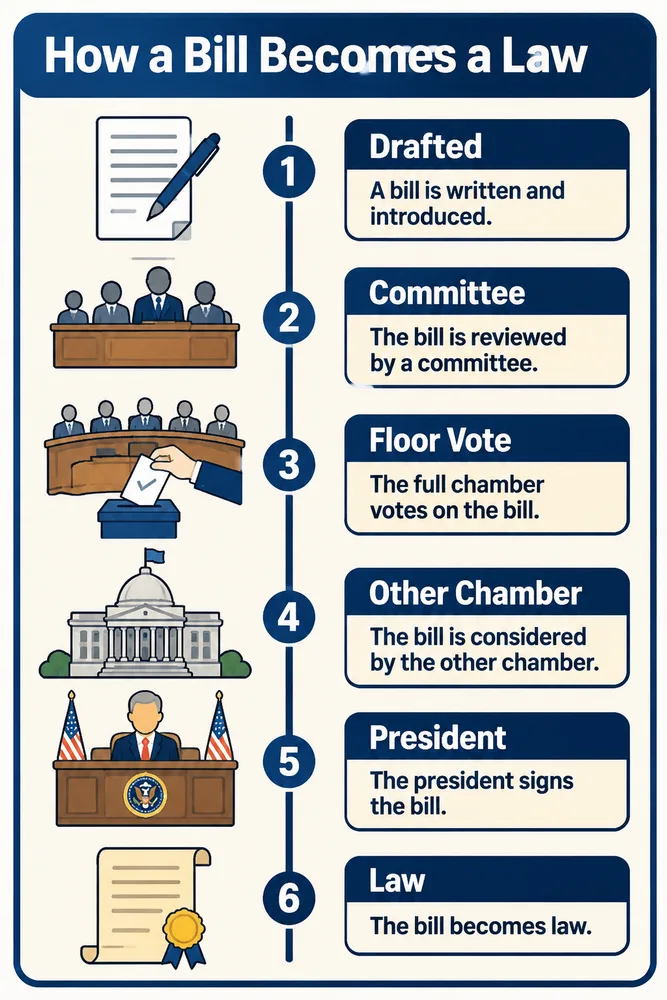
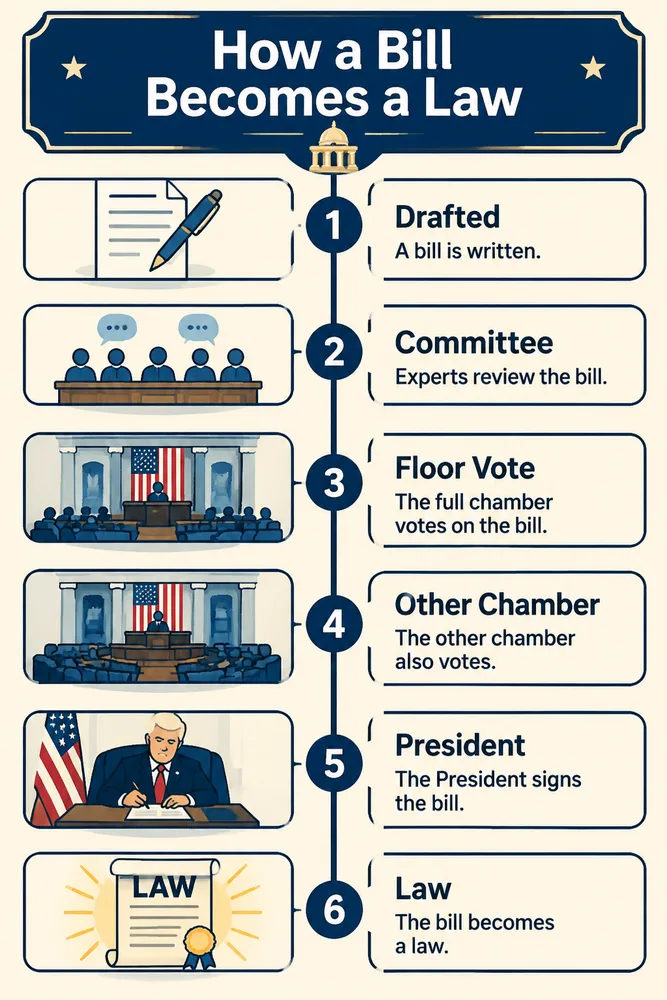
All six step labels were correct on both. Sunburst gave each icon its own box and kept the timeline tidy; Flare's version was bolder but left faint white smudges over the title.
Poster: both spell it right, Flare has more punch


Title and date line were exact on both. Flare's light and color are stronger and more graphic; Sunburst's are softer and more painterly. Neither is wrong, so for posters pick by taste, or by speed.
Product photo: Flare keeps the requested empty space
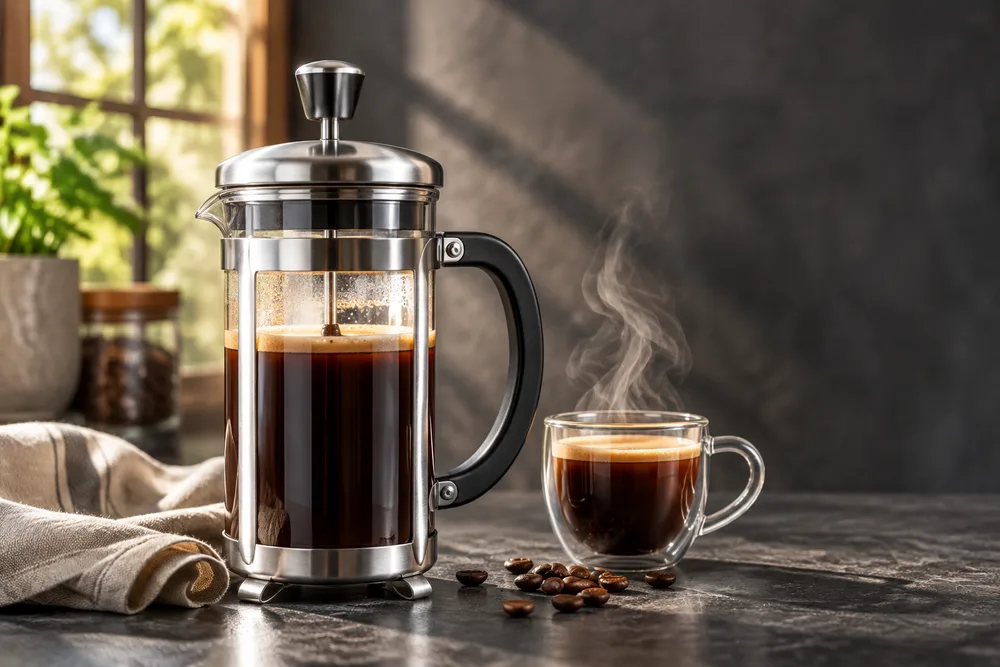
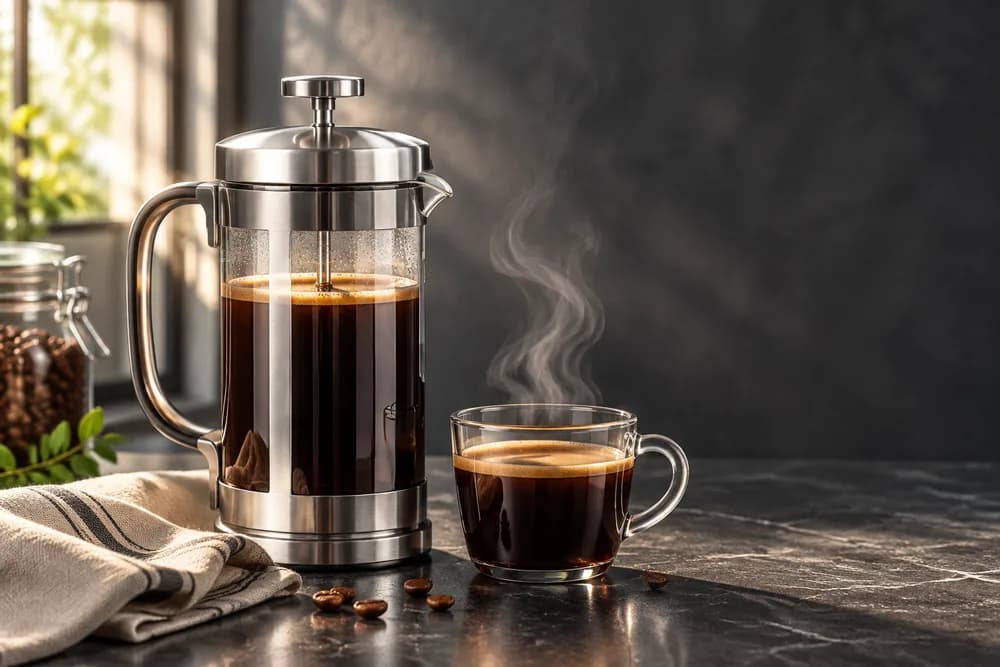
Both are convincing photographs. Flare left the clear space on the right that the prompt asked for; Sunburst moved the press toward the center, leaving less room for a headline.
Edits: which one changes only what you ask
Background swap
We asked both to "change only the background" of the Flare product photo above to a white marble counter and a plain gray wall, keeping everything on the counter.
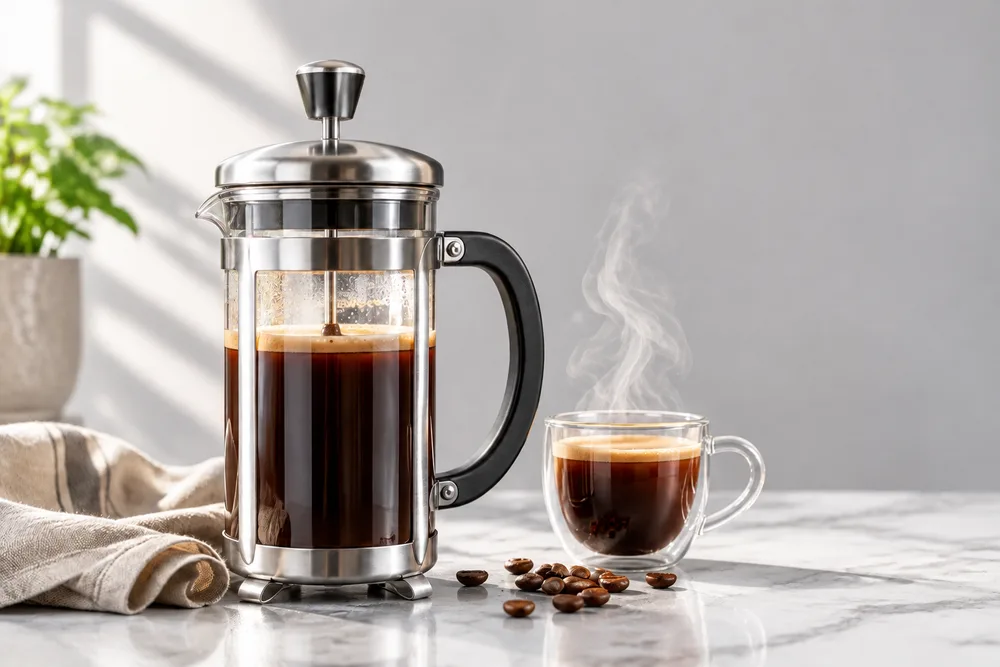
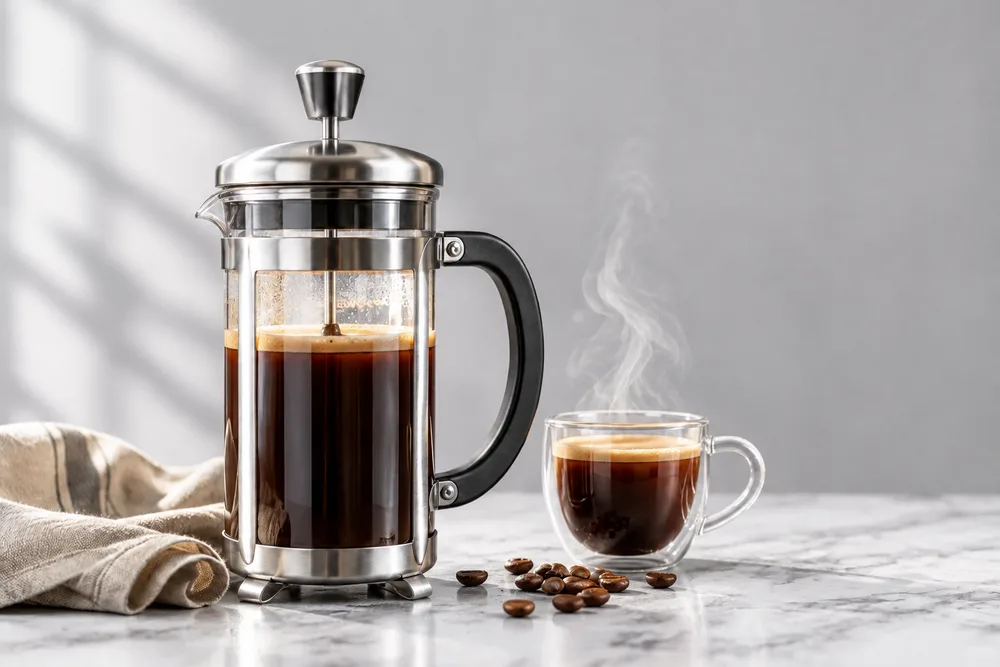
Both kept the press, cup, steam, napkin and beans exactly. Flare also kept the plant and jar that stood by the old window; Sunburst removed them, which is what "a plain soft-gray wall" means. The 2.5 versions split the same way, so this is a stable difference between the two model types.
One-line text change


Asked to change only the date on the poster, both did exactly that and left every other word, the figure and the skyline alone. For small, clearly worded edits either model works; Sunburst took 18.5 seconds here and Flare 26.9.
A simple rule: light or arrangement
A hands-on comparison of the 2.5 versions on DEV Community ran five prompts on both and reached a rule that matches our 2.6 results: use Flare when the image is about light, and Sunburst when it is about arrangement, such as type, interface or layout. When neither applies, the two are roughly equal, so take the faster one.
- Flare: posters, social graphics, product and lifestyle photos, thumbnails, stickers, mascots, animated GIFs and first drafts of anything.
- Sunburst: app and web screens, dashboards, packaging and labels, infographics, maps, menus and other dense typography.
- Sunburst: edits where the rest of the image must not change, and multi-step edit chains on one product or character.
- Either: short headline text and single-line text edits; both spelled every word correctly in our tests.
A two-step workflow: draft on Flare, finish on Sunburst
- Explore on Flare at low or medium quality: try several compositions quickly.
- Pick the layout you like and write down what must stay: text, positions, colors.
- If the image is about arrangement, re-render it once on Sunburst at high or xhigh with that list in the prompt; if it is about light and mood, stay on Flare and raise the quality.
- Make edits on Sunburst when they must leave everything else untouched, and say "change only" the one thing in each round.
Settings for each model
| Flare | Sunburst | |
|---|---|---|
| Quality for drafts | low or medium | medium |
| Quality for finals | high; xhigh for fine detail | high or xhigh; max only for hero images |
| Complexity | Default (high); low for quick edits | Default (high); low if an edit drifts |
| Animated GIFs | Preferred: half the wait | Works, about twice as slow |
| SVG | Either; unreliable at launch | Either; unreliable at launch |
On OpenAI's API both models cost the same at each quality level, so the setting, not the model, decides the bill. Higher quality and complexity can also add latency; CellCog's max-quality Flare image took 18 seconds against 7.9 at high.
Flare and Sunburst on GPT Image Hub
Both 2.6 models are in the GPT Image Hub generator as GPT Image 2.6 Flare Saver and Sunburst Saver, at a flat 10 credits per image for any size and quality, so you can run the same prompt on both and compare for the price of two images. New accounts get 25 free credits. The Hub makes still images; GIF and SVG output need OpenAI's API.
Flare vs Sunburst FAQ
What is the difference between GPT Image 2.6 Flare and Sunburst?
Flare is tuned for fast iteration and Sunburst for detailed visual work. They cost the same and support the same settings. Flare was about three times faster through OpenAI's API; Sunburst followed layout and edit instructions more literally in our tests.
Is GPT Image 2.6 Sunburst better than Flare?
Not across the board. Both spelled every requested word correctly in our tests. Sunburst was better at screens, infographics and edits that must change one thing only; Flare gave stronger light and color and kept requested empty space in a product shot.
Does Sunburst cost more than Flare?
No. OpenAI bills both at the same token rates, and they used the same token counts in an independent test. On GPT Image Hub both cost 10 credits per image.
Which is faster, Flare or Sunburst?
Flare, by 2.6 to 3.5 times in a launch-night API test (5.6–8.0 seconds against 14.5–25.4). Through GPT Image Hub's Saver route the two took similar times, 14–27 seconds.
Which model should I use for text in images?
Either for short headlines and posters: both were exact in our tests. Use Sunburst for dense text such as UI labels, menus and infographics, because Flare tends to add text you did not ask for.
Which model is better for editing photos?
Sunburst when the edit must leave everything else alone, such as swapping a background around a product. For a single clear change like one line of text, both did it exactly.
Which should I use for animated GIFs?
Flare. Both make GIFs through OpenAI's API, but Sunburst took about twice as long in an independent test with no visible benefit.
Sources
Model descriptions are from OpenAI's model pages as of 5 November 2026. API timings are from CellCog's independent launch-night test; the DEV Community comparison tested GPT Image 2.5. Images and Hub timings are our own, from GPT Image Hub's Saver route on 5 November 2026.
- OpenAI: GPT-Image-2.6 Flare model page
- OpenAI: GPT-Image-2.6 Sunburst model page
- OpenAI image generation guide
- TestingCatalog: OpenAI launches Images 2.6 with GIFs and image reference
- CellCog: GPT Image 2.6 vs 2.5, 80 generations on launch night
- DEV Community: Flare vs Sunburst, five prompts rendered twice (GPT Image 2.5)
Keep exploring