
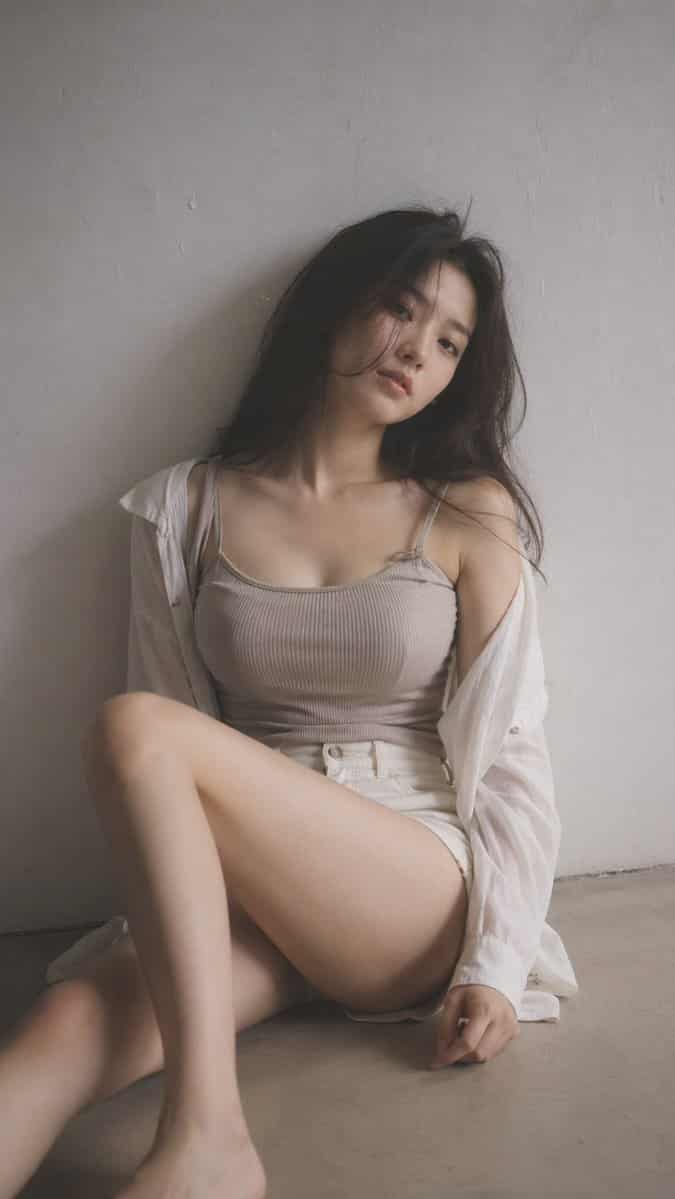
Yumuşak Siyah Sis Editoryal Portresi
9:16 dikey — editoryal portre, tek konu yumuşak siyah sis filtresi, hafif pus, hafif vurgu çiçeklenme, sessiz tonlar minimum iç mekan alanı, temiz arka plan, hafif dokulu genç Koreli kadın, minimal makyaj, doğal cilt do…
İstemi
9:16 dikey — editoryal portre, tek konu yumuşak siyah sis filtresi, hafif pus, hafif vurgu çiçeklenme, sessiz tonlar minimum iç mekan alanı, temiz arka plan, hafif dokulu genç Koreli kadın, minimal makyaj, doğal cilt dokusu kıyafeti: bol bir gömleğin altına yerleştirilmiş, yüksek belli şort veya etekle eşleştirilmiş, vücuda oturan nervürlü örgü üst veya yumuşak kaşkorse; kumaş vücut şekline hafifçe yapışıyor, yumuşak ve doğal, açıklayıcı unsurlar yok saç: biraz dağınık, doğal hacimli poz: bir bacak bükülmüş ve diğeri gevşek olarak yerde oturmak, vücut hafifçe eğik, omuzlar aynı hizada değil, baş eğik kompozisyon: konu biraz merkezin dışında, negatif alan mevcut ifade: sakin, biraz mesafeli, doğal dudak aydınlatması: yumuşak yan ışık, hafif gölge düşüşü ruh hali: abartısız, sessiz, doğal vücut hatları aracılığıyla zarif bir şekilde şehvetli, rahat ve pozlanmamış kalite: ince taneli, hafif yumuşaklık, gerçekçi görünüm
Bu istem nasıl kullanılır?
Oluşturmadan önce Yumuşak Siyah Sis Editoryal Portresi isteminin tamamını okuyun ve konuyu, stili, kamerayı, ışıklandırmayı ve kompozisyon gereksinimlerini tanımlayın.
Parantezli veya bağımsız değişken tarzı yer tutucuları ürününüz, karakteriniz, markanız, sahneniz, renk paletiniz veya en boy oranı gereksinimlerinizle değiştirin.
https://www.gptimagehub.com/tr/generate?promptId=cmogwrt0h0015zpdys698d3dm dosyasını açın, görüntüyü oluşturun, ardından gerekirse daha spesifik konu, metin, düzen veya negatif kısıtlamalarla istemi hassaslaştırın.
Bilgi İstemi SSS
Yumuşak Siyah Sis Editoryal Portresi istemi en iyi ne için kullanılır?
Bu istem, yeniden kullanılabilir bir yapı, ayrıntılı görsel yön ve tutarlı çıktı kalitesi istediğiniz portre ve fotoğrafçılık görselleri için en iyi şekilde kullanılır.
İstemi oluşturmadan önce düzenleyebilir miyim?
Evet. Bilgi istemi metninin tamamı bu sayfada görünür; böylece oluşturmadan önce konuları, ürün adlarını, renkleri, kompozisyonu, kamera terimlerini, en boy oranını ve stil notlarını değiştirebilirsiniz.
Bu istemle hangi modeli kullanmalıyım?
Bilgi istemi meta verilerinde gösterilen modeli varsayılan başlangıç noktası olarak kullanın. Başka bir görüntü modeli aynı en boy oranını ve talimat stilini destekliyorsa istemi uyarlayabilir ve sonuçları karşılaştırabilirsiniz.