
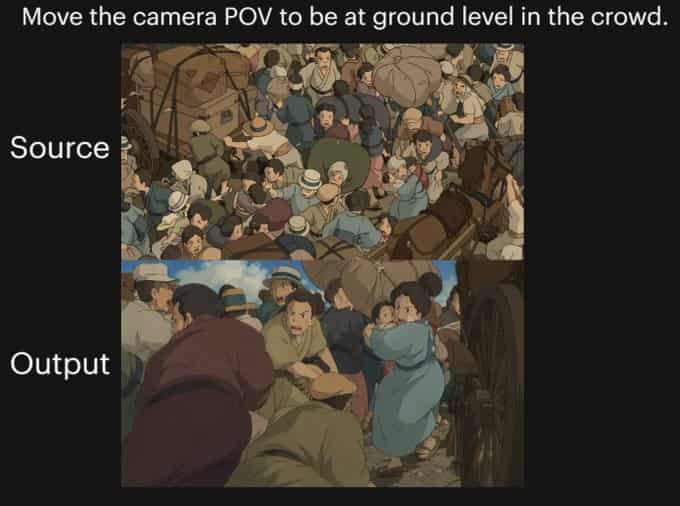
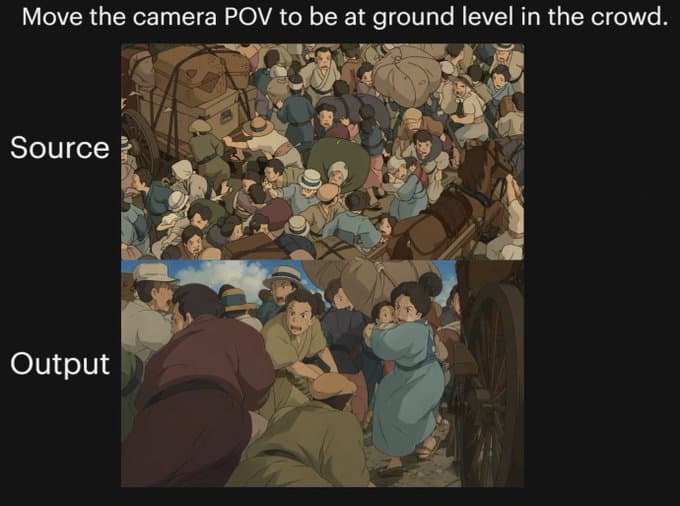
プロンプト
{"type":"比較グラフィック","style":"黒のプレゼンテーション背景上のアニメシネマティックデモンストレーション画像","canvas":{"aspect_ratio":"4:3","background":"単色の黒"},"text_elements":[{"text":"{argument name=\"headline text\" default=\"Move the camera POV to be at ground level in the crowd.\"}","position":"上部中央","style":"大きな白いサンセリフ"},{"text":"Source","position":"上部画像の左","style":"大きな白いサンセリフ"},{"text":"Output","position":"下部画像の左","style":"大きな白いサンセリフ"}],"layout":{"sections":[{"title":"Source","position":"上部中央","count":1,"labels":["俯瞰群衆シーン"]},{"title":"Output","position":"下部中央","count":1,"labels":["地面レベルの群衆POVシーン"]}],"image_frames":2},"images":[{"role":"ソース画像","composition":"上から見た、密集した歴史的な街路の群衆の賑やかなトップダウンビュー","scene":"荷馬車と馬車を取り囲む混沌とした群衆。肩を寄せ合う人々、多くは帽子を被り、抑えた20世紀初頭または旧ヨーロッパ風の衣装を着ている。包みと袋が見える。右端に1頭の茶色の馬。木製の荷車の車輪と荷台構造が部分的に見える","camera":"群衆を見下ろす高い俯瞰の鳥瞰アングル","lighting":"柔らかな日光","color_palette":"抑えた大地のような茶色、埃っぽい青、ベージュ、オリーブ、温かみのあるグレー","rendering":"手描きアニメフィルムスチル、詳細な群衆イラスト、わずかにソフトなシェーディング"},{"role":"出力画像","composition":"同じ混雑した歴史的な街路を、人々の中から地面近くの高さで再構成","scene":"馬車の車輪の脇、群衆の中からの視点。前景と中景に身体が満ちる。左に暗い赤褐色の服を着て前かがみになっている人物、中央下付近に緑の服でしゃがんでいる人物、右中央に振り返るライトブルーのドレスの女性、密に配置された人物、近くに馬と荷車が示唆される、圧縮と近さのドラマチックな感覚","camera":"群衆の内側から非常に低い地面レベルのPOV、人々を通して上方および前方へ、複雑な遮蔽と深さを強調","lighting":"温かみのあるシネマティックな影を伴う柔らかな日光","color_palette":"抑えた大地のような茶色、埃っぽい青、ベージュ、オリーブ、温かみのあるグレー","rendering":"手描きアニメフィルムスチル、シネマティックな視点シフト、詳細なキャラクター混雑、柔らかな絵画的シェーディング"}],"overall_goal":"同じアニメ群衆シーンの前後カメラアングル変換を示す。出力は俯瞰ビューから群衆内の低く没入感のあるPOVへ移動する"}
このプロンプトの使用方法
生成する前に、完全な アニメ群衆POV比較 プロンプトを読み、主題、スタイル、カメラ、照明、構成の要件を特定してください。
括弧で囲まれたプレースホルダーまたは引数スタイルのプレースホルダーを、製品、キャラクター、ブランド、シーン、カラーパレット、またはアスペクト比の要件に置き換えます。
https://www.gptimagehub.com/ja/generate?promptId=cmogx289g00crzpdybkpbusju を開いて画像を生成し、必要に応じてより具体的な件名、テキスト、レイアウト、または否定的な制約を使用してプロンプトを調整します。
プロンプトFAQ
アニメ群衆POV比較 プロンプトは何に最適ですか?
このプロンプトは、再利用可能な構造、詳細な視覚的方向性、一貫した出力品質が必要な ソーシャルメディア 画像に最適です。
生成する前にプロンプトを編集できますか?
はい。このページには完全なプロンプト テキストが表示されるため、生成前に件名、製品名、色、構成、カメラ用語、アスペクト比、スタイル メモを変更できます。
このプロンプトではどのモデルを使用すればよいですか?
プロンプトのメタデータに示されているモデルをデフォルトの開始点として使用します。別の画像モデルが同じアスペクト比と指示スタイルをサポートしている場合は、プロンプトを調整して結果を比較できます。