
動漫 VTuber Minecraft 直播縮圖
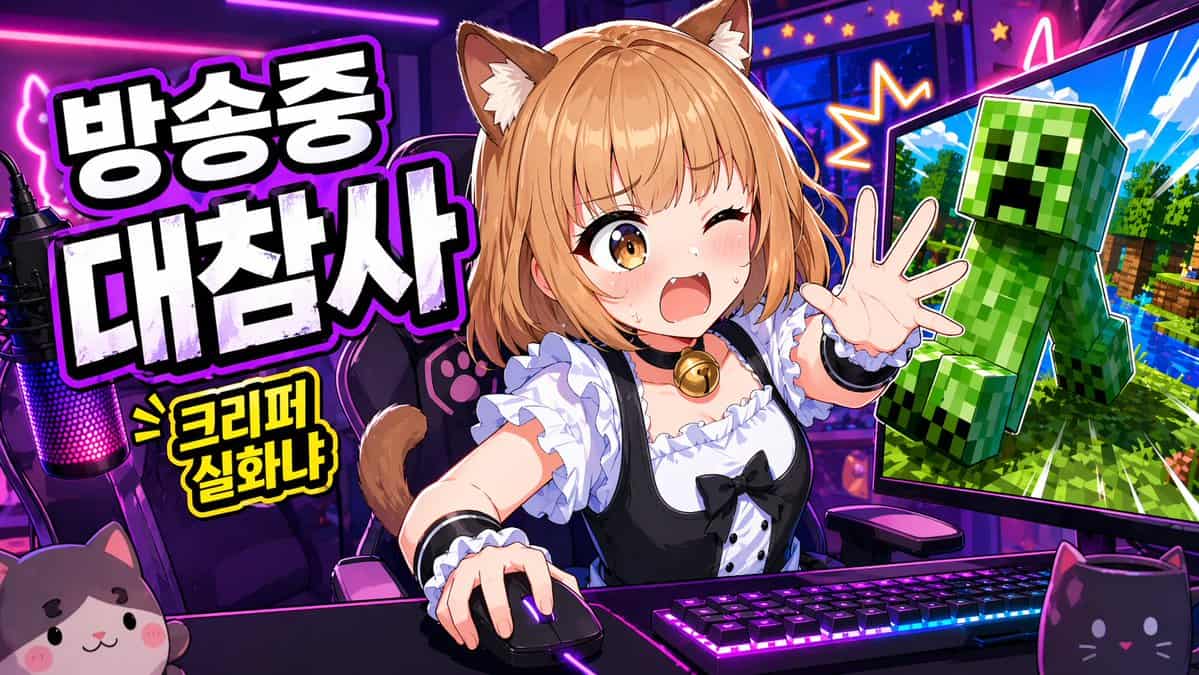
一張鮮豔動漫風 YouTube 縮圖,用於直播遊戲節目,寬幅 16:9 構圖,背景是霓虹紫粉色主播房間。畫面中央是一位可愛的貓娘 VTuber 坐在桌前,腰部以上,充滿活力地前傾,一隻手放在電腦滑鼠上,另一隻手伸向觀眾。她有 {argument name="hair color" default="light orange-blonde"} 波波頭,柔軟劉海,蓬鬆棕奶油色貓耳,以及可見貓尾。她的臉由中央實心矩形遮擋塊有意遮住。她穿黑白…
提示詞
一張鮮豔動漫風 YouTube 縮圖,用於直播遊戲節目,寬幅 16:9 構圖,背景是霓虹紫粉色主播房間。畫面中央是一位可愛的貓娘 VTuber 坐在桌前,腰部以上,充滿活力地前傾,一隻手放在電腦滑鼠上,另一隻手伸向觀眾。她有 {argument name="hair color" default="light orange-blonde"} 波波頭,柔軟劉海,蓬鬆棕奶油色貓耳,以及可見貓尾。她的臉由中央實心矩形遮擋塊有意遮住。她穿黑白女僕靈感服裝,有褶邊白襯衫、黑色連衣裙胸衣、泡泡袖、白色荷葉邊、黑色絲帶蝴蝶結和金色鈴鐺頸圈。桌上放置帶明亮 RGB 燈光的機械鍵盤、發光遊戲滑鼠,以及遠左側一個帶粉紫 LED 燈的主播麥克風。前景放 2 個貓主題桌面物品:左下角一個貓臉毛絨物,右下角一個黑貓造型馬克杯。她身後是一把帶爪印細節的遊戲椅。左側加入大號粗體韓文標題,厚重白色塊狀字,帶黑色填充陰影和發光紫色描邊,堆疊成 2 行:{argument name="headline text" default="방송중 대참사"}。其下加入較小黃色漫畫爆炸標註,黑色描邊,文字為 {argument name="sub text" default="> 크리퍼 실화냐"}。右側展示 1 個大型電腦顯示器,向內傾斜,螢幕裡是類似 Minecraft 的場景,有亮藍天空、綠色樹木、水面,以及一個大型綠色 Creeper 朝觀眾彈出,像貼紙剪影一樣帶戲劇化描邊。顯示器周圍加入星爆效果和霓虹點綴,強化混亂感。使用誇張縮圖美學:超飽和色彩、銳利賽璐璐明暗、粗描邊、亮面高光、高對比、動態透視,以及值得點選的主播災難氛圍。
如何使用此提示
在生成之前閱讀完整的 動漫 VTuber Minecraft 直播縮圖 提示並確定主題、風格、相機、燈光和構圖要求。
將括號或參數式佔位符替換為您的產品、角色、品牌、場景、調色板或寬高比要求。
開啟 https://www.gptimagehub.com/zh-TW/generate?promptId=cmogx383p00djzpdyvf0shnxe,產生圖像,然後根據需要使用更具體的主題、文字、佈局或負面約束來最佳化提示。
提示常見問題解答
動漫 VTuber Minecraft 直播縮圖 提示符號最適合用來做什麼?
此提示最適用於您需要可重複使用結構、詳細視覺方向和一致輸出品質的 社群媒體 影像。
我可以在生成之前編輯提示嗎?
是的。完整的提示文字在此頁面上可見,因此您可以在生成之前更改主題、產品名稱、顏色、構圖、相機術語、長寬比和樣式註釋。
出現此提示時我應該使用哪種型號?
使用提示元資料中顯示的模型作為預設起點。如果另一個影像模型支援相同的寬高比和指令風格,您可以調整提示並比較結果。