

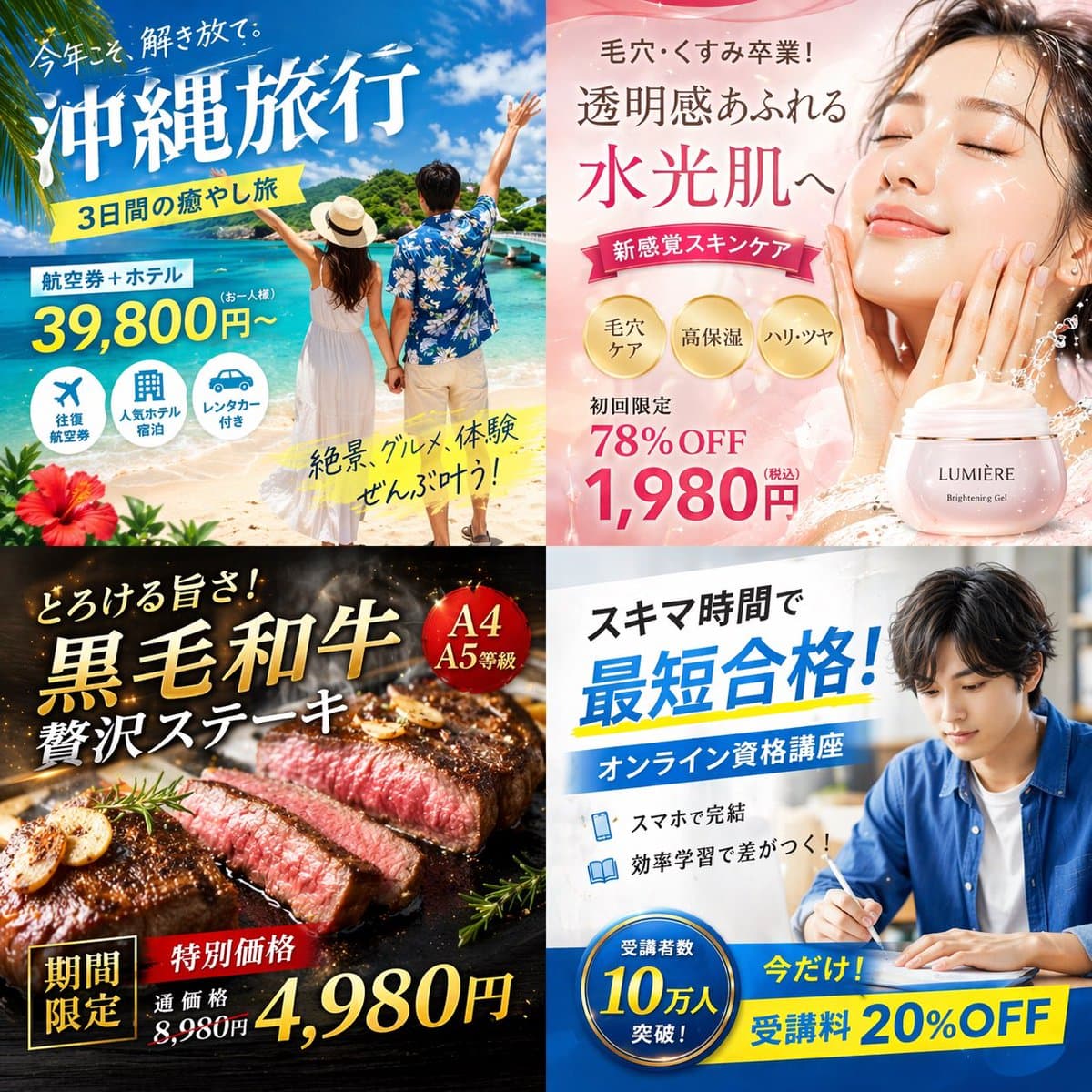
四宮格日式數字廣告橫幅
{ "type": "2x2 日式數字廣告橫幅網格", "layout": { "structure": "4 個等分象限", "quadrants": [ { "position": "top-left", "theme": "旅行", "subject": "一對情侶在白色沙灘上牽手,望向明亮藍天下的綠松石色海水。", "elements": ["左下角有紅色扶桑花"], "text_labels": [ "今年こそ、解き放て。"…
提示詞
{ "type": "2x2 日式數字廣告橫幅網格", "layout": { "structure": "4 個等分象限", "quadrants": [ { "position": "top-left", "theme": "旅行", "subject": "一對情侶在白色沙灘上牽手,望向明亮藍天下的綠松石色海水。", "elements": ["左下角有紅色扶桑花"], "text_labels": [ "今年こそ、解き放て。", "{argument name="travel destination" default="沖縄旅行"}", "3日間の癒やし旅", "航空券+ホテル", "39,800円〜", "絶景、グルメ、體験 ぜんぶ葉う!" ], "icons": { "count": 3, "descriptions": ["飛機", "酒店建築", "汽車"] } }, { "position": "top-right", "theme": "護膚", "subject": "年輕女性近景人像,皮膚髮光水潤,閉著眼,輕輕觸碰臉頰。", "elements": [ "柔和粉色漸變背景", "動態水花效果", "粉色化妝品罐,標籤寫著 '{argument name="skincare product name" default="LUMIÈRE"} Brightening Gel'" ], "text_labels": [ "毛穴・くすみ卒業!", "透明感あふれる", "水光肌へ", "新感覚スキンケア", "初回限定 78%OFF", "{argument name="discount price" default="1,980円"}" ], "badges": { "count": 3, "style": "金色圓形", "labels": ["毛穴ケア", "高保溼", "ハリ・ツヤ"] } }, { "position": "bottom-left", "theme": "美食", "subject": "厚切三分熟牛排正在深色烤盤上滋滋作響。", "elements": [ "蒜片", "迷迭香枝", "帶煙霧和發光餘燼的深色背景" ], "text_labels": [ "とろける旨さ!", "{argument name="food item" default="黒毛和牛"}", "贅沢ステーキ", "期間限定", "特別価格", "通常価格 8,980円", "4,980円" ], "badges": { "count": 1, "style": "紅色圓形", "labels": ["A4 A5等級"] } }, { "position": "bottom-right", "theme": "線上教育", "subject": "一位穿藍色襯衫的年輕男子坐在書桌前學習,在開啟的膝上型電腦旁寫筆記。", "elements": ["明亮室內光", "書桌環境"], "text_labels": [ "スキマ時間で", "{argument name="education goal" default="最短合格!"}", "オンライン資格講座", "スマホで完結", "効率學習で差がつく!", "今だけ! 受講料 20%OFF" ], "badges": { "count": 1, "style": "藍色圓形", "labels": ["受講者數 10萬人 突破!"] }, "icons": { "count": 2, "descriptions": ["智慧手機", "開啟的書"] } } ] } }
如何使用此提示
在生成之前閱讀完整的 四宮格日式數字廣告橫幅 提示並確定主題、風格、相機、燈光和構圖要求。
將括號或參數式佔位符替換為您的產品、角色、品牌、場景、調色板或寬高比要求。
開啟 https://www.gptimagehub.com/zh-TW/generate?promptId=cmogwzlmn00arzpdywa7y0h6t,產生圖像,然後根據需要使用更具體的主題、文字、佈局或負面約束來最佳化提示。
提示常見問題解答
四宮格日式數字廣告橫幅 提示符號最適合用來做什麼?
此提示最適用於您需要可重複使用結構、詳細視覺方向和一致輸出品質的 社群媒體 影像。
我可以在生成之前編輯提示嗎?
是的。完整的提示文字在此頁面上可見,因此您可以在生成之前更改主題、產品名稱、顏色、構圖、相機術語、長寬比和樣式註釋。
出現此提示時我應該使用哪種型號?
使用提示元資料中顯示的模型作為預設起點。如果另一個影像模型支援相同的寬高比和指令風格,您可以調整提示並比較結果。