
提示词
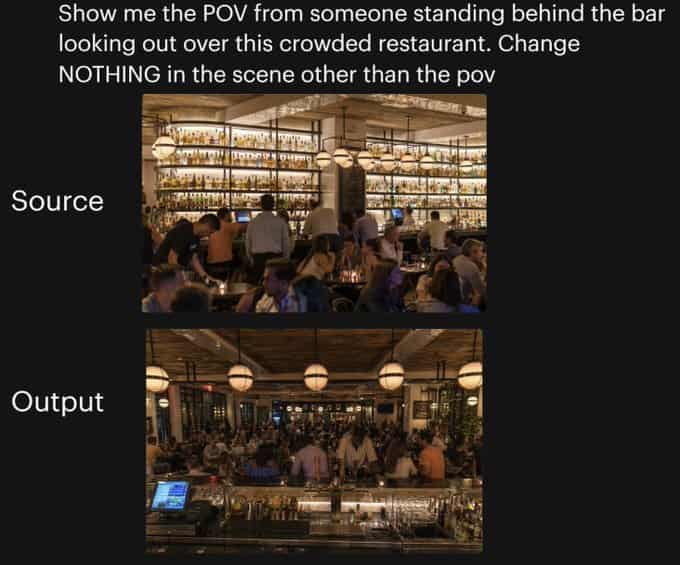
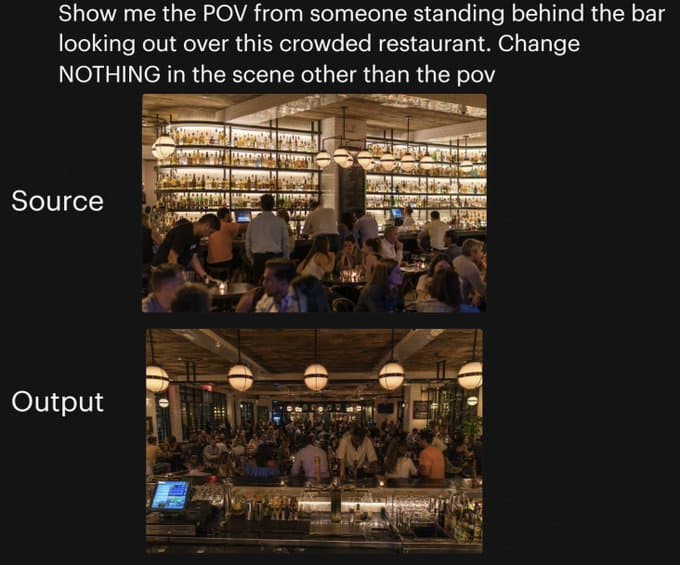
黑色背景上的并排对比图,用于展示同一餐厅场景的相机角度变化。顶部用大号白色无衬线文字写着:“Show me the POV from someone standing behind the bar looking out over this crowded restaurant. Change NOTHING in the scene other than the pov”。下方居中垂直放置 2 张堆叠的矩形照片:上方图片左侧用大号白字标注“Source”,下方图片左侧用大号白字标注“Output”。上方照片展示一个灯光温暖、高档、拥挤的餐厅内部,从用餐区一侧看向高大的后吧台,墙面搁架上摆满许多发光酒瓶,吧台前有调酒师和客人,琥珀色灯光、球形吊灯、木质天花板、米色立柱,以及前景中密集就坐的食客。下方照片展示完全相同的餐厅,同样的人群密度、同样的暖光、同样的装饰、同样的吧台酒架、同样的球形吊灯和整体构图元素,但现在视角变为站在吧台后方向外看向拥挤餐厅;前景包含吧台台面、玻璃器皿、金属吧台工具、酒瓶,以及左下可见的收银/POS 屏幕,而客人和员工充满中景,用餐区延伸到背景。保持两张图之间只有相机位置发生变化,没有其他场景改动。
如何使用此提示
在生成之前阅读完整的 餐厅视角变化对比图 提示并确定主题、风格、相机、灯光和构图要求。
将括号或参数式占位符替换为您的产品、角色、品牌、场景、调色板或宽高比要求。
打开 https://www.gptimagehub.com/zh-CN/generate?promptId=cmogx25mu00cpzpdyjrm1b5fc,生成图像,然后根据需要使用更具体的主题、文本、布局或负面约束来优化提示。
提示常见问题解答
餐厅视角变化对比图 提示符最适合用来做什么?
此提示最适用于您需要可重用结构、详细视觉方向和一致输出质量的 社交媒体 图像。
我可以在生成之前编辑提示吗?
是的。完整的提示文本在此页面上可见,因此您可以在生成之前更改主题、产品名称、颜色、构图、相机术语、长宽比和样式注释。
出现此提示时我应该使用哪种型号?
使用提示元数据中显示的模型作为默认起点。如果另一个图像模型支持相同的宽高比和指令风格,您可以调整提示并比较结果。