
Ürün karşılaştırma tablosu
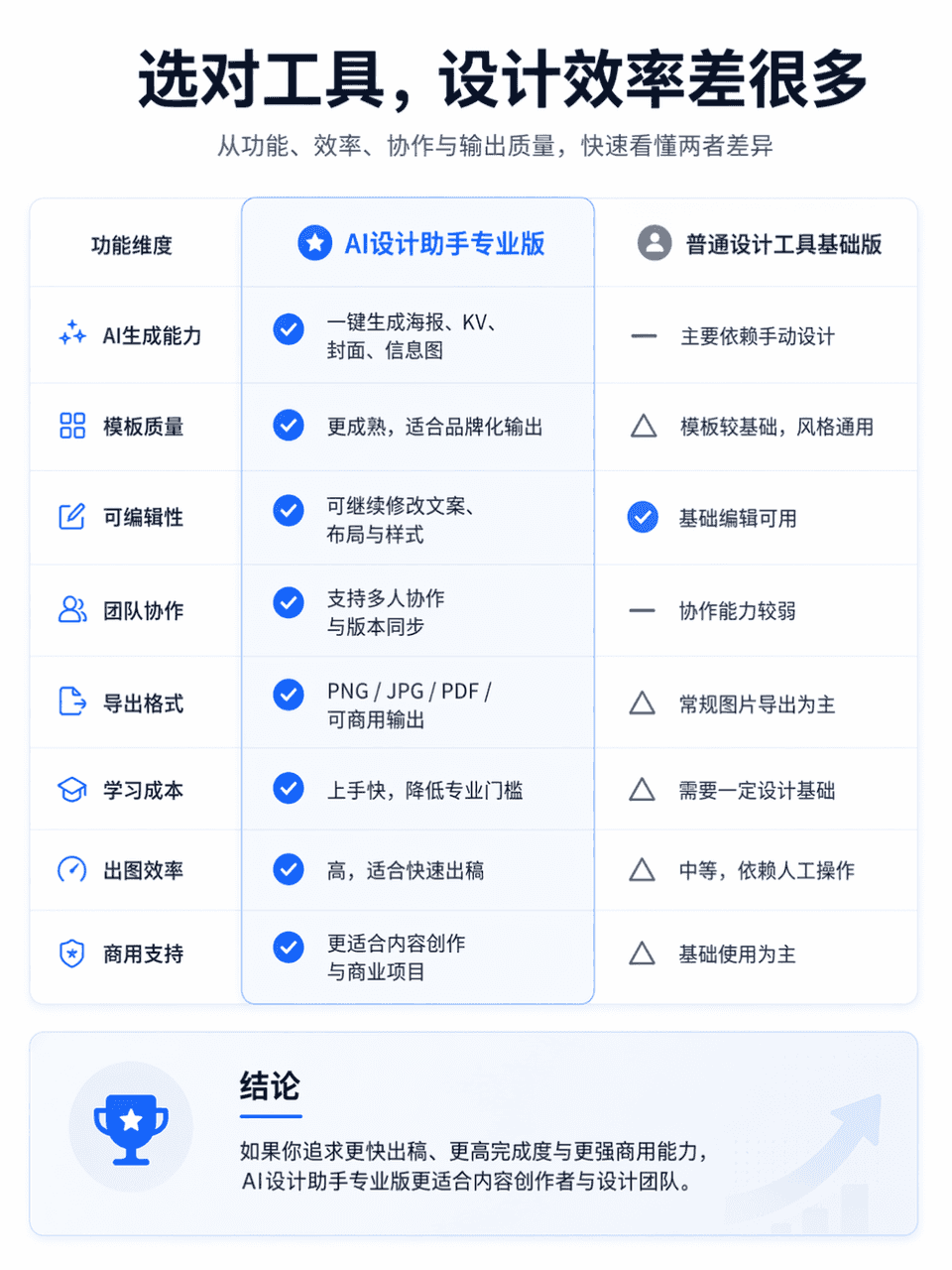
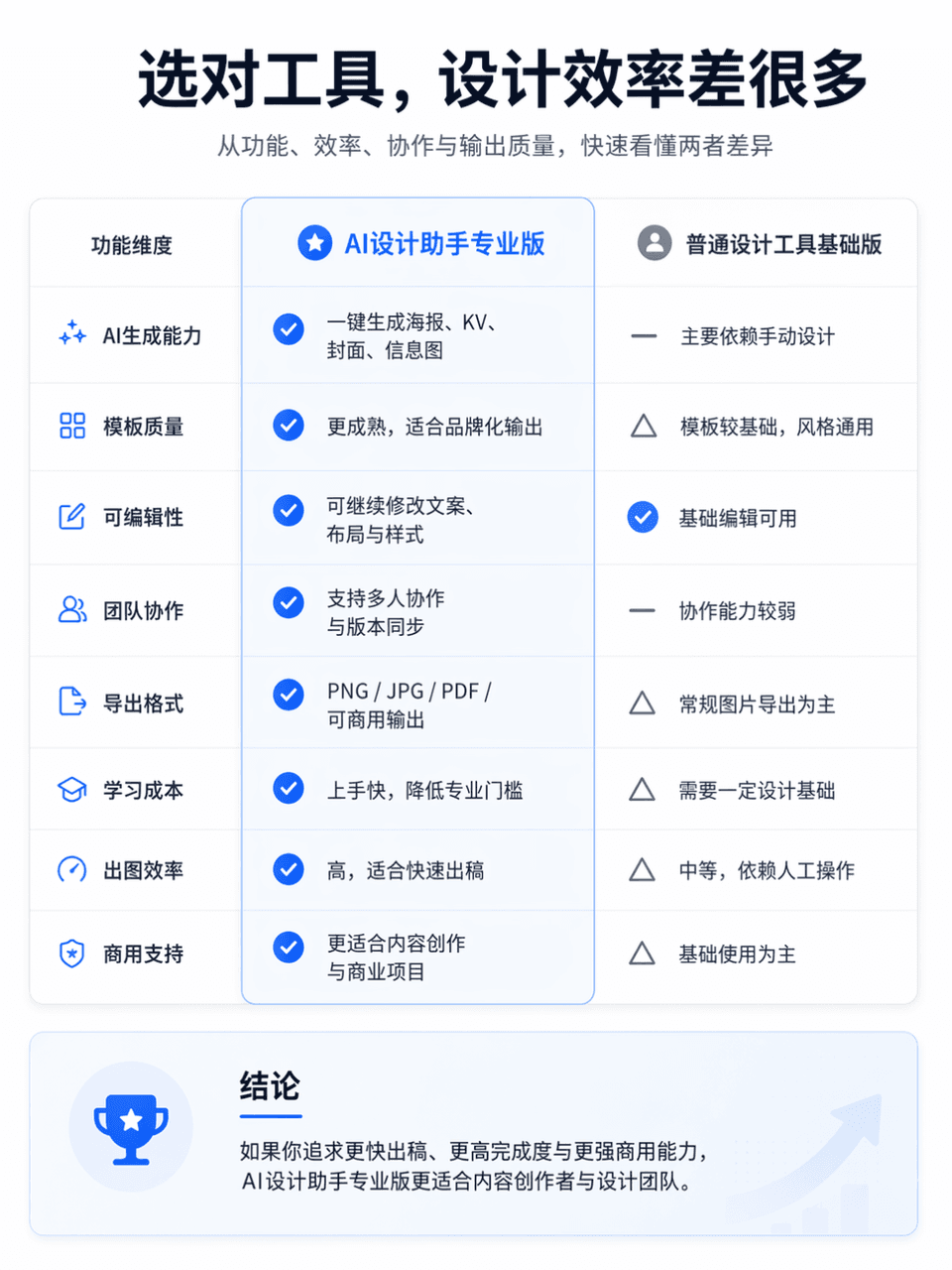
Çerçeve boyutu 3:4'tür ve profesyonel ve net bir ürün işlev karşılaştırma tablosu oluşturulur. Karşılaştırma nesnesi, AI Design Assistant Professional Edition ile General Design Tool Basic Edition'dır. Genel düzen, karş…
İstemi
Çerçeve boyutu 3:4'tür ve profesyonel ve net bir ürün işlev karşılaştırma tablosu oluşturulur. Karşılaştırma nesnesi, AI Design Assistant Professional Edition ile General Design Tool Basic Edition'dır. Genel düzen, karşılaştırma için sol ve sağ sütunlara bölünmüştür. Sol taraf "AI Design Assistant Professional Edition", sağ taraf ise "Genel Tasarım Aracı Temel Sürüm"dür. Ekranın üst kısmına göz alıcı bir ana başlık yerleştirin: "Doğru aracı seçin, tasarım verimliliği çok daha farklı olacaktır." Alt başlık şu şekilde desteklenebilir: "İşlevsellik, verimlilik, işbirliği ve çıktı kalitesi açısından ikisi arasındaki farkları hızlı bir şekilde anlayın." Genel stil, basit bir düzen, net bilgi hiyerarşisi, yeterli beyaz alan, modern yazı tipleri, ölçülü ve gelişmiş renk uyumu ve gerçek bir İnternet ürünü resmi web sitesinin görsel dokusunu gerektiren resmi web sitesinin ürün karşılaştırma sayfasını ifade eder. Hafif simgeler, bölücüler, kart gölgeleri ve önemli vurgular ekleyebilir, ancak e-ticaret promosyonlarından, dağınıklıktan ve düşük kaliteli tablolardan kaçınabilirsiniz.
Bu istem nasıl kullanılır?
Oluşturmadan önce Ürün karşılaştırma tablosu isteminin tamamını okuyun ve konuyu, stili, kamerayı, ışıklandırmayı ve kompozisyon gereksinimlerini tanımlayın.
Parantezli veya bağımsız değişken tarzı yer tutucuları ürününüz, karakteriniz, markanız, sahneniz, renk paletiniz veya en boy oranı gereksinimlerinizle değiştirin.
https://www.gptimagehub.com/tr/generate?promptId=cmogxm7as00mxxt5gcv7epe6c dosyasını açın, görüntüyü oluşturun, ardından gerekirse daha spesifik konu, metin, düzen veya negatif kısıtlamalarla istemi hassaslaştırın.
Bilgi İstemi SSS
Ürün karşılaştırma tablosu istemi en iyi ne için kullanılır?
Bu istem, yeniden kullanılabilir bir yapı, ayrıntılı görsel yön ve tutarlı çıktı kalitesi istediğiniz diğer görselleri için en iyi şekilde kullanılır.
İstemi oluşturmadan önce düzenleyebilir miyim?
Evet. Bilgi istemi metninin tamamı bu sayfada görünür; böylece oluşturmadan önce konuları, ürün adlarını, renkleri, kompozisyonu, kamera terimlerini, en boy oranını ve stil notlarını değiştirebilirsiniz.
Bu istemle hangi modeli kullanmalıyım?
Bilgi istemi meta verilerinde gösterilen modeli varsayılan başlangıç noktası olarak kullanın. Başka bir görüntü modeli aynı en boy oranını ve talimat stilini destekliyorsa istemi uyarlayabilir ve sonuçları karşılaştırabilirsiniz.