
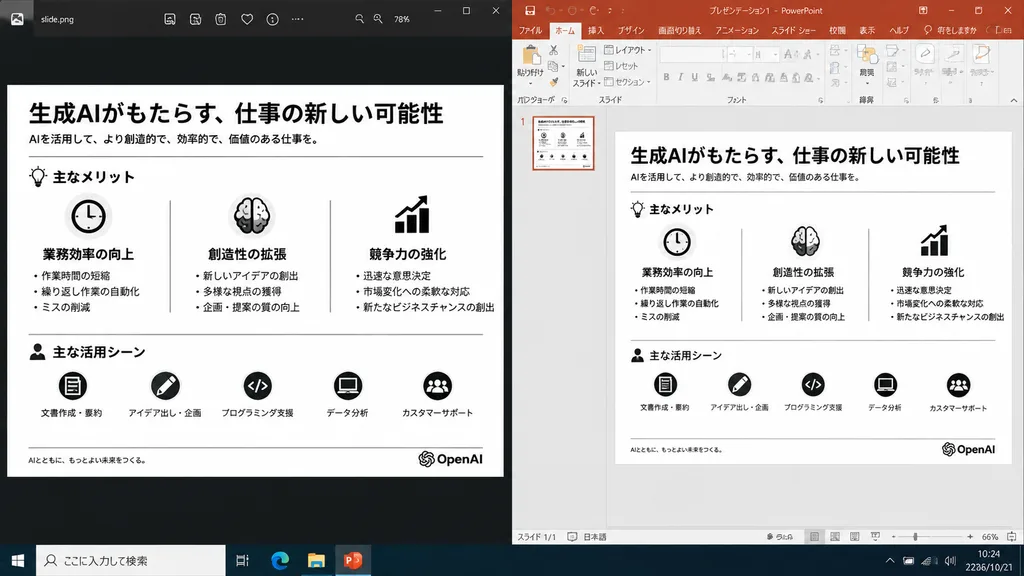
Yan Yana Sunum Slaytı Yeniden Yapılandırması
Dışa aktarılan bir slayt ile PowerPoint düzenleme görünümünü karşılaştıran masaüstü ekran görüntüsü oluşturur. Özelleştirmek için parantez içindeki ögeleri değiştirin.
İstem
A realistic side-by-side Windows desktop screenshot showing a polished presentation slide reconstruction based on the reference image. The left panel shows a dark image viewer window displaying the clean exported slide. The right panel shows Microsoft PowerPoint in editing view containing the exact same editable slide. The slide retains the original Japanese monochrome infographic layout: 1 top title and header row, 3 mid-page comparison columns, and 1 bottom use-case row with 5 icon-labeled items, a footer line, and the [OpenAI] logo at the bottom right. Clean, legible Japanese typography, properly aligned dividers, crisp monochrome icons, and no clutter, selection handles, or malformed vector artifacts. Crisp UI detailing, native desktop app appearance, high readability.
Neleri özelleştirebilirsiniz
Oluşturmadan önce istemin bu kısımlarını kendi konunuz veya metninizle değiştirin.
[OpenAI]yer tutucu
İstem ayrıntıları
- Kategori
- UI / UX tasarımı
- Model
- GPT IMAGE 2
- Görsel başına maliyet
- 1K: 43 kredi · 2K: 86 kredi · 4K: 143 kredi
- En boy oranı
- 16:9
- Eklenme