
Geleceğin ıslak pazar rehberlik sistemi
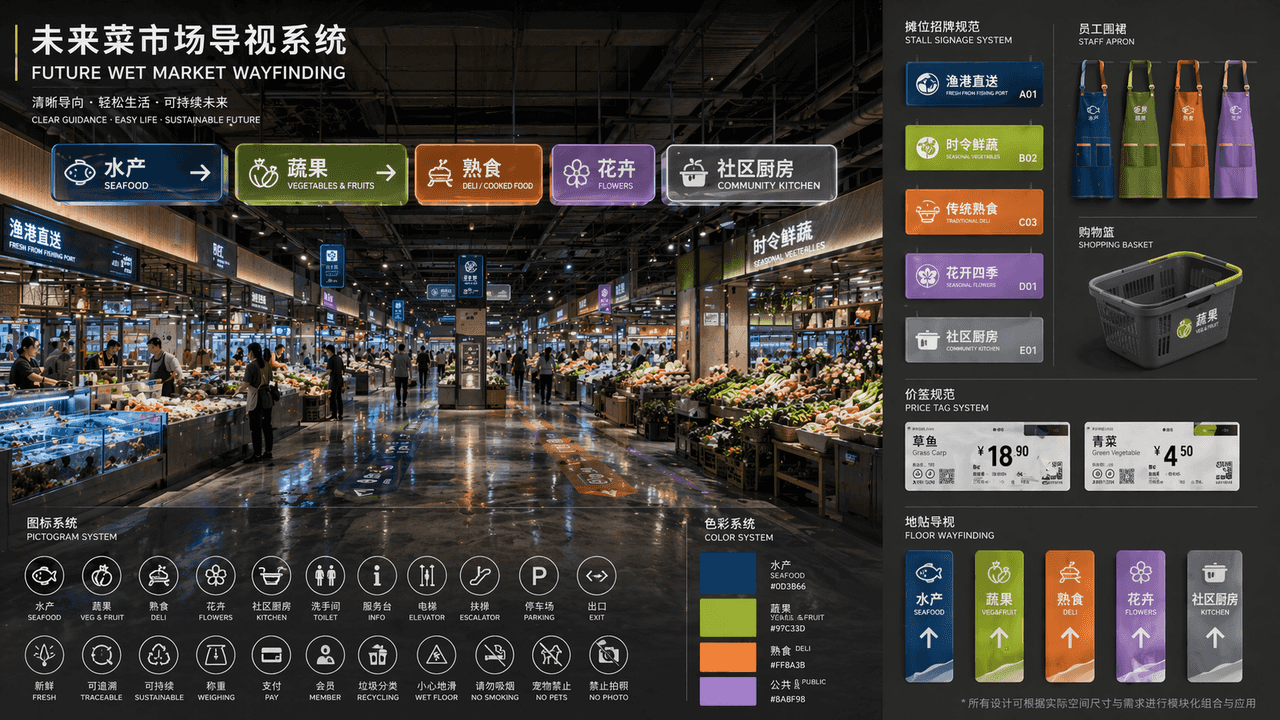
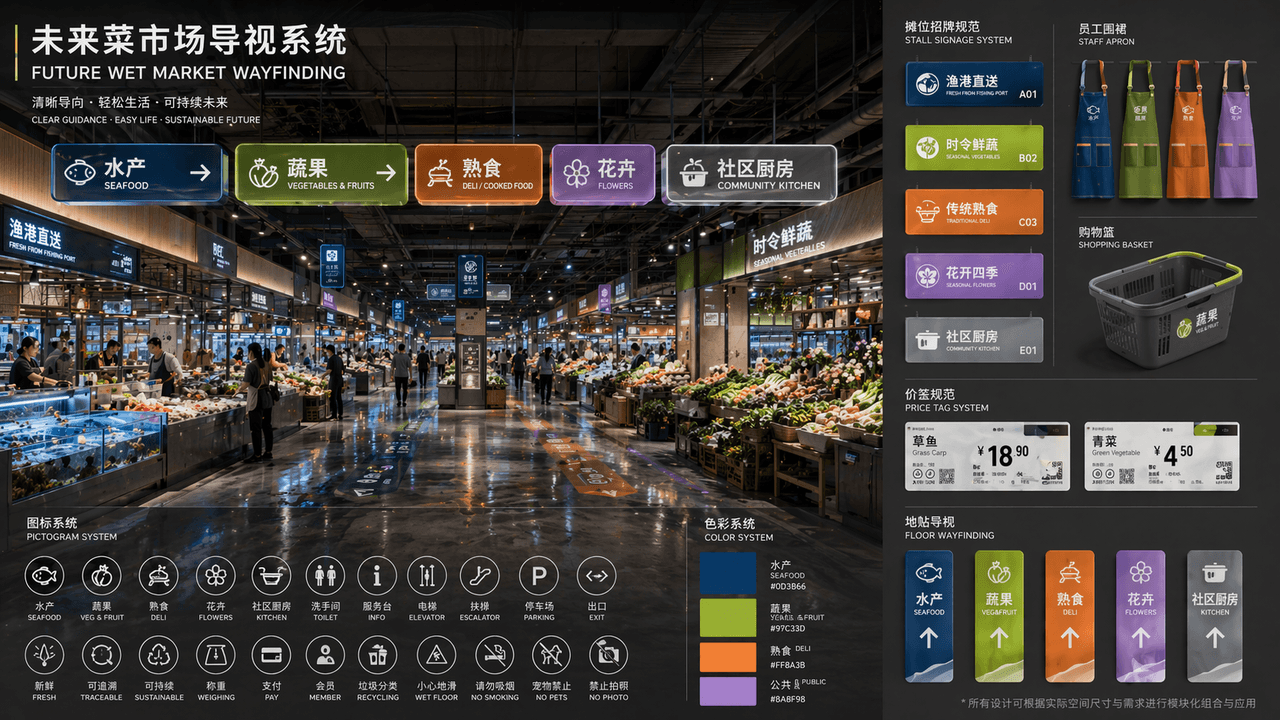
"GELECEĞİN ISLAK PAZAR YOL BULMASI" kamusal alan görsel kimlik önerilerinin eksiksiz bir setidir. Ana resim, yenilenmiş fütüristik ıslak pazar salonunun perspektif görünümüdür. Üstte modüler bir ışıklı kılavuz panosu as…
İstemi
"GELECEĞİN ISLAK PAZAR YOL BULMASI" kamusal alan görsel kimlik önerilerinin eksiksiz bir setidir. Ana resim, yenilenmiş fütüristik ıslak pazar salonunun perspektif görünümüdür. Üstte modüler bir ışıklı kılavuz panosu asılıdır. Bölmeler arasında "su ürünleri/meyve ve sebzeler/şarküteri/çiçekler/ortak mutfak" yer alır. Renk sistemi derin deniz mavisi, sarı yeşil, sıcak turuncu ve lavantaya karşılık gelir. Sol alt köşeye bir piktogram yerleştirilir. Sağ taraftaki simge sistemi, durak işaretleri, personel önlükleri, alışveriş sepetleri, fiyat etiketleri ve zemin çıkartmalarına ilişkin birleşik özelliklerin genişletilmiş bir görünümüdür. Başlık düzeni, bir tasarım enstitüsü ihale teklifi gibidir. Genel tasarım bir yaşam duygusuna ve üst düzey kamusal tasarıma sahiptir. Malzeme, buzlu akrilik, geri dönüştürülmüş metal ve ıslak zeminlerin yansımasını 16:9 oranıyla vurguluyor.
Bu istem nasıl kullanılır?
Oluşturmadan önce Geleceğin ıslak pazar rehberlik sistemi isteminin tamamını okuyun ve konuyu, stili, kamerayı, ışıklandırmayı ve kompozisyon gereksinimlerini tanımlayın.
Parantezli veya bağımsız değişken tarzı yer tutucuları ürününüz, karakteriniz, markanız, sahneniz, renk paletiniz veya en boy oranı gereksinimlerinizle değiştirin.
https://www.gptimagehub.com/tr/generate?promptId=cmogxhv9a00ghxt5gzsw049qk dosyasını açın, görüntüyü oluşturun, ardından gerekirse daha spesifik konu, metin, düzen veya negatif kısıtlamalarla istemi hassaslaştırın.
Bilgi İstemi SSS
Geleceğin ıslak pazar rehberlik sistemi istemi en iyi ne için kullanılır?
Bu istem, yeniden kullanılabilir bir yapı, ayrıntılı görsel yön ve tutarlı çıktı kalitesi istediğiniz diğer görselleri için en iyi şekilde kullanılır.
İstemi oluşturmadan önce düzenleyebilir miyim?
Evet. Bilgi istemi metninin tamamı bu sayfada görünür; böylece oluşturmadan önce konuları, ürün adlarını, renkleri, kompozisyonu, kamera terimlerini, en boy oranını ve stil notlarını değiştirebilirsiniz.
Bu istemle hangi modeli kullanmalıyım?
Bilgi istemi meta verilerinde gösterilen modeli varsayılan başlangıç noktası olarak kullanın. Başka bir görüntü modeli aynı en boy oranını ve talimat stilini destekliyorsa istemi uyarlayabilir ve sonuçları karşılaştırabilirsiniz.