
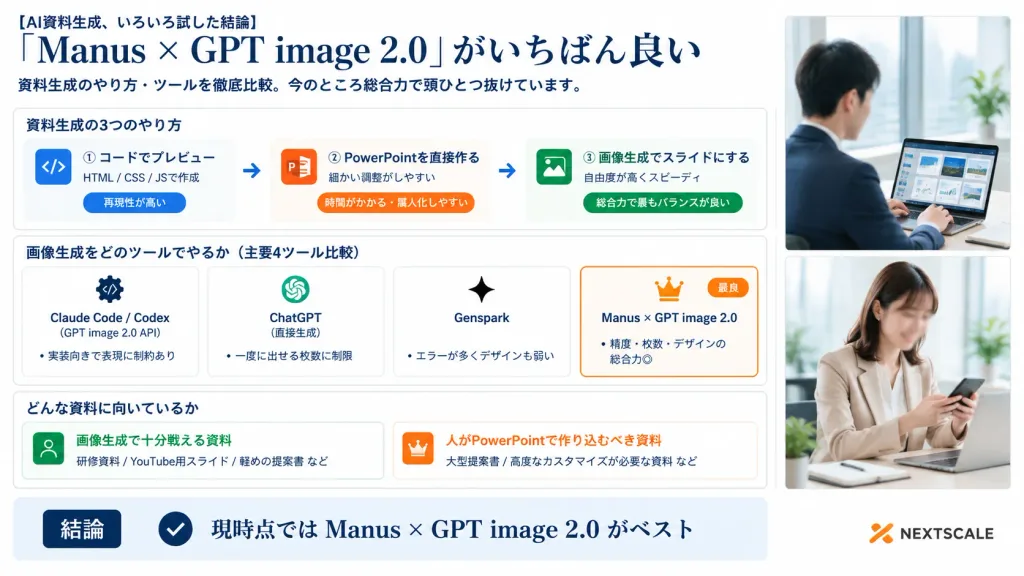
Kurumsal Yapay Zeka Slayt Aracı Kıyaslama İnfografiği
Düzenli kartlar ve fotoğraf şeridi içeren 16:9 Japon tarzı iş sunum slaytı oluşturur. Köşeli ayraç içindeki başlık ve değerlendirmeleri dilediğinizce değiştirin.
İstem
A polished Japanese business infographic presentation slide in 16:9 widescreen format, with a corporate white background, deep navy typography, thin light-gray card borders, subtle blue-gray shadows, and an accent palette of navy, orange, and vibrant green. Layout and Structure: - Left and Center (76% width): Main infographic content organized into a clear header, three structured sections, and a bottom summary bar. - Right Side (24% width): A vertical panel containing exactly two stacked realistic corporate lifestyle photos with soft bright office lighting and clean white borders. Top photo shows a Japanese businessman in a navy suit working on a laptop displaying slide thumbnails near a window (face softly blurred). Bottom photo shows a Japanese businesswoman in a beige blazer checking a smartphone at her desk (face softly blurred). Header (Top Left): - Small lead-in text: "[AI資料生成、いろいろ試した結論]" - Large elegant serif headline: "[「Manus × GPT image 2.0」がいちばん良い]" - Subtitle below: "[資料生成のやり方・ツールを徹底比較。今のところ総合力で頭ひとつ抜けています。]" Section 1 (Card titled "資料生成の3つのやり方"): Contains three horizontal method cards connected by two right-pointing arrows: 1. Blue code icon | "① コードでプレビュー" | "HTML / CSS / JSで作成" | pill tag "再現性が高い" 2. Orange PowerPoint icon | "② PowerPointを直接作る" | "細かい調整がしやすい" | pill tag "時間がかかる・属人化しやすい" 3. Green image icon | "③ 画像生成でスライドにする" | "自由度が高くスピーディ" | pill tag "総合力で最もバランスが良い" Section 2 (Card titled "画像生成をどのツールでやるか(主要4ツール比較)"): Contains four equal comparison cards side-by-side: 1. "Claude Code / Codex" | gear/code icon | "(GPT image 2.0 API)" | bullet "実装向きで表現に制約あり" 2. "ChatGPT" | OpenAI knot icon | "(直接生成)" | bullet "一度に出せる枚数に制限" 3. "Genspark" | sparkle icon | bullet "エラーが多くデザインも弱い" 4. Featured card with an orange border, crown icon, and small orange "最良" badge | "[Manus × GPT image 2.0]" | bullet "精度・枚数・デザインの総合力◎" Section 3 (Card titled "どんな資料に向いているか"): Two side-by-side cards: - Left card with green user icon | "画像生成で十分戦える資料" | examples "研修資料 / YouTube用スライド / 軽めの提案書 など" - Right card with orange crown icon | "人がPowerPointで作り込むべき資料" | examples "大型提案書 / 高度なカスタマイズが必要な資料 など" Bottom Bar: Full-width light-blue conclusion strip with a dark navy badge reading "結論", a circular checkmark icon, and large bold text reading "[現時点では Manus × GPT image 2.0 がベスト]". At the bottom right corner, a subtle orange abstract logo mark with dark gray text reading "NEXTSCALE". Crisp Japanese corporate graphic design, sharp typography, precise grid alignment.
Neleri özelleştirebilirsiniz
Oluşturmadan önce istemin bu kısımlarını kendi konunuz veya metninizle değiştirin.
[AI資料生成、いろいろ試した結論]yer tutucu[「Manus × GPT image 2.0」がいちばん良い]yer tutucu[資料生成のやり方・ツールを徹底比較。今のところ総合力で頭ひとつ抜けています。]yer tutucu[Manus × GPT image 2.0]yer tutucu[現時点では Manus × GPT image 2.0 がベスト]yer tutucu“資料生成の3つのやり方”tırnak içindeki metin“① コードでプレビュー”tırnak içindeki metin“HTML / CSS / JSで作成”tırnak içindeki metin
İstem ayrıntıları
- Kategori
- İnfografik / Eğitim
- Model
- GPT IMAGE 2
- Görsel başına maliyet
- 1K: 43 kredi · 2K: 86 kredi · 4K: 143 kredi
- En boy oranı
- 16:9
- Eklenme