
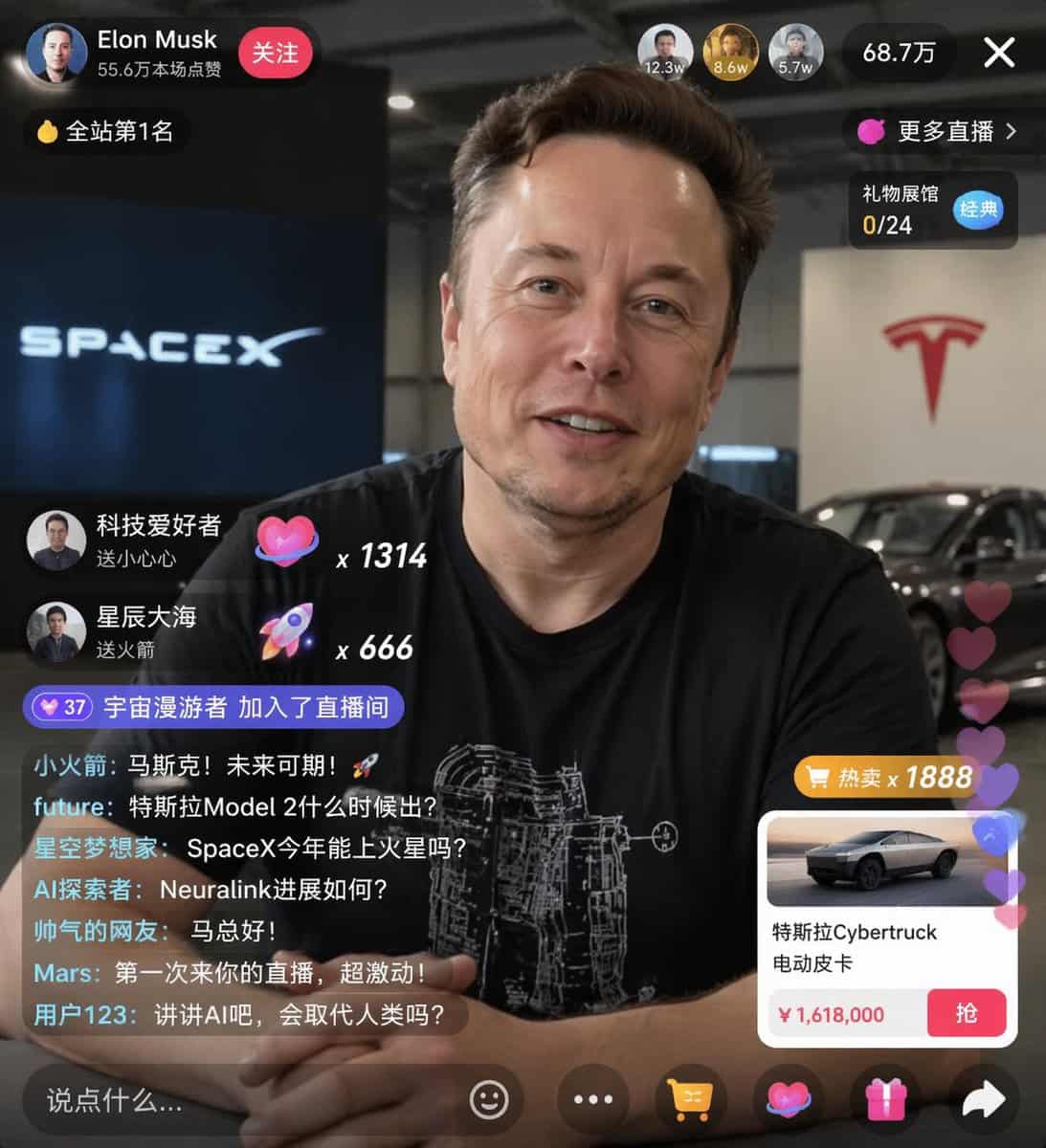
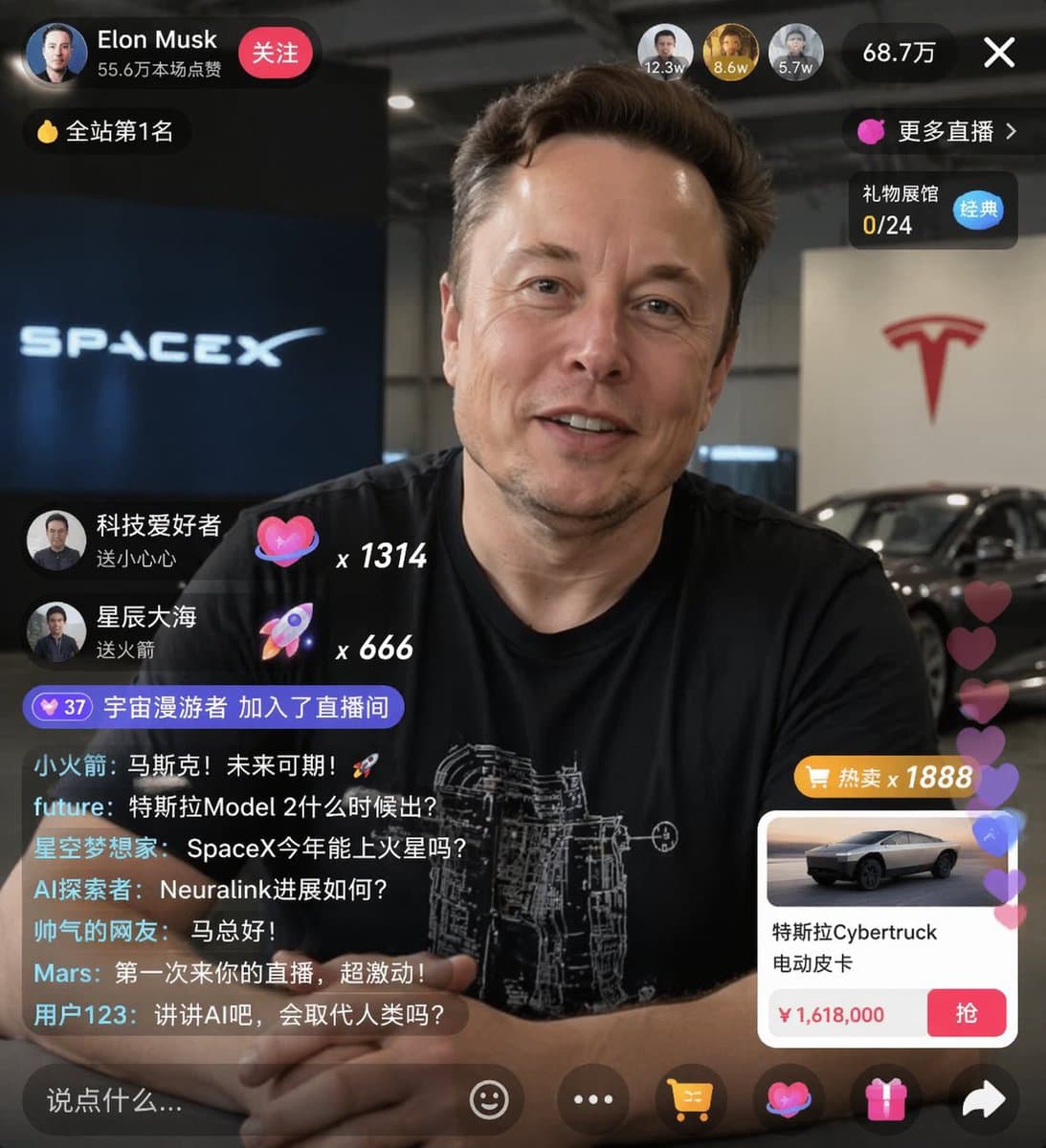
E-ticaret Canlı Yayını UI Maketi
{ "type": "canlı yayın kullanıcı arayüzü modeli", "konu": { "description": "{argument name=\"host name\" default=\"Elon Musk\"}'in gülümseyen, beyaz teknik şematik grafikli siyah tişört giyen portresi", "background": "s…
İstemi
{ "type": "canlı yayın kullanıcı arayüzü modeli", "konu": { "description": "{argument name=\"host name\" default=\"Elon Musk\"}'in gülümseyen, beyaz teknik şematik grafikli siyah tişört giyen portresi", "background": "sol tarafta '{argument name=\"left background logo\" default=\"SPACEX\"}' metni bulunan bir ekran, sağ tarafta ise kırmızı bir '{argument name=\"right background logo\" default=\"Tesla T logo\"}' ve karanlık bir araba gösteriliyor" }, "ui_yer paylaşımı": { "üst_başlık": { "host_info": "avatar, ad '{argument name=\"host name\" default=\"Elon Musk\"}', alt metin '556.000 beğeni', kırmızı 'Takip Et' düğmesi", "rank_badge": "'Sitede 1 numara' yazan altın para simgesi", "viewer_stats": "'12,3a', '8,6a', '5,7a', toplam '687.000', 'X' kapatma düğmesiyle en iyi 3 izleyici avatarı", "right_links": "'Daha fazla canlı yayın >', 'Hediye Sergi Salonu 0/24', mavi 'Klasik' etiketli" }, "mid_left_gifts": { "sayım": 2, "öğeler": [ "avatar 'teknoloji meraklısı', 'küçük bir kalp gönder', kalp simgesi x 1314", "avatar 'yıldızlı deniz', 'roket gönder', roket simgesi x 666" ] }, "alt_sol_sohbet": { "system_message": "seviye 37 rozeti 'Uzay Gezgini canlı yayın odasına katıldı'", "mesaj_sayısı": 7, "mesajlar": [ "Küçük Roket: Musk! Gelecek umut verici! 🚀", "gelecek: Tesla Model 2 ne zaman piyasaya sürülecek?", "Yıldız Hayalperestleri: SpaceX bu yıl Mars'a gidebilir mi?", "AI Explorer: Neuralink'in gelişimi nasıl?", "Yakışıklı netizen: Merhaba Bay Ma!", "Mars: Canlı yayınınıza ilk defa geliyorum, çok heyecanlıyım!", "Kullanıcı 123: Yapay zeka hakkında konuşalım. İnsanların yerini alacak mı?" ] }, "alt_sağ_ürün_kartı": { "hot_tag": "turuncu 'sıcak indirim x 1888'", "resim": "Tesla Cybertruck", "başlık": "{argument name=\"product name\" default=\"特斯拉Cybertruck 电动皮卡\"}", "fiyat": "{argument name=\"product price\" default=\"¥ 1,618,000\"}", "button": "kırmızı 'yakala' butonu", "floating_animation": "sağ kenarda yüzen yarı saydam kalpler" }, "alt_çubuk": { "input_field": "'Bir şey söyle...'", "simgeler": ["gülen yüz", "üç nokta", "alışveriş sepeti", "hediye kutusu", "paylaş"] } } }
Bu istem nasıl kullanılır?
Oluşturmadan önce E-ticaret Canlı Yayını UI Maketi isteminin tamamını okuyun ve konuyu, stili, kamerayı, ışıklandırmayı ve kompozisyon gereksinimlerini tanımlayın.
Parantezli veya bağımsız değişken tarzı yer tutucuları ürününüz, karakteriniz, markanız, sahneniz, renk paletiniz veya en boy oranı gereksinimlerinizle değiştirin.
https://www.gptimagehub.com/tr/generate?promptId=cmogwxwj3009hzpdyjdxym0wy dosyasını açın, görüntüyü oluşturun, ardından gerekirse daha spesifik konu, metin, düzen veya negatif kısıtlamalarla istemi hassaslaştırın.
Bilgi İstemi SSS
E-ticaret Canlı Yayını UI Maketi istemi en iyi ne için kullanılır?
Bu istem, yeniden kullanılabilir bir yapı, ayrıntılı görsel yön ve tutarlı çıktı kalitesi istediğiniz uı / ux tasarımı görselleri için en iyi şekilde kullanılır.
İstemi oluşturmadan önce düzenleyebilir miyim?
Evet. Bilgi istemi metninin tamamı bu sayfada görünür; böylece oluşturmadan önce konuları, ürün adlarını, renkleri, kompozisyonu, kamera terimlerini, en boy oranını ve stil notlarını değiştirebilirsiniz.
Bu istemle hangi modeli kullanmalıyım?
Bilgi istemi meta verilerinde gösterilen modeli varsayılan başlangıç noktası olarak kullanın. Başka bir görüntü modeli aynı en boy oranını ve talimat stilini destekliyorsa istemi uyarlayabilir ve sonuçları karşılaştırabilirsiniz.