

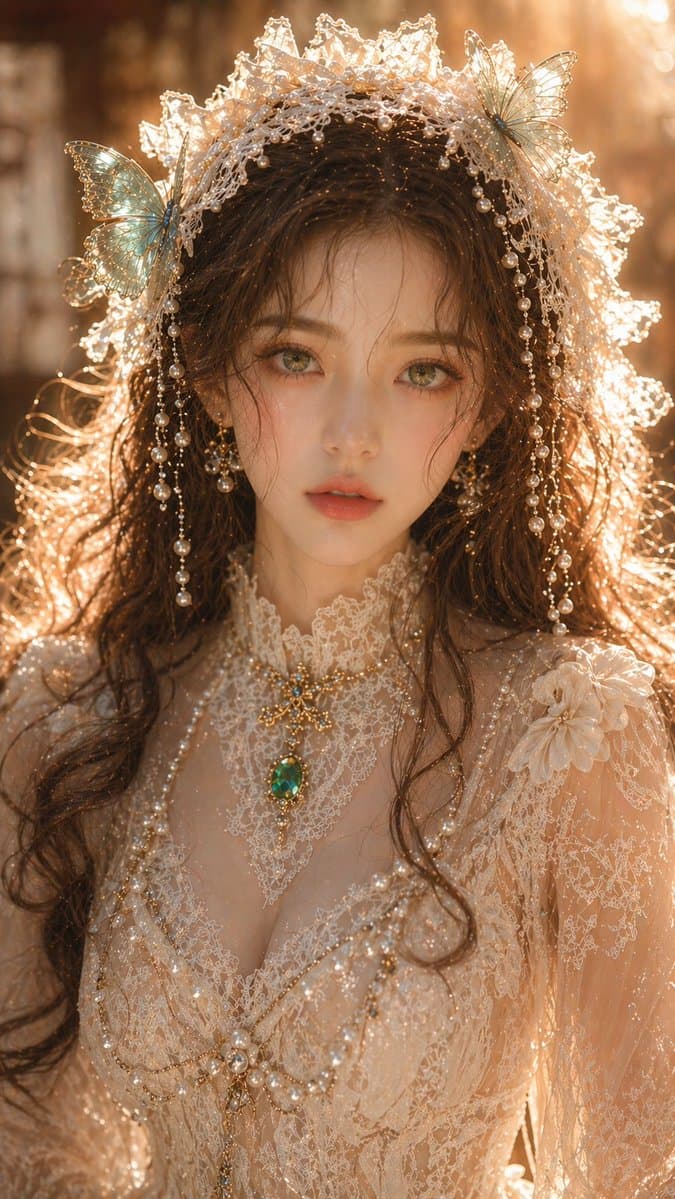
Rüya gibi oryantal kadın portresi istemi
{argument name="subject" default="Dreamy Oriental female portrait"}, yetişkin kadın, yakın çekim portre, zarif yüz özellikleri, açık ve yarı saydam cilt, narin ama temiz cilt dokusu, zümrüt yeşili gözler, yumuşak ve büy…
İstemi
{argument name="subject" default="Dreamy Oriental female portrait"}, yetişkin kadın, yakın çekim portre, zarif yüz özellikleri, açık ve yarı saydam cilt, narin ama temiz cilt dokusu, zümrüt yeşili gözler, yumuşak ve büyüleyici bakış, doğal olarak düşen kahverengi dalgalı saçlar; turkuaz kelebekler ve inci süslemelerle süslenmiş {argument name="accessories" default="Off-white lace headpiece"}; kıyafet, zümrüt takıların eşlik ettiği, net bir yapıya ve temiz, aşırı karmaşık olmayan bir dokuya sahip zarif bir dantel elbisedir; aydınlatma yumuşak sıcak altın rengi yan arka aydınlatma, jant aydınlatması net ancak aşırı pozlanmamış, ciltte hafif vurgular var ancak aşırı yansıma yok, genel aydınlatma temiz ve şeffaf, arka plan sığ alan derinliği ile yumuşak bir şekilde bulanıklaştırılmış; üst düzey portre fotoğrafçılığı kalitesi, ayrıntılar net ancak ölçülü, grensiz, gürültüsüz, gerçek fiziksel aydınlatma, 8K, ticari sınıf kalite. En boy oranı: 9:16
Bu istem nasıl kullanılır?
Oluşturmadan önce Rüya gibi oryantal kadın portresi istemi isteminin tamamını okuyun ve konuyu, stili, kamerayı, ışıklandırmayı ve kompozisyon gereksinimlerini tanımlayın.
Parantezli veya bağımsız değişken tarzı yer tutucuları ürününüz, karakteriniz, markanız, sahneniz, renk paletiniz veya en boy oranı gereksinimlerinizle değiştirin.
https://www.gptimagehub.com/tr/generate?promptId=cmogwyrka00a5zpdysrekft0g dosyasını açın, görüntüyü oluşturun, ardından gerekirse daha spesifik konu, metin, düzen veya negatif kısıtlamalarla istemi hassaslaştırın.
Bilgi İstemi SSS
Rüya gibi oryantal kadın portresi istemi istemi en iyi ne için kullanılır?
Bu istem, yeniden kullanılabilir bir yapı, ayrıntılı görsel yön ve tutarlı çıktı kalitesi istediğiniz portre ve fotoğrafçılık görselleri için en iyi şekilde kullanılır.
İstemi oluşturmadan önce düzenleyebilir miyim?
Evet. Bilgi istemi metninin tamamı bu sayfada görünür; böylece oluşturmadan önce konuları, ürün adlarını, renkleri, kompozisyonu, kamera terimlerini, en boy oranını ve stil notlarını değiştirebilirsiniz.
Bu istemle hangi modeli kullanmalıyım?
Bilgi istemi meta verilerinde gösterilen modeli varsayılan başlangıç noktası olarak kullanın. Başka bir görüntü modeli aynı en boy oranını ve talimat stilini destekliyorsa istemi uyarlayabilir ve sonuçları karşılaştırabilirsiniz.