
資訊圖與教育
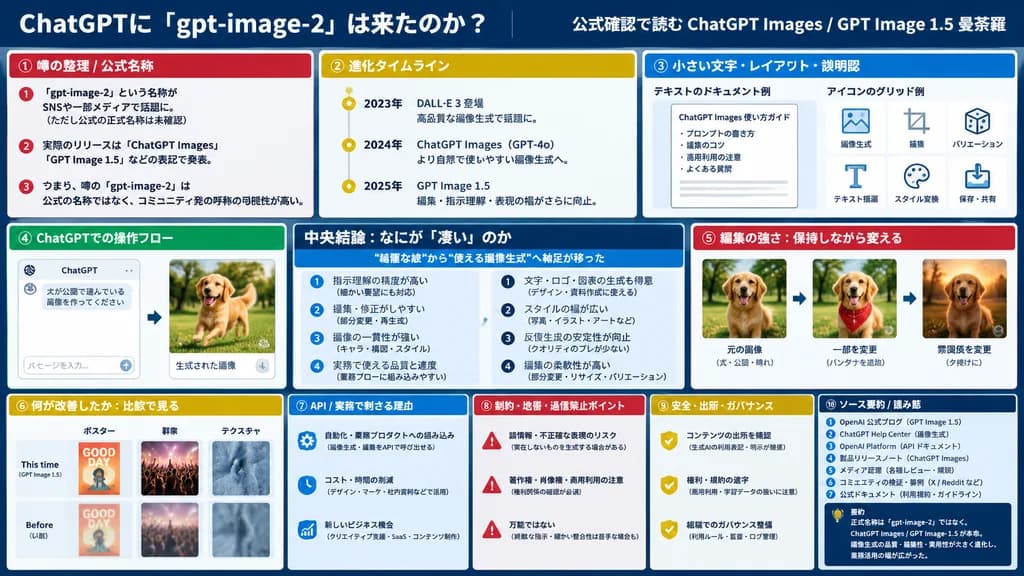
三欄技術分析儀表板簡報投影片
生成包含十個分析模組與UI對比的企業級簡報投影片版面。可在JSON結構中自訂區塊標題、強調色彩與圖表內容。
資訊圖儀表板簡報投影片資料視覺化扁平設計企業級
瀏覽相似提示詞資訊圖表 AI 提示詞
提示詞
{
  "type": "infographic dashboard",
  "style": "corporate presentation slide, dense information layout, flat design",
  "header": {
    "left_title": "[ChatGPTに『gpt-image-2』は來たのか?]",
    "right_subtitle": "[公式確認で読む ChatGPT Images / GPT Image 1.5 曼荼羅]",
    "background_color": "[深藍色]"
  },
  "layout": {
    "columns": 3,
    "sections": [
      {
        "id": 1,
        "title": "① 噂の整理 / 公式名稱",
        "color": "[紅色]",
        "content_type": "3條要點列表"
      },
      {
        "id": 2,
        "title": "② 進化タイムライン",
        "color": "金色",
        "content_type": "時間線3個關鍵節點"
      },
      {
        "id": 3,
        "title": "③ 小さい文字・レイアウト・説明図",
        "color": "藍色",
        "content_type": "包含文字排版與圖示網格的2張內嵌示例圖"
      },
      {
        "id": 4,
        "title": "④ ChatGPTでの操作フロー",
        "color": "綠色",
        "content_type": "包含聊天介面和狗圖片的UI操作流程模型"
      },
      {
        "id": "central",
        "title": "中央結論:なにが『悽い』のか",
        "color": "深藍色",
        "subtitle": "[“綺麗な絵”から“使える畫像生成”へ軸足が移った]",
        "content_type": "雙列各4條核心結論"
      },
      {
        "id": 5,
        "title": "⑤ 編集の強さ:保持しながら変える",
        "color": "紅色",
        "content_type": "展示連續編輯過程的3張序列圖"
      },
      {
        "id": 6,
        "title": "⑥ 何が改善したか:比較で見る",
        "color": "金色",
        "content_type": "海報、人群與紋理的6組前後對比圖(本次 vs 以往)"
      },
      {
        "id": 7,
        "title": "⑦ API / 実務で刺さる理由",
        "color": "藍色",
        "content_type": "3條要點列表"
      },
      {
        "id": 8,
        "title": "⑧ 制約・地雷・過信禁止ポイント",
        "color": "紅色",
        "content_type": "3條要點列表"
      },
      {
        "id": 9,
        "title": "⑨ 安全・出所・ガバナンス",
        "color": "金色",
        "content_type": "3條要點列表"
      },
      {
        "id": 10,
        "title": "⑩ ソース要約 / 読み筋",
        "color": "深藍色",
        "content_type": "7條資料來源列表與核心總結框"
      }
    ]
  }
}可以替換的部分
生成前,把提示詞裡的這些部分換成你自己的主題或文案。
[ChatGPTに『gpt-image-2』は來たのか?]佔位符[公式確認で読む ChatGPT Images / GPT Image 1.5 曼荼羅]佔位符[深藍色]佔位符[紅色]佔位符[“綺麗な絵”から“使える畫像生成”へ軸足が移った]佔位符
提示詞資訊
- 分類
- 資訊圖與教育
- 模型
- GPT IMAGE 2
- 每張圖消耗
- 1K:43 點數 · 2K:86 點數 · 4K:143 點數
- 畫幅比例
- 16:9
- 收錄時間