
提示詞
{
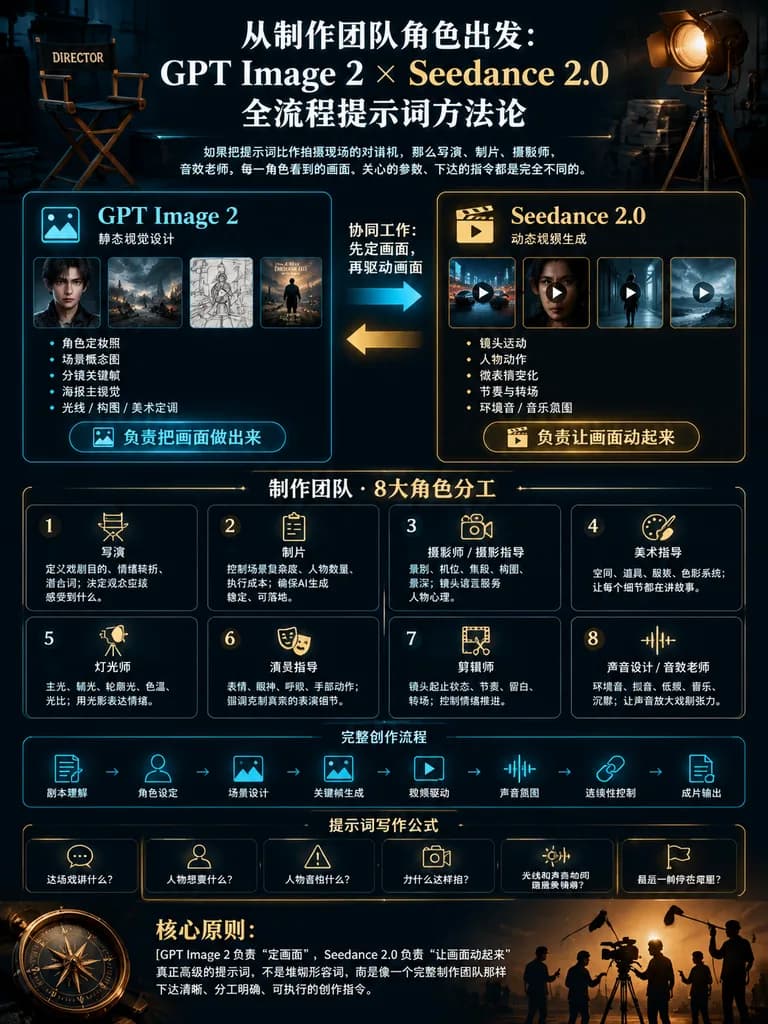
  "type": "AI電影製作提示詞工作流的電影感中文資訊圖海報",
  "format": "豎版 3:4 海報",
  "overall_style": "暗調高階電影製作控制室美學,黑色與深藏青色背景,微弱的藍圖網格與科技HUD線條,暖金與冷青點綴,高對比度,精緻排版佈局,寫實電影道具與簡潔向量圖示相結合,優雅中文排版",
  "headline": {
    "position": "top center",
    "text": "[從製作團隊角色出發:\nGPT Image 2 × Seedance 2.0\n全流程提示詞方法論]",
    "style": "大號粗體白色襯線中文標題,金色強調,居中"
  },
  "subtitle": {
    "position": "under headline",
    "text": "如果把提示詞比作拍攝現場的對講機,那麼導演、製片、攝影師、音效老師,每一角色看到的畫面、關心的引數、下達的指令都是完全不同的。",
    "style": "小號白色說明性中文文字"
  },
  "top_props": {
    "count": 2,
    "items": [
      {
        "description": "左上方微弱照明的導演椅,標註有DIRECTOR"
      },
      {
        "description": "右上方三腳架上的大型復古電影聚光燈,散發暖琥珀色光芒"
      }
    ]
  },
  "main_comparison": {
    "position": "upper middle",
    "count": 2,
    "panels": [
      {
        "title": "[GPT Image 2]",
        "subtitle": "靜態視覺設計",
        "position": "left",
        "accent_color": "cyan blue",
        "thumbnail_count": 4,
        "thumbnails": [
          "暗調人物肖像劇照",
          "暴風雨中的電影感城市或戰場環境",
          "分鏡草圖幀",
          "帶站立人物的氛圍感海報主視覺"
        ],
        "bullet_count": 5,
        "bullets": [
          "角色定妝照",
          "場景概念圖",
          "分鏡關鍵幀",
          "海報主視覺",
          "光線 / 構圖 / 美術定調"
        ],
        "button_label": "負責把畫面做出來",
        "button_icon": "image icon"
      },
      {
        "title": "[Seedance 2.0]",
        "subtitle": "動態影片生成",
        "position": "right",
        "accent_color": "warm gold",
        "thumbnail_count": 4,
        "thumbnails": [
          "夜間飛車追逐或載具鏡頭帶播放圖示",
          "暗調特寫影片劇照帶播放圖示",
          "走過電影感走廊的人物帶播放圖示",
          "暴風雨景觀動態鏡頭帶播放圖示"
        ],
        "bullet_count": 5,
        "bullets": [
          "鏡頭運動",
          "人物動作",
          "微表情變化",
          "節奏與轉場",
          "環境音 / 音樂氛圍"
        ],
        "button_label": "負責讓畫面動起來",
        "button_icon": "clapperboard play icon"
      }
    ]
  },
  "workflow_arrows": {
    "position": "between comparison panels",
    "count": 2,
    "labels": [
      "協同工作:先定畫面,再驅動畫面",
      "從左至右藍色箭頭",
      "從右至左金色箭頭"
    ]
  },
  "production_team_grid": {
    "position": "middle",
    "count": 8,
    "layout": "2行4列",
    "cells": [
      {
        "number": "1",
        "title": "導演",
        "icon": "director chair",
        "text": "定義戲劇目的、情緒轉折、潛臺詞;決定觀眾應該感受到什麼"
      },
      {
        "number": "2",
        "title": "製片",
        "icon": "clipboard",
        "text": "控制場景複雜度、人物數量、執行成本;確保AI生成穩定、可落地"
      },
      {
        "number": "3",
        "title": "攝影師 / 攝影指導",
        "icon": "cinema camera lens",
        "text": "景別、機位、焦段、構圖、景深;鏡頭語言服務人物心理"
      },
      {
        "number": "4",
        "title": "美術指導",
        "icon": "paint palette and brush",
        "text": "空間、道具、服裝、色彩系統;讓每個細節都在講故事"
      },
      {
        "number": "5",
        "title": "燈光師",
        "icon": "studio light",
        "text": "主光、輔光、輪廓光、色溫、光比;用光影表達情緒"
      },
      {
        "number": "6",
        "title": "演員指導",
        "icon": "theater masks",
        "text": "表情、眼神、呼吸、手部動作;強調剋制真實的表演細節"
      },
      {
        "number": "7",
        "title": "剪輯師",
        "icon": "film strip and scissors",
        "text": "鏡頭起止狀態、節奏、留白、轉場;控制情緒推進"
      },
      {
        "number": "8",
        "title": "聲音設計 / 音效老師",
        "icon": "audio waveform",
        "text": "環境音、擬音、低頻、音樂、沉默;讓聲音放大戲劇張力"
      }
    ]
  },
  "pipeline_strip": {
    "position": "lower middle",
    "count": 8,
    "style": "帶箭頭連線的青色線框圖示",
    "steps": [
      "劇本理解",
      "角色設定",
      "場景設計",
      "關鍵幀生成",
      "影片驅動",
      "聲音氛圍",
      "連續性控制",
      "成片輸出"
    ]
  },
  "prompt_formula_bar": {
    "position": "below pipeline",
    "title": "提示詞寫作公式",
    "count": 6,
    "items": [
      {
        "icon": "speech bubble",
        "label": "這場戲講什麼?"
      },
      {
        "icon": "person",
        "label": "人物想要什麼?"
      },
      {
        "icon": "warning triangle",
        "label": "人物害怕什麼?"
      },
      {
        "icon": "camera",
        "label": "為什麼這樣拍?"
      },
      {
        "icon": "sun and sound waves",
        "label": "光線和聲音如何服務情緒?"
      },
      {
        "icon": "film flag",
        "label": "最後一幀停在哪裡?"
      }
    ]
  },
  "core_principle_footer": {
    "position": "bottom",
    "title": "核心原則:",
    "text": "[GPT Image 2 負責“定畫面”,Seedance 2.0 負責“讓畫面動起來”\n真正高階的提示詞,不是堆砌形容詞,而是像一個完整製作團隊那樣下達清晰、分工明確、可執行的創作指令。]",
    "decorations": "左側大型羅盤圖示,右側為帶暖背光的攝製組與錄音杆操作員剪影"
  },
  "color_palette": {
    "background": "近黑深藏青",
    "primary_text": "象牙白",
    "accent_1": "青藍",
    "accent_2": "金琥珀色",
    "lines": "細金色與青色邊框"
  },
  "composition_notes": "採用多個帶微光細邊框的精準矩形模組,均衡留白,電影海報級層級,清晰易讀的中文文字,面向創作者的高階教程資訊圖,版塊外無雜亂雜質。",
  "customization": {
    "topic": "[AI cinematic prompt methodology]",
    "left tool name": "[GPT Image 2]",
    "right tool name": "[Seedance 2.0]"
  }
}可以替換的部分
生成前,把提示詞裡的這些部分換成你自己的主題或文案。
[從製作團隊角色出發:\nGPT Image 2 × Seedance 2.0\n全流程提示詞方法論]佔位符[GPT Image 2]佔位符[Seedance 2.0]佔位符[AI cinematic prompt methodology]佔位符
提示詞資訊
- 分類
- 資訊圖與教育
- 模型
- GPT IMAGE 2
- 每張圖消耗
- 1K:43 點數 · 2K:86 點數 · 4K:143 點數
- 畫幅比例
- 3:4
- 收錄時間