
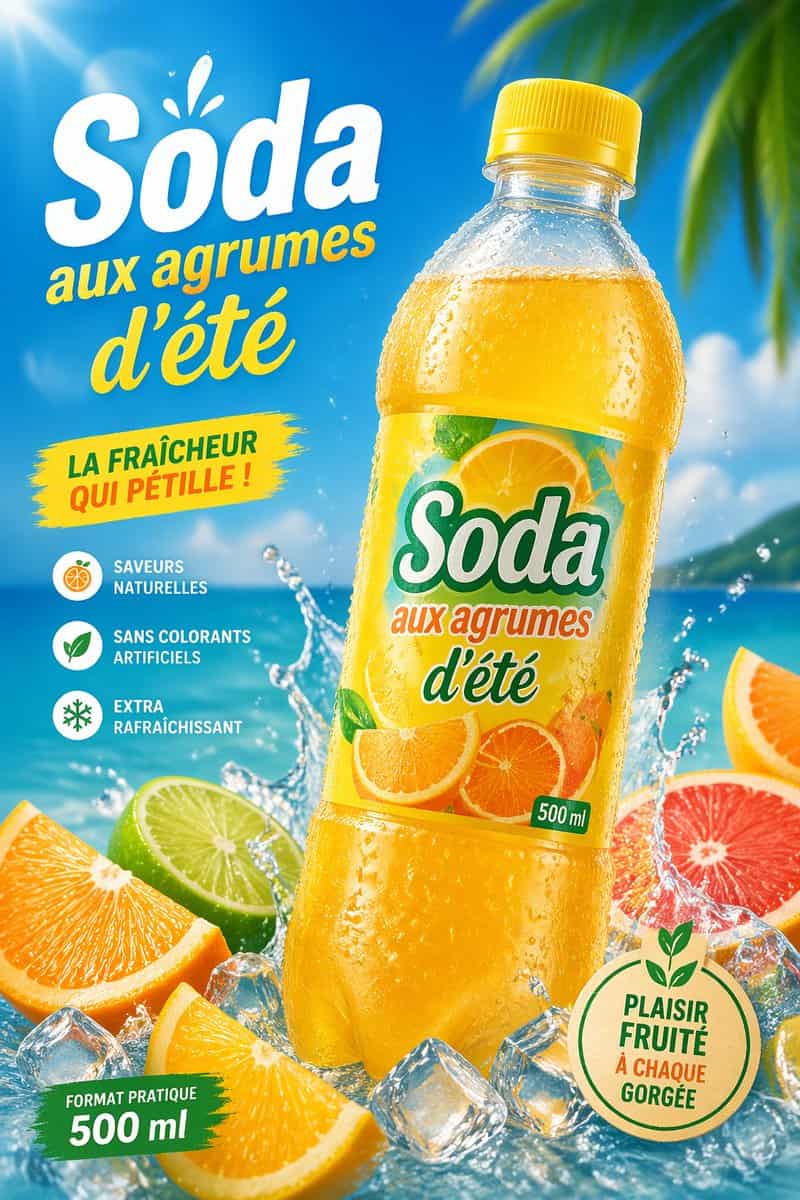
トロピカルシトラスソーダの広告ポスター
シトラスソーダのボトルを題材にした、明るい夏向け広告スタイルの鮮やかなトロピカルコマーシャルポスターを制作してください。{argument name="product name" default="Soda"}の大きなプラスチックボトルを1本、中央からやや右に配置し、わずかに左へ傾ける。黄色のキャップと冷たい結露の水滴に覆われた透明なボトルに、輝くゴールデンオレンジ色のソーダが満たされている。ラベルにはスライスされたオレンジとシトラス…
プロンプト
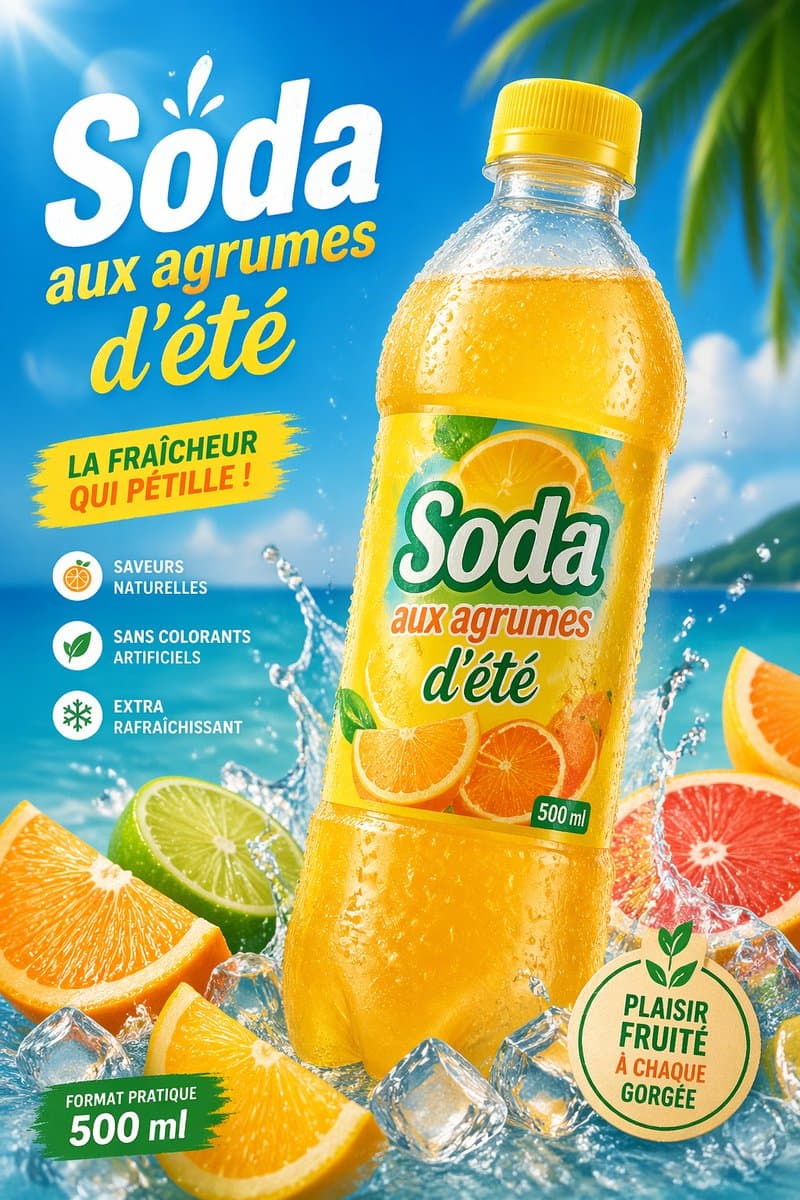
シトラスソーダのボトルを題材にした、明るい夏向け広告スタイルの鮮やかなトロピカルコマーシャルポスターを制作してください。{argument name="product name" default="Soda"}の大きなプラスチックボトルを1本、中央からやや右に配置し、わずかに左へ傾ける。黄色のキャップと冷たい結露の水滴に覆われた透明なボトルに、輝くゴールデンオレンジ色のソーダが満たされている。ラベルにはスライスされたオレンジとシトラスのアートワーク、ブランドテキスト「{argument name="product name" default="Soda"}」、フレーズ「aux agrumes d'été」、そして小さな緑色の「500 ml」のマークを配置する。鮮やかな青空、ターコイズの海、柔らかな雲、右上隅から差し込むぼかされた熱帯のヤシの葉を含む晴れたビーチの背景を使用。ボトルの根元周辺にダイナミックな水しぶき、散らばった透明な氷、そして前景に5つのシトラスを配置する:オレンジのくし切り2個、ライムのハーフ1個、グレープフルーツのハーフ1個、右端にオレンジスライスの一部1個。左側にフランス語の大きなプロモーションテキストを配置:巨大な白い見出し「{argument name="headline text" default="Soda"}」とその上に小さな水しぶきのアクセント、その下に黄色のスクリプトテキスト「aux agrumes d'été」。中央左に「LA FRAÎCHEUR QUI PÉTILLE !」と書かれた黄色のペイントストロークバッジを追加。左下に縦並びの特徴リストを配置し、3つの丸いアイコンとフランス語のキャプション「SAVEURS NATURELLES」「SANS COLORANTS ARTIFICIELS」「EXTRA RAFRAÎCHISSANT」を入れる。左下に「FORMAT PRATIQUE 500 ml」と書かれた緑色のブラシストロークバナーを追加。右下に緑色の輪郭と葉のモチーフを持つ丸いベージュのエコスタイルのシールを配置し、「{argument name="seal text" default="PLAISIR FRUITÉ À CHAQUE GORGÉE"}」というテキストを含める。照明は左上からの強い太陽光フレアによる光沢ある高エネルギーの仕上がりとし、彩度の高いシトラスカラー、シャープなパッケージディテール、リアルな水滴、洗練されたスーパーマーケット広告のリアリズムを表現する。
このプロンプトの使用方法
生成する前に、完全な トロピカルシトラスソーダの広告ポスター プロンプトを読み、主題、スタイル、カメラ、照明、構成の要件を特定してください。
括弧で囲まれたプレースホルダーまたは引数スタイルのプレースホルダーを、製品、キャラクター、ブランド、シーン、カラーパレット、またはアスペクト比の要件に置き換えます。
https://www.gptimagehub.com/ja/generate?promptId=cmogx6b6200fxzpdykrh7jkm8 を開いて画像を生成し、必要に応じてより具体的な件名、テキスト、レイアウト、または否定的な制約を使用してプロンプトを調整します。
プロンプトFAQ
トロピカルシトラスソーダの広告ポスター プロンプトは何に最適ですか?
このプロンプトは、再利用可能な構造、詳細な視覚的方向性、一貫した出力品質が必要な 商品・eコマース 画像に最適です。
生成する前にプロンプトを編集できますか?
はい。このページには完全なプロンプト テキストが表示されるため、生成前に件名、製品名、色、構成、カメラ用語、アスペクト比、スタイル メモを変更できます。
このプロンプトではどのモデルを使用すればよいですか?
プロンプトのメタデータに示されているモデルをデフォルトの開始点として使用します。別の画像モデルが同じアスペクト比と指示スタイルをサポートしている場合は、プロンプトを調整して結果を比較できます。