
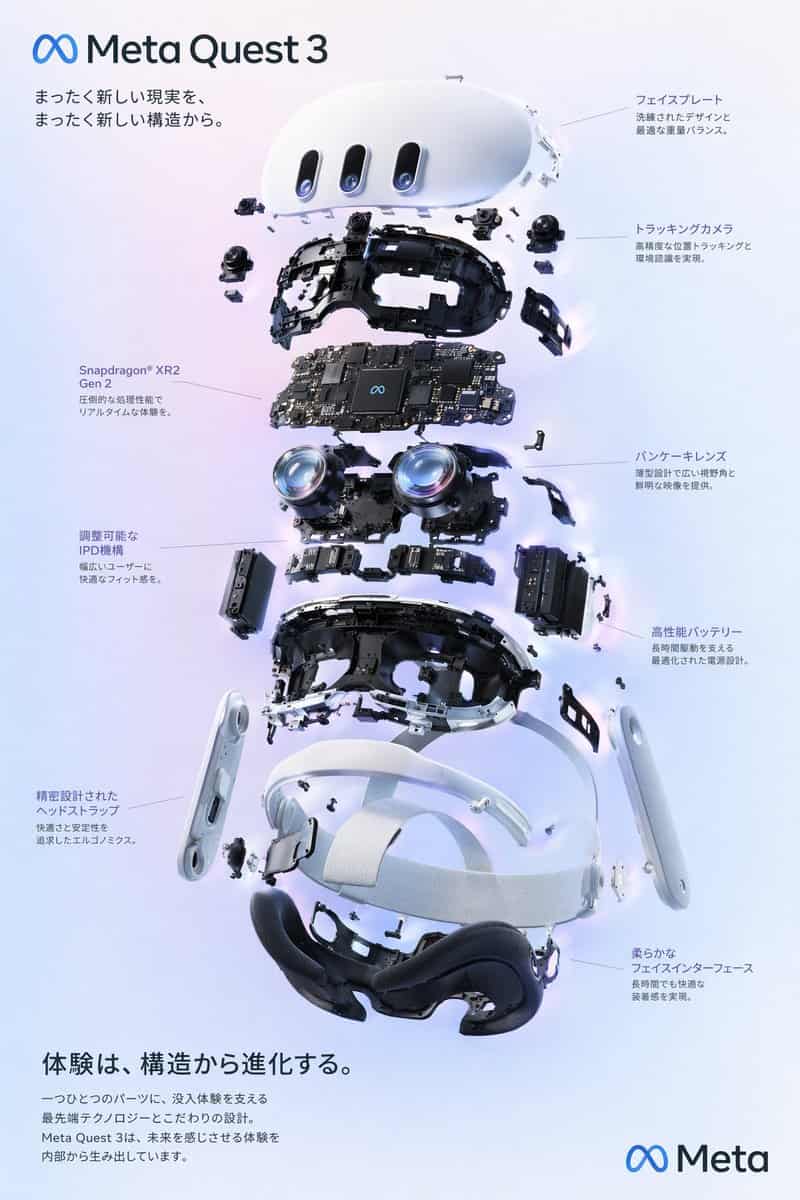
VRヘッドセット分解図ポスター
{ "type": "分解図プロダクトダイアグラムポスター", "subject": "VRヘッドセット", "style": "クリーンでハイテクな3Dレンダリング、スタジオライティング、輝くアクセント", "background": "{argument name=\"background color\" default=\"soft purple and blue gradient\"}", "header": { "logo"…
プロンプト
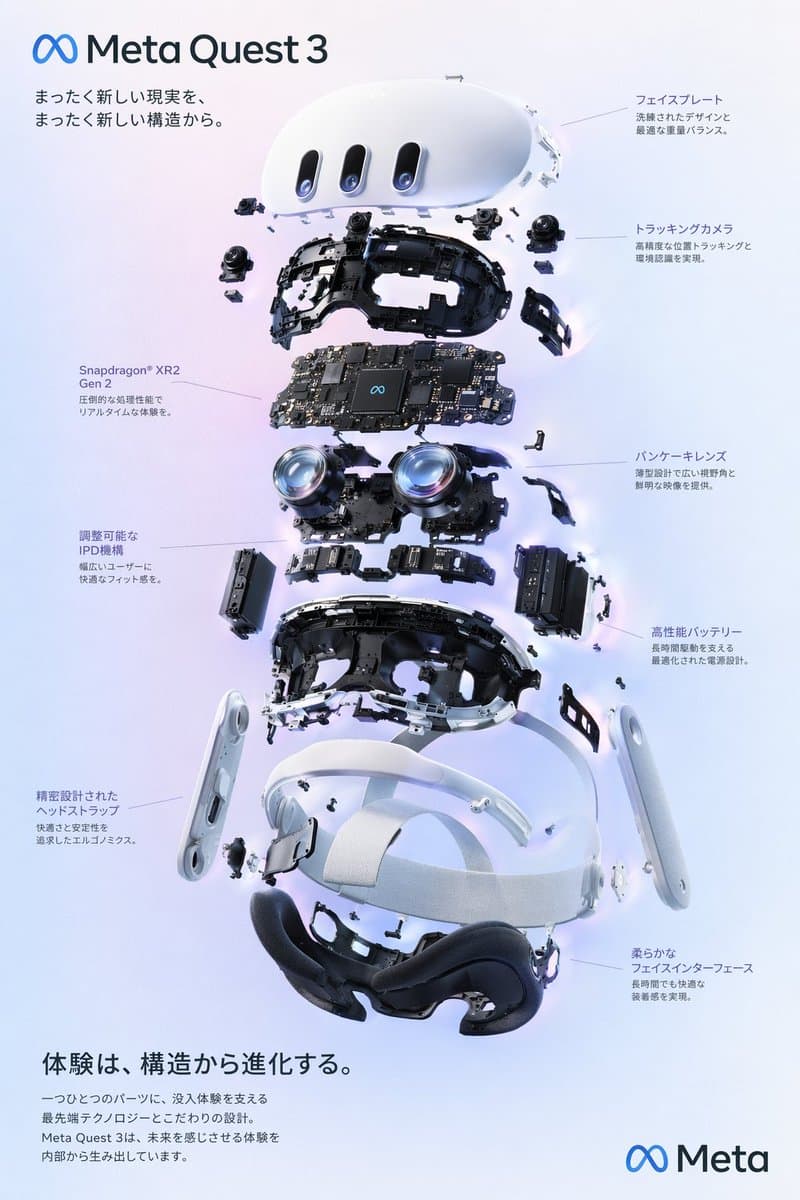
{ "type": "分解図プロダクトダイアグラムポスター", "subject": "VRヘッドセット", "style": "クリーンでハイテクな3Dレンダリング、スタジオライティング、輝くアクセント", "background": "{argument name=\"background color\" default=\"soft purple and blue gradient\"}", "header": { "logo": "∞ {argument name=\"product name\" default=\"Meta Quest 3\"}", "subtitle": "{argument name=\"main catchphrase\" default=\"まったく新しい現実を、まったく新しい構造から。\"}" }, "layout": { "centerpiece": "VRヘッドセットを縦に積み重ねた分解図で、内部コンポーネントの9層を明示:外殻、カメラセンサー、チップ搭載のマザーボード、パンケーキレンズ、内部フレーム、バッテリーパック、サイドストラップ、トップストラップ、フェイシャルインターフェースクッション。", "callout_labels": { "count": 8, "left_side": [ "Snapdragon® XR2 Gen 2\n圧倒的な処理性能でリアルタイムな体験を。", "調整可能なIPD機構\n幅広いユーザーに快適なフィット感を。", "精密設計されたヘッドストラップ\n快適さと安定性を追求したエルゴノミクス。" ], "right_side": [ "フェイスプレート\n洗練されたデザインと最適な重量バランス。", "トラッキングカメラ\n高精度な位置トラッキングと環境認識を実現。", "パンケーキレンズ\n薄型設計で広い視野角と鮮明な映像を提供。", "高性能バッテリー\n長時間駆動を支える最適化された電源設計。", "柔らかなフェイスインターフェース\n長時間でも快適な装着感を実現。" ] }, "footer": { "left_text_block": { "headline": "{argument name=\"bottom headline\" default=\"体験は、構造から進化する。\"}", "body": "一つひとつのパーツに、没入体験を支える最先端テクノロジーとこだわりの設計。Meta Quest 3は、未来を感じさせる体験を内部から生み出しています。" }, "right_logo": "∞ Meta" } } }
このプロンプトの使用方法
生成する前に、完全な VRヘッドセット分解図ポスター プロンプトを読み、主題、スタイル、カメラ、照明、構成の要件を特定してください。
括弧で囲まれたプレースホルダーまたは引数スタイルのプレースホルダーを、製品、キャラクター、ブランド、シーン、カラーパレット、またはアスペクト比の要件に置き換えます。
https://www.gptimagehub.com/ja/generate?promptId=cmogwxo12009bzpdyuolir7ys を開いて画像を生成し、必要に応じてより具体的な件名、テキスト、レイアウト、または否定的な制約を使用してプロンプトを調整します。
プロンプトFAQ
VRヘッドセット分解図ポスター プロンプトは何に最適ですか?
このプロンプトは、再利用可能な構造、詳細な視覚的方向性、一貫した出力品質が必要な ロゴ・ブランディング 画像に最適です。
生成する前にプロンプトを編集できますか?
はい。このページには完全なプロンプト テキストが表示されるため、生成前に件名、製品名、色、構成、カメラ用語、アスペクト比、スタイル メモを変更できます。
このプロンプトではどのモデルを使用すればよいですか?
プロンプトのメタデータに示されているモデルをデフォルトの開始点として使用します。別の画像モデルが同じアスペクト比と指示スタイルをサポートしている場合は、プロンプトを調整して結果を比較できます。