
海報與插畫
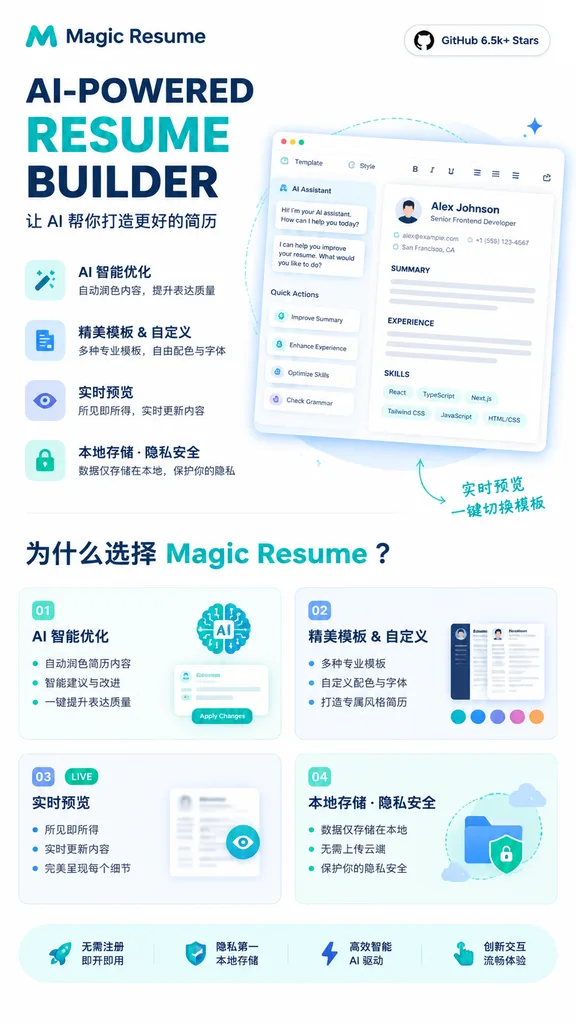
AI 履歷生成器 SaaS 行銷海報
生成極簡現代的 SaaS 行銷海報,展示 AI 履歷編輯器介面、特色卡片與文案標題。可在括號中替換產品名稱、求職者範例與介面文字。
海報saasui介面資訊圖行銷設計向量風格履歷生成器
提示詞
{
  "type": "landing page product promo poster",
  "product": {
    "name": "[Magic Resume]",
    "category": "AI resume builder website",
    "brand_style": "極簡現代 SaaS 風格,純白背景,青綠與深藍點綴色,圓角卡片,淺灰細邊框,柔和微陰影"
  },
  "canvas": {
    "orientation": "portrait",
    "aspect_ratio": "9:16"
  },
  "headline_block": {
    "position": "top-left",
    "logo": "抽象青綠色 M 標誌及品牌字標",
    "headline": "AI-POWERED RESUME BUILDER",
    "subheadline": "讓 AI 幫你打造更好的簡歷",
    "style": "超大加粗無襯線標題,RESUME 為亮青色,其餘文字為深海軍藍"
  },
  "top_right_badge": {
    "text": "GitHub 6.5k+ Stars",
    "style": "帶有深色文字與 GitHub 圖示的白色圓角膠囊標籤"
  },
  "hero_section": {
    "position": "upper-right",
    "main_visual": "大型傾斜視角的網頁應用卡片,展示簡歷編輯器 UI",
    "screen_contents": {
      "left_panel": {
        "title": "AI Assistant",
        "chat_lines_count": 3,
        "quick_actions_count": 4,
        "quick_actions": [
          "Improve Summary",
          "Enhance Experience",
          "Optimize Skills",
          "Check Grammar"
        ]
      },
      "top_toolbar_count": 7,
      "top_toolbar_items": [
        "Template",
        "Style",
        "Bold",
        "Italic",
        "Underline",
        "alignment/settings icons",
        "share/export icon"
      ],
      "resume_preview": {
        "name": "[Alex Johnson]",
        "role": "Senior Frontend Developer",
        "contact_count": 3,
        "contact_items": [
          "email",
          "phone",
          "location"
        ],
        "sections_count": 3,
        "sections": [
          "SUMMARY",
          "EXPERIENCE",
          "SKILLS"
        ],
        "skill_tags_count": 6,
        "skill_tags": [
          "React",
          "TypeScript",
          "Next.js",
          "Tailwind CSS",
          "JavaScript",
          "HTML/CSS"
        ]
      }
    },
    "decorations": "柔和淡藍投影,虛線曲線指引線,微小星芒點綴,右下方手寫風格箭頭標註寫作 實時預覽 一鍵切換模板"
  },
  "feature_list": {
    "position": "left-center",
    "count": 4,
    "items": [
      {
        "title": "AI 智慧最佳化",
        "description": "自動潤色內容,提升表達質量",
        "icon": "圓角方塊內的魔棒或星芒圖示"
      },
      {
        "title": "精美模板 & 自定義",
        "description": "多種專業模板,自由配色與字型",
        "icon": "圓角方塊內的文件圖示"
      },
      {
        "title": "實時預覽",
        "description": "所見即所得,實時更新內容",
        "icon": "圓角方塊內的眼睛圖示"
      },
      {
        "title": "本地儲存 · 隱私安全",
        "description": "資料僅儲存在本地,保護你的隱私",
        "icon": "圓角膠囊卡片內的鎖圖示"
      }
    ]
  },
  "why_section": {
    "position": "lower-middle",
    "title": "為什麼選擇 [Magic Resume]?",
    "cards_count": 4,
    "cards": [
      {
        "number": "01",
        "title": "AI 智慧最佳化",
        "bullet_count": 3,
        "bullets": [
          "自動潤色簡歷內容",
          "智慧建議與改進",
          "一鍵提升表達質量"
        ],
        "visual": "AI大腦插畫與帶有 Apply Changes 按鈕的小型助手面板"
      },
      {
        "number": "02",
        "title": "精美模板 & 自定義",
        "bullet_count": 3,
        "bullets": [
          "多種專業模板",
          "自定義配色與字型",
          "打造專屬風格簡歷"
        ],
        "visual": "2張簡歷縮圖與6個調色盤色塊"
      },
      {
        "number": "03",
        "title": "實時預覽",
        "badge": "LIVE",
        "bullet_count": 3,
        "bullets": [
          "所見即所得",
          "實時更新內容",
          "完美呈現每個細節"
        ],
        "visual": "帶有眼睛圖示按鈕的模糊簡歷預覽卡片"
      },
      {
        "number": "04",
        "title": "本地儲存 · 隱私安全",
        "bullet_count": 3,
        "bullets": [
          "資料僅儲存在本地",
          "無需上傳雲端",
          "保護你的隱私安全"
        ],
        "visual": "資料夾、盾牌鎖、虛線箭頭路徑與小云朵"
      }
    ]
  },
  "bottom_bar": {
    "position": "bottom",
    "count": 4,
    "items": [
      "無需註冊 即開即用",
      "隱私第一 本地儲存",
      "高效智慧 AI 驅動",
      "創新互動 流暢體驗"
    ],
    "icons_count": 4,
    "icons": [
      "火箭",
      "盾牌",
      "閃電",
      "指標手勢"
    ]
  },
  "style": {
    "typography": "粗體幾何無襯線英文字型搭配利落的中文無襯線體",
    "rendering": "高精營銷宣傳圖,清晰向量感 UI,微漸變,柔和青綠高光,通透留白排版",
    "palette": {
      "background": "white",
      "primary": "teal",
      "secondary": "dark navy",
      "accent": "light aqua and pale blue"
    }
  }
}可以替換的部分
生成前,把提示詞裡的這些部分換成你自己的主題或文案。
[Magic Resume]佔位符[Alex Johnson]佔位符
提示詞資訊
- 分類
- 海報與插畫
- 模型
- GPT IMAGE 2
- 每張圖消耗
- 1K:43 點數 · 2K:86 點數 · 4K:143 點數
- 畫幅比例
- 9:16
- 收錄時間