
UI / UX 設計
Retro Programming Museum Cartoon
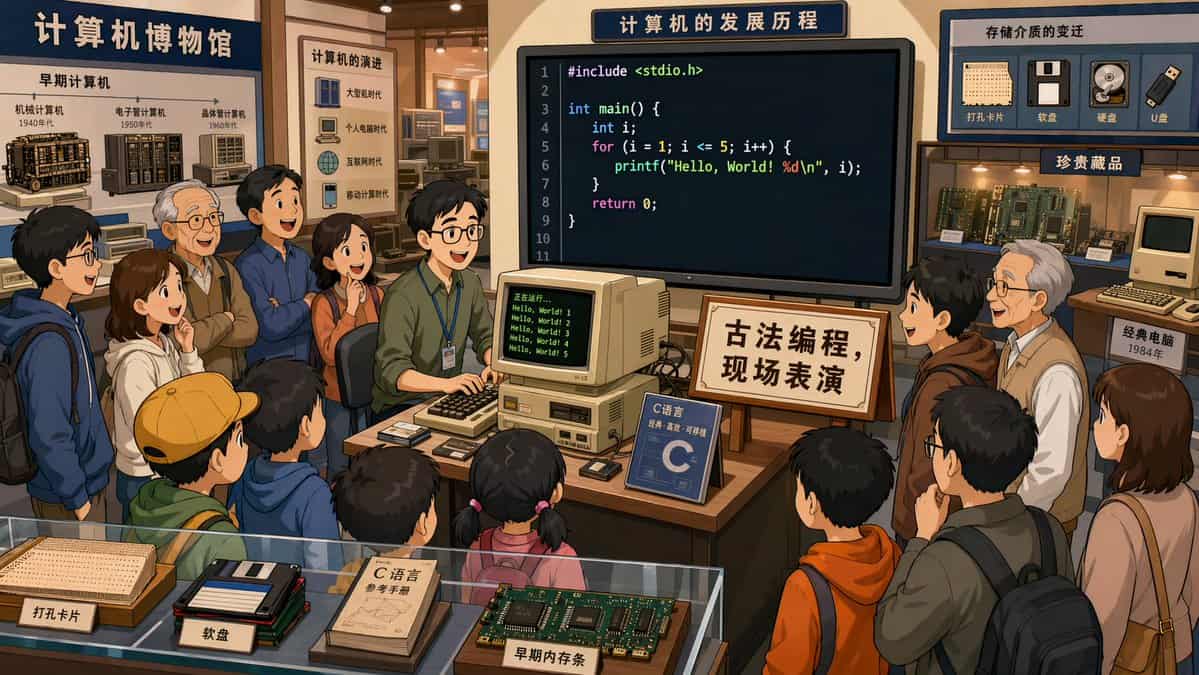
在計算機博物館裡,一個程式設計師在展廳中央,正在演示C語言程式設計,很多參觀者在圍觀,螢幕上的程式碼清晰可見。旁邊的牌子寫著:古法程式設計,現場表演。2D卡通畫風,16:9
提示詞
在計算機博物館裡,一個程式設計師在展廳中央,正在演示C語言程式設計,很多參觀者在圍觀,螢幕上的程式碼清晰可見。旁邊的牌子寫著:古法程式設計,現場表演。2D卡通畫風,16:9
如何使用此提示
1
看完整提示
在生成之前閱讀完整的 Retro Programming Museum Cartoon 提示並確定主題、風格、相機、燈光和構圖要求。
2
自訂變數
將括號或參數式佔位符替換為您的產品、角色、品牌、場景、調色板或寬高比要求。
3
生成並迭代
開啟 https://www.gptimagehub.com/zh-TW/generate?promptId=cmogwxb20007pzpdy3gwqjspu,產生圖像,然後根據需要使用更具體的主題、文字、佈局或負面約束來最佳化提示。
提示常見問題解答
Retro Programming Museum Cartoon 提示符號最適合用來做什麼?
此提示最適用於您需要可重複使用結構、詳細視覺方向和一致輸出品質的 ui / ux 設計 影像。
我可以在生成之前編輯提示嗎?
是的。完整的提示文字在此頁面上可見,因此您可以在生成之前更改主題、產品名稱、顏色、構圖、相機術語、長寬比和樣式註釋。
出現此提示時我應該使用哪種型號?
使用提示元資料中顯示的模型作為預設起點。如果另一個影像模型支援相同的寬高比和指令風格,您可以調整提示並比較結果。