
提示詞
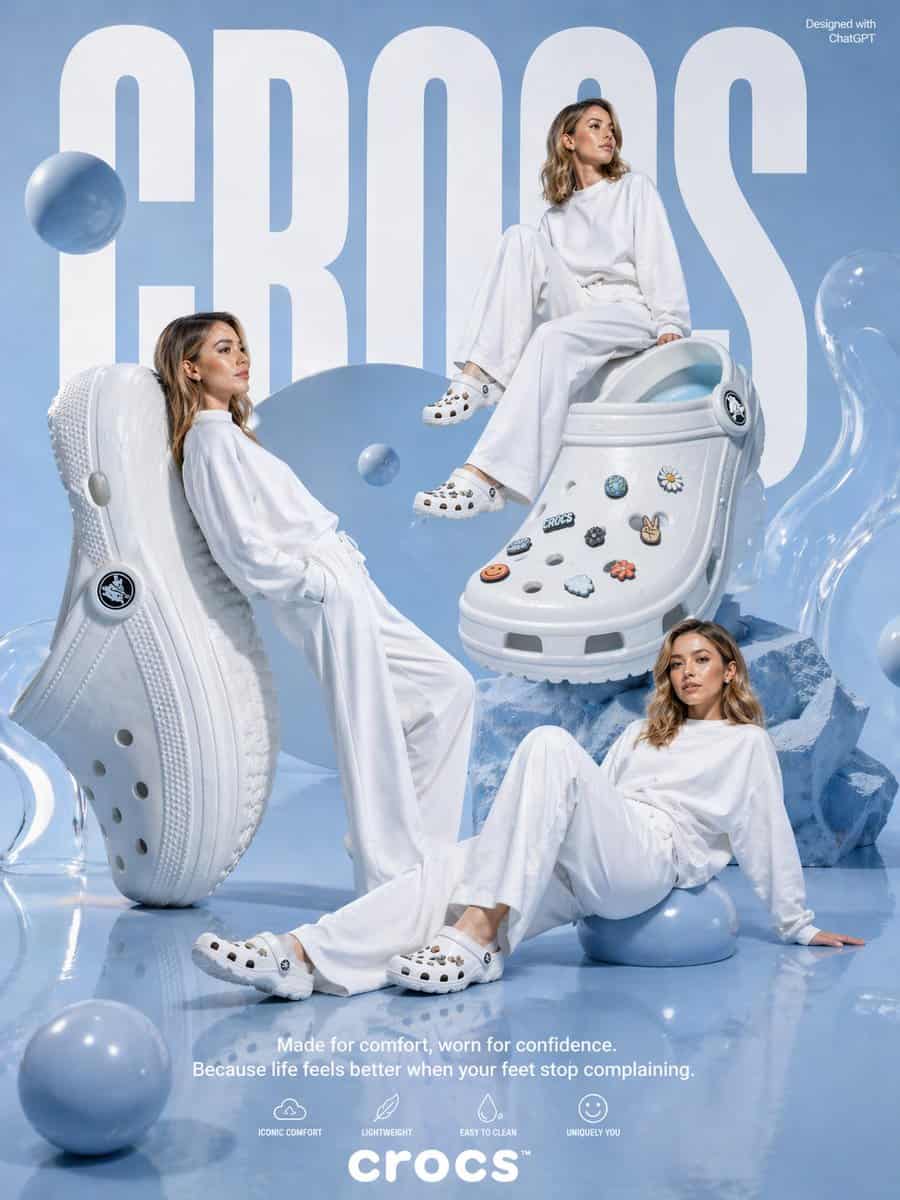
一張為 {argument name="brand name" default="crocs"} 製作的高階影棚廣告海報,使用單色粉彩藍和白色配色,亮面反光地面和柔和天藍色背景。背景由巨大粗體白色緊縮無襯線字 {argument name="headline text" default="CROCS"} 主導,幾乎跨越影象全高。右上角加入小號白色文字“Designed with ChatGPT”。展示 3 位成年女性,肩長淺棕到深金色波浪發,全部穿寬鬆超大白色長袖上衣和飄逸白色闊腿褲,造型為極簡時裝模特,表情放鬆中性。她們的臉有意遮擋或模糊。一個模特倚靠在左側一隻巨大直立白色洞洞鞋上,一個模特隨意坐在右上方一隻巨大白色洞洞鞋上,一個模特躺坐在右下地面,單臂向後支撐,部分坐在亮面藍色球體上。包含 2 只超大白色洞洞鞋作為主道具:左側一隻垂直站立,展示鞋底和側面輪廓;中右一隻斜放在藍色晶體塊上,展示鞋面和鞋頭。兩隻鞋都是經典泡沫一腳蹬樣式,帶透氣孔、厚底紋、後跟帶和圓形 logo 鉚釘。中右鞋面裝飾有正好 8 個可見 charms:藍綠色虹彩圓形 charm、白色黃心雛菊、靠近鞋帶的黑白圓形徽章、小“CROCS”文字 charm、深色花朵、和平手勢、橙色笑臉、白雲和橙色花朵。佈景周圍散落正好 7 個不同大小的亮面漂浮或落地藍色球體:左側模特身後一個大球,中央附近一箇中等漂浮球,左下前景一箇中等球,右下模特坐著的一箇中等球,左上附近一個小球,以及另外 2 個融入構圖的藍色球。最左和最右邊緣加入半透明雕塑感凝膠狀形體,右側鞋下方加入稜角藍色水晶狀石塊。底部中央放置白色宣傳文案,乾淨無襯線字型:第一行 {argument name="tagline line 1" default="Made for comfort, worn for confidence."},第二行 {argument name="tagline line 2" default="Because life feels better when your feet stop complaining."}。其下展示 4 個極簡白色功能圖示和標籤:“ICONIC COMFORT”、“LIGHTWEIGHT”、“EASY TO CLEAN”、“UNIQUELY YOU”。底部中央放置 {argument name="logo text" default="crocs"} 標誌,粗體小寫白字,帶小商標符號。整體風格應像高階超現實時尚廣告,乾淨編輯光、柔和陰影、亮面紋理、通透構圖和現代生活方式產品廣告。
如何使用此提示
在生成之前閱讀完整的 粉彩藍 Crocs 時尚廣告 提示並確定主題、風格、相機、燈光和構圖要求。
將括號或參數式佔位符替換為您的產品、角色、品牌、場景、調色板或寬高比要求。
開啟 https://www.gptimagehub.com/zh-TW/generate?promptId=cmogx612200fpzpdyliz41eib,產生圖像,然後根據需要使用更具體的主題、文字、佈局或負面約束來最佳化提示。
提示常見問題解答
粉彩藍 Crocs 時尚廣告 提示符號最適合用來做什麼?
此提示最適用於您需要可重複使用結構、詳細視覺方向和一致輸出品質的 產品與電商 影像。
我可以在生成之前編輯提示嗎?
是的。完整的提示文字在此頁面上可見,因此您可以在生成之前更改主題、產品名稱、顏色、構圖、相機術語、長寬比和樣式註釋。
出現此提示時我應該使用哪種型號?
使用提示元資料中顯示的模型作為預設起點。如果另一個影像模型支援相同的寬高比和指令風格,您可以調整提示並比較結果。