
UI / UX 设计
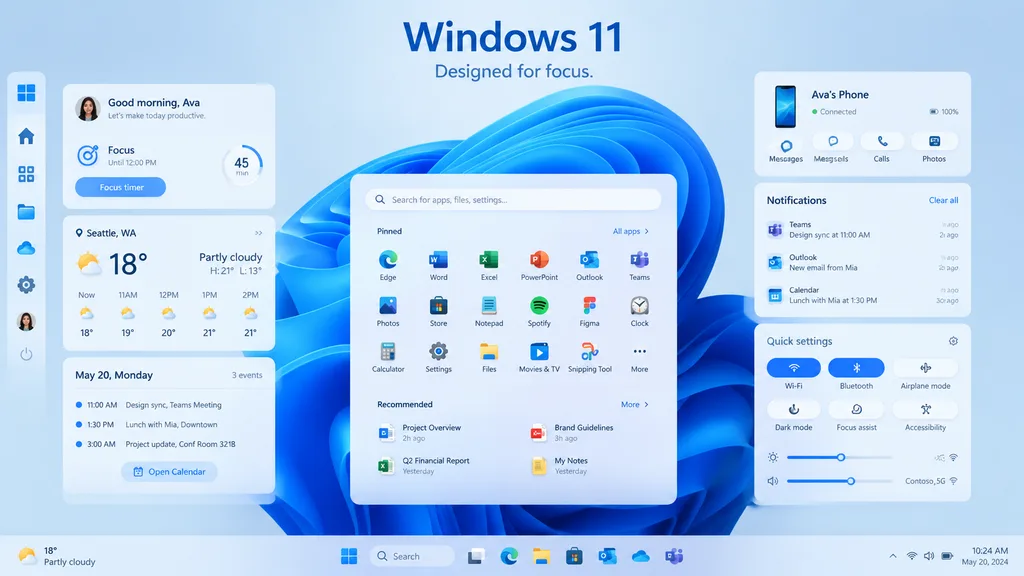
Windows 11 桌面 UI 展示
生成带有现代毛玻璃拟态小组件与任务栏布局的桌面 UI 宣传展示图。可自定义标题文案、天气位置与设备名称。
windows 11ui模型毛玻璃拟态桌面ui产品展示仪表盘操作系统
提示词
{
  "type": "Windows 11 宣传 UI 模型",
  "style": "干净现代的产品营销渲染,柔和的毛玻璃拟态卡片,微妙的阴影,圆角,浅蓝与白色调,清晰的矢量感界面,精致的演示文稿美学",
  "scene": {
    "background": "淡冰蓝渐变背景,界面后方居中展示标志性的 Windows 11 蓝色抽象缎带旋转壁纸",
    "headline": {
      "text": "[Windows 11]",
      "subtext": "[Designed for focus.]",
      "position": "顶部居中"
    }
  },
  "layout": {
    "type": "桌面 UI 展示",
    "sections": [
      {
        "title": "左侧边栏",
        "position": "最左侧垂直托盘",
        "count": 8,
        "labels": [
          "Windows logo",
          "Home",
          "Apps",
          "Files",
          "Cloud",
          "Settings",
          "Ava profile",
          "Power"
        ]
      },
      {
        "title": "效率小组件",
        "position": "左栏卡片",
        "count": 3,
        "labels": [
          "Good morning, Ava",
          "Weather",
          "Calendar"
        ]
      },
      {
        "title": "中央开始菜单",
        "position": "中下部",
        "count": 3,
        "labels": [
          "Search bar",
          "Pinned",
          "Recommended"
        ]
      },
      {
        "title": "右栏卡片",
        "position": "右上、右中及右下",
        "count": 3,
        "labels": [
          "Ava's Phone",
          "Notifications",
          "Quick settings"
        ]
      },
      {
        "title": "任务栏",
        "position": "底部全宽",
        "count": 10,
        "labels": [
          "Weather summary",
          "Start",
          "Search",
          "Task View",
          "Microsoft Edge",
          "File Explorer",
          "Microsoft Store",
          "Outlook",
          "OneDrive",
          "Teams"
        ]
      }
    ],
    "centerpiece": "浮动在蓝色抽象壁纸前方的 Windows 11 大尺寸开始菜单"
  },
  "widgets": {
    "greeting_card": {
      "title": "Good morning, Ava",
      "subtitle": "Let's make today productive.",
      "focus_block": {
        "label": "Focus",
        "time": "Until 12:00 PM",
        "timer": "45 min",
        "button": "Focus timer"
      }
    },
    "weather_card": {
      "location": "[Seattle, WA]",
      "temperature": "18°",
      "condition": "Partly cloudy",
      "range": "H: 21°  L: 13°",
      "forecast_count": 5,
      "forecast_labels": [
        "Now 18°",
        "11AM 19°",
        "12PM 20°",
        "1PM 21°",
        "2PM 21°"
      ]
    },
    "calendar_card": {
      "date": "May 20, Monday",
      "events_count": 3,
      "event_labels": [
        "11:00 AM Design sync, Teams Meeting",
        "1:30 PM Lunch with Mia, Downtown",
        "3:00 PM Project update, Conf Room 32/1B"
      ],
      "button": "Open Calendar"
    },
    "phone_card": {
      "device_name": "[Ava's Phone]",
      "status": "Connected",
      "actions_count": 3,
      "action_labels": [
        "Messages",
        "Calls",
        "Photos"
      ],
      "battery": "100%"
    },
    "notifications_card": {
      "title": "Notifications",
      "action": "Clear all",
      "items_count": 3,
      "item_labels": [
        "Teams — Design sync at 11:00 AM — 2m ago",
        "Outlook — New email from Mia — 10m ago",
        "Calendar — Lunch with Mia at 1:30 PM — 30m ago"
      ]
    },
    "quick_settings_card": {
      "title": "Quick settings",
      "toggles_count": 6,
      "toggle_labels": [
        "Wi‑Fi",
        "Bluetooth",
        "Airplane mode",
        "Dark mode",
        "Focus assist",
        "Accessibility"
      ],
      "active_toggles": [
        "Wi‑Fi",
        "Bluetooth"
      ],
      "sliders_count": 2,
      "slider_labels": [
        "Brightness",
        "Volume"
      ],
      "wifi_network": "Contoso_5G"
    },
    "start_menu": {
      "search_placeholder": "Search for apps, files, settings...",
      "pinned_count": 18,
      "pinned_labels": [
        "Edge",
        "Word",
        "Excel",
        "PowerPoint",
        "Outlook",
        "Teams",
        "Photos",
        "Store",
        "Notepad",
        "Spotify",
        "Figma",
        "Clock",
        "Calculator",
        "Settings",
        "Files",
        "Movies & TV",
        "Snipping Tool",
        "More"
      ],
      "recommended_count": 4,
      "recommended_labels": [
        "Project Overview",
        "Q2 Financial Report",
        "Brand Guidelines",
        "My Notes"
      ]
    }
  },
  "composition": "对称的产品展示构图,开始菜单居中,左侧堆叠三张卡片,右侧三张卡片,间距充裕,所有元素略微悬浮于背景之上,底部任务栏贯穿全屏边缘",
  "rendering": "用于桌面操作系统发布页面的高分辨率 UI 概念图,精湛的版式排印,纯粹利落的微软风格图标体系"
}可以替换的部分
生成前,把提示词里的这些部分换成你自己的主题或文案。
[Windows 11]占位符[Designed for focus.]占位符[Seattle, WA]占位符[Ava's Phone]占位符
提示词信息
- 模型
- GPT IMAGE 2
- 每张图消耗
- 1K:43 积分 · 2K:86 积分 · 4K:143 积分
- 画幅比例
- 16:9
- 收录时间