
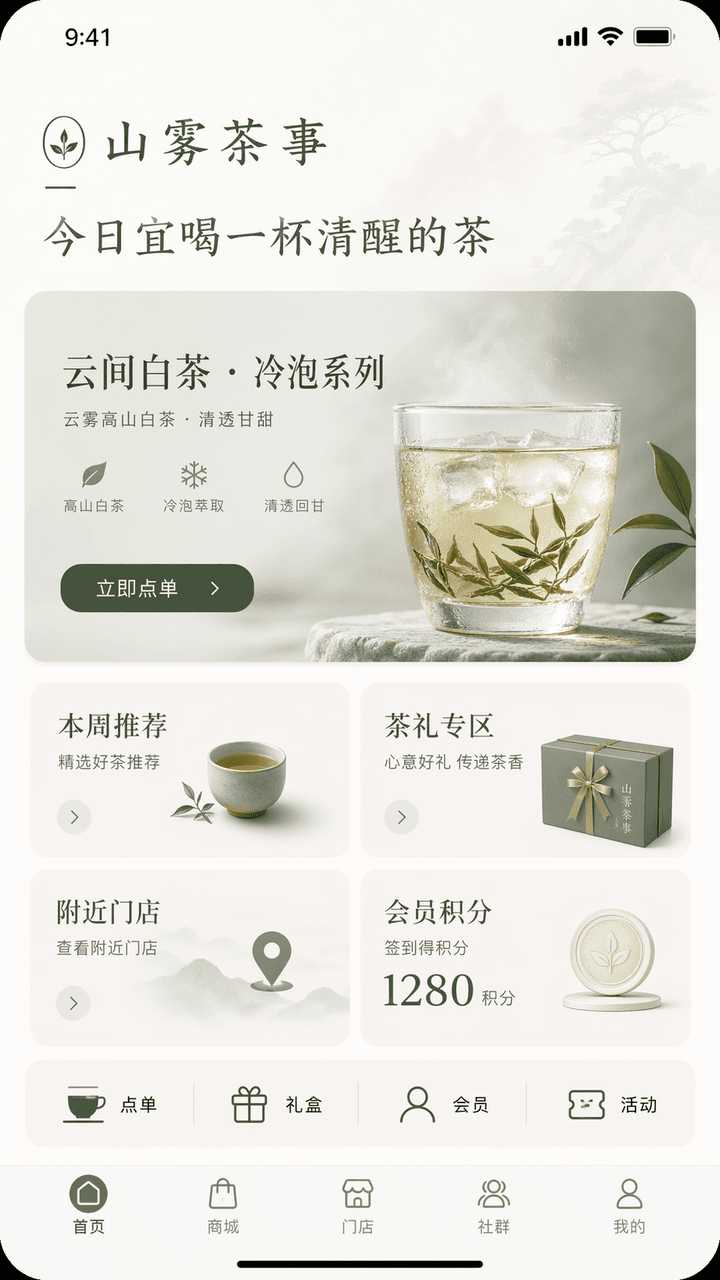
App homepage concept map
Generates a minimalist mobile app homepage mockup for a tea lifestyle brand, ideal for UI/UX designer portfolios, client presentations, and concept reviews.
Prompt
Design an iPhone-style app homepage concept interface. The brand name is "Shanwu Tea Shi", the industry is new Chinese tea drinks/tea lifestyle, and the functions are store ordering, new cold brew tea product recommendations, tea gift purchases, membership points, and nearby store inquiries. The top of the homepage displays the brand greeting "Today is a good time to drink a cup of sober tea", the main visual is the new product recommendation card "Yunjian White Tea·Cold Brew Series", and the button is "Order Now"; in the middle, there are four modules: this week's recommendations, tea gift area, nearby stores, and member points; a row of quick entrances is added below: ordering, gift boxes, members, and activities; the bottom navigation bar is homepage, mall, store, community, and mine. The overall interface needs to have an oriental temperament of restraint + a mature brand feel. The color scheme should be controlled within three colors: off-white, tea green, and moon gray. The interface should be like the homepage of a high-end lifestyle brand app, with clear hierarchy, concise information, reasonable buttons, and all text in accurate Chinese.
What you can customize
Swap these parts of the prompt for your own subject or wording before you generate.
“Shanwu Tea Shi”quoted wording“Today is a good time to drink a cup of sober tea”quoted wording“Yunjian White Tea·Cold Brew Series”quoted wording“Order Now”quoted wording
Prompt details
- Category
- UI / UX Design
- Model
- GPT IMAGE 2
- Cost per image
- 1K: 43 credits · 2K: 86 credits · 4K: 143 credits
- Aspect ratio
- 1:1
- Added
- Updated