
Infographic / Education
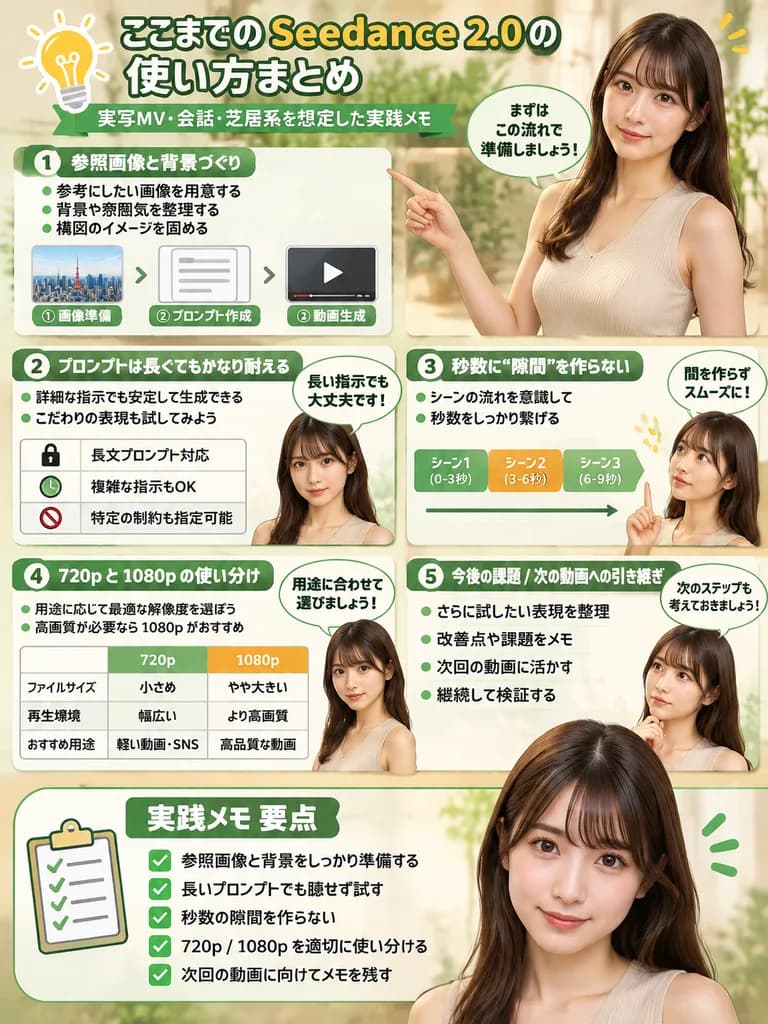
Software Guide Infographic with Presenter
Generates a structured, multi-section tutorial infographic with photorealistic human presenter cutouts. Customize section titles, flowcharts, and character appearance to explain any software or workflow.
infographicsoftware tutorialworkflowdiagrampresenterui designguide
Prompt
{
  "type": "infographic",
  "style": "clean, modern, professional, soft green and beige color palette, photorealistic character integration",
  "header": {
    "icon": "lightbulb",
    "title": "[ここまでの Seedance 2.0 の使い方まとめ]",
    "subtitle": "[実写MV・会話・芝居系を想定した実践メモ]"
  },
  "presenter_character": "[photorealistic young Japanese woman with long dark brown hair wearing a beige sleeveless top]",
  "total_presenter_cutouts": 6,
  "layout": {
    "sections": [
      {
        "number": 1,
        "title": "[参照画像と背景づくり]",
        "elements": "3 bullet points, 1 horizontal 3-step flowchart with thumbnail images (cityscape, text box, video player)",
        "presenter_pose": "pointing left towards the flowchart, with a speech bubble"
      },
      {
        "number": 2,
        "title": "[プロンプトは長くてもかなり耐える]",
        "elements": "2 bullet points, 1 table with 3 rows featuring icons (lock, clock, prohibition sign)",
        "presenter_pose": "neutral expression, looking forward, with a speech bubble"
      },
      {
        "number": 3,
        "title": "秒数に“隙間”を作らない",
        "elements": "2 bullet points, 1 horizontal timeline graphic with 3 segments",
        "presenter_pose": "pointing up, looking slightly left, with a speech bubble"
      },
      {
        "number": 4,
        "title": "720p と 1080p の使い分け",
        "elements": "text description, 1 two-column comparison table (green column, orange column)",
        "presenter_pose": "looking forward, with a speech bubble"
      },
      {
        "number": 5,
        "title": "今後の課題 / 次の動画への引き継ぎ",
        "elements": "4 bullet points",
        "presenter_pose": "looking slightly right, with a speech bubble"
      },
      {
        "type": "summary_box",
        "title": "実践メモ 要点",
        "elements": "clipboard icon, 5 checklist items with green checkmarks",
        "presenter_pose": "large portrait from chest up, looking directly at viewer"
      }
    ]
  }
}What you can customize
Swap these parts of the prompt for your own subject or wording before you generate.
[ここまでの Seedance 2.0 の使い方まとめ]placeholder[実写MV・会話・芝居系を想定した実践メモ]placeholder[参照画像と背景づくり]placeholder[プロンプトは長くてもかなり耐える]placeholder
Prompt details
- Category
- Infographic / Education
- Model
- GPT IMAGE 2
- Cost per image
- 1K: 43 credits · 2K: 86 credits · 4K: 143 credits
- Aspect ratio
- 3:4
- Added