
UI / UX Design
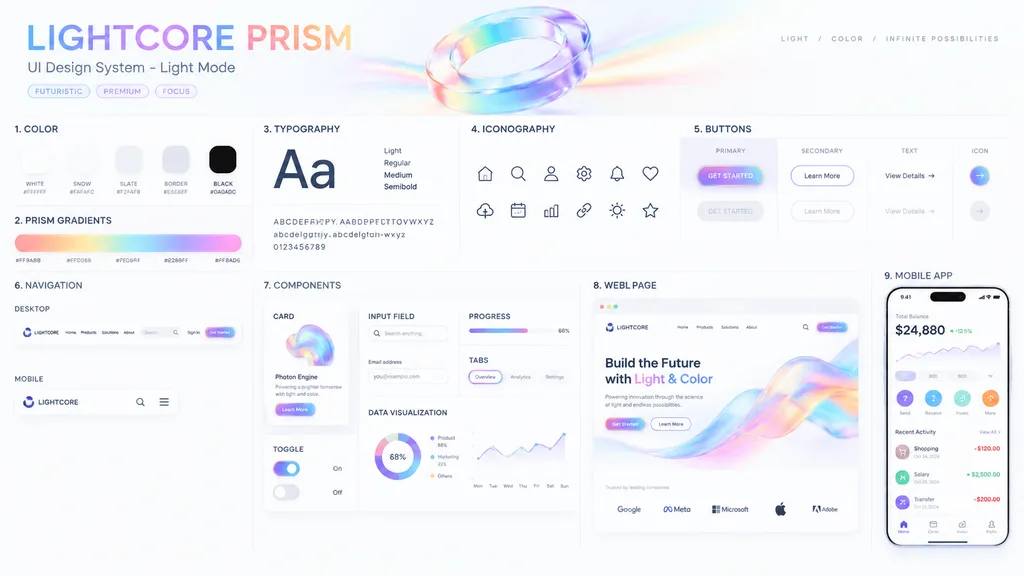
Prismatic Light Mode UI Design System Board
Renders an intricate, clean presentation board for a light-mode UI design system with iridescent prism styling. Customize the theme, gradient color schemes, typography, and component names inside the bracketed fields.
ui designdesign systempresentation boardlight modeiridescentinterface mockup
Browse similar promptsUI design AI prompts
Prompt
{
  "type": "UI Design System presentation board",
  "theme": "[optical science and light refraction]",
  "overall_aesthetic": "clean white background, light mode, futuristic, premium, featuring [iridescent rainbow, pastel orange, yellow, cyan, purple, pink] accents",
  "header": {
    "title": "[LIGHTCORE PRISM]",
    "subtitle": "UI Design System - Light Mode",
    "tags": [
      "FUTURISTIC",
      "PREMIUM",
      "FOCUS"
    ],
    "hero_graphic": "3D transparent glass ring refracting iridescent light"
  },
  "layout": {
    "sections": [
      {
        "title": "COLOR",
        "count": 5,
        "labels": [
          "WHITE #FFFFFF",
          "SNOW #FAFAFC",
          "SLATE #F2F4F8",
          "BORDER #E6E8EF",
          "BLACK #0A0A0C"
        ],
        "description": "5 solid color swatches in rounded squares"
      },
      {
        "title": "PRISM GRADIENTS",
        "count": 1,
        "description": "1 long horizontal gradient bar with 5 hex codes below it"
      },
      {
        "title": "TYPOGRAPHY",
        "description": "Large 'Aa' with 4 font weights listed (Light, Regular, Medium, Semibold) and full alphabet and numbers"
      },
      {
        "title": "ICONOGRAPHY",
        "count": 12,
        "description": "12 minimalist line-art icons arranged in a 2x6 grid"
      },
      {
        "title": "BUTTONS",
        "count": 8,
        "categories": [
          "PRIMARY",
          "SECONDARY",
          "TEXT",
          "ICON"
        ],
        "description": "8 buttons showing normal and disabled states for each category. Primary button features an iridescent border and '[GET STARTED]' text."
      },
      {
        "title": "NAVIGATION",
        "count": 2,
        "variants": [
          "DESKTOP",
          "MOBILE"
        ],
        "description": "Desktop navigation bar with logo, 4 text links, search bar, sign-in, and CTA button. Mobile navigation with logo, search icon, and hamburger menu."
      },
      {
        "title": "COMPONENTS",
        "count": 6,
        "items": [
          "CARD: 'Photon Engine' with abstract iridescent graphic and button",
          "INPUT FIELD: Search bar and email input with label",
          "PROGRESS: Iridescent progress bar at 68%",
          "TABS: Overview, Analytics, Settings",
          "TOGGLE: 2 switches (on and off)",
          "DATA VISUALIZATION: 1 donut chart with 3 legend items, 1 line chart over 7 days"
        ]
      },
      {
        "title": "WEB PAGE",
        "description": "Desktop browser mockup featuring the headline '[Build the Future with Light & Color]', 2 buttons, a flowing 3D iridescent wave graphic, and 5 partner logos at the bottom."
      },
      {
        "title": "MOBILE APP",
        "description": "Smartphone mockup displaying a balance of $24,880, a line chart, 4 quick action icons, a recent activity list with 3 items, and a bottom navigation bar with 4 icons."
      }
    ]
  }
}What you can customize
Swap these parts of the prompt for your own subject or wording before you generate.
[optical science and light refraction]placeholder[LIGHTCORE PRISM]placeholder[GET STARTED]placeholder[Build the Future with Light & Color]placeholder
Prompt details
- Category
- UI / UX Design
- Model
- GPT IMAGE 2
- Cost per image
- 1K: 43 credits · 2K: 86 credits · 4K: 143 credits
- Aspect ratio
- 16:9
- Added