
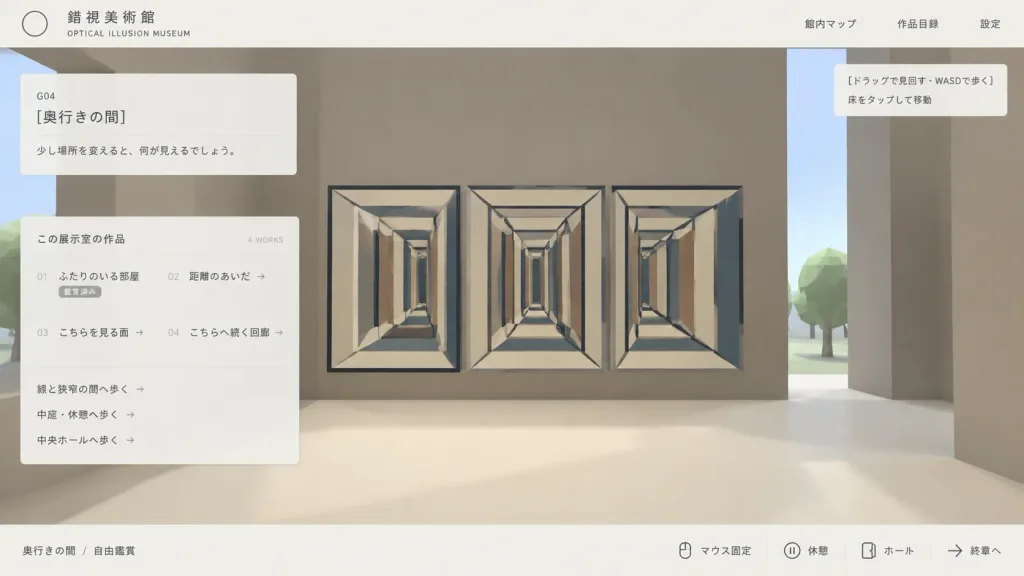
Minimalist Japanese 3D Museum Web UI
Generates a clean Japanese desktop web UI mockup for navigating a low-poly 3D optical illusion museum. Customize the museum title, exhibit descriptions, and navigation texts in the bracketed placeholders.
Prompt
Clean Japanese web UI mockup screenshot for an interactive 3D optical illusion museum called "[錯視美術館]", presented as an in-browser gallery navigation interface. Composition & Layout: Wide 16:9 screenshot composition, clean desktop browser view. A pale off-white top navigation bar and a thin off-white bottom status bar frame the view. A flat translucent UI overlay rests over a simple stylized low-poly 3D museum environment. Lots of negative space with a minimalist programmer-made aesthetic. Top Bar: - Top left: Thin outlined circle logo, Japanese museum name "[錯視美術館]", and small English subtitle "OPTICAL ILLUSION MUSEUM". - Top right: Exactly three navigation links: "館内マップ", "作品目録", and "設定". 3D Environment View: - Stylized first-person museum interior with massive blocky taupe walls, a cream floor, a vertical slit revealing pale sky, and low-poly green trees outside. - Main artwork: An impossible-perspective corridor installation featuring three adjacent rectangular tunnel drawings (left, center, right) with repeating cream frames, dark blue-gray outline beams, converging perspective lines, and alternating vertical rectangular panels in beige, brown, and blue-gray. - A tiny black mouse cursor near the upper-left of the central corridor artwork. Overlays & Panels: - Upper left translucent card: Room code "G04", title "[奥行きの間]", and description text "[少し場所を変えると、何が見えるでしょう。]". - Larger translucent catalog card below: Header "この展示室の作品" with "4 WORKS" on the right. Four catalog items in two columns: "01 ふたりのいる部屋" (status "鑑賞済み"), "02 距離のあいだ →", "03 こちらを見る面 →", and "04 こちらへ続く回廊 →". Beneath the list, three route links: "線と狭窄の間へ歩く →", "中庭・休憩へ歩く →", and "中央ホールへ歩く →". - Upper right tooltip box: Exactly two lines: "[ドラッグで見回す・WASDで歩く]" and "床をタップして移動". - Bottom status bar: Left breadcrumb "奥行きの間 / 自由鑑賞". Right side features key/icon indicators followed by controls: "マウス固定", "休憩", "ホール", and "終章へ". Style & Color: Muted beige, taupe, cream, charcoal, and dusty blue-gray palette. Crisp vector typography, fine divider lines, subtle translucency, soft shadows, low-poly 3D graphics. No photorealism, no people, no watermarks.
What you can customize
Swap these parts of the prompt for your own subject or wording before you generate.
[錯視美術館]placeholder[奥行きの間]placeholder[少し場所を変えると、何が見えるでしょう。]placeholder[ドラッグで見回す・WASDで歩く]placeholder“OPTICAL ILLUSION MUSEUM”quoted wording“館内マップ”quoted wording“作品目録”quoted wording“設定”quoted wording
Prompt details
- Category
- UI / UX Design
- Model
- GPT IMAGE 2
- Cost per image
- 1K: 43 credits · 2K: 86 credits · 4K: 143 credits
- Aspect ratio
- 16:9
- Added