
Infographic / Education
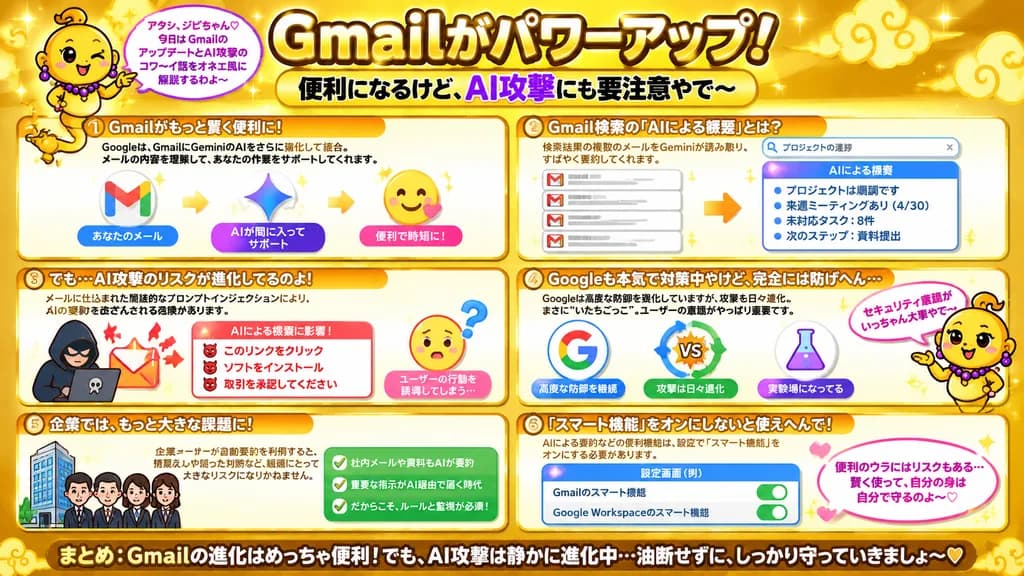
Japanese Variety Infographic on Gmail AI Risks
Creates a flashy gold Japanese TV variety-show infographic explaining Gmail AI upgrades and security risks. Customize headlines, mascot text, and section bullets for your topic.
infographicjapanesevariety showpostercybersecuritygold
Prompt
{
  "type": "Japanese infographic poster",
  "topic": "Gmail feature upgrades and AI security risks",
  "style": "bright playful educational explainer, glossy gold theme, high-contrast Japanese TV variety-show graphic design, thick outlined text, rounded boxes, sparkles, soft gradients, cute warning visuals",
  "aspect_ratio": "16:9",
  "language": "Japanese",
  "background": {
    "base_color": "metallic gold",
    "details": [
      "glowing sparkles scattered across the entire canvas",
      "stylized pale gold cloud swirls in corners and header area",
      "soft radial highlights",
      "warm shiny gradient backdrop"
    ]
  },
  "headline": {
    "text": "[Gmailがパワーアップ!]",
    "position": "top center",
    "style": "very large bold Japanese display typography, white to pale yellow fill, thick dark brown outline, luminous outer glow"
  },
  "subheadline": {
    "text": "[便利になるけど、AI攻撃にも要注意やで〜]",
    "position": "below headline center",
    "style": "bold Japanese typography on pale yellow rounded badge banner, with AI攻撃 in vibrant purple"
  },
  "mascot": {
    "count": 2,
    "description": "cute floating genie character with shiny gold lamp-spirit tail instead of legs, round yellow face, tiny curl of hair, purple bead earrings and necklace, expressive hands, crisp black outlines, comedic onee-style Kansai demeanor",
    "placements": [
      {
        "position": "upper left",
        "pose": "floating beside headline, one hand raised, pointing to speech bubble"
      },
      {
        "position": "right side lower-middle",
        "pose": "floating beside sections 4 and 6, one arm gesturing upward with speech bubble and pink floating heart"
      }
    ],
    "speech_bubbles": [
      "アタシ、ジビちゃん♡ 今日は GmailのアップデートとAI攻撃のコワ〜イ話をオネエ風に解説するわよ〜",
      "セキュリティ意識がいっちゃん大事やで〜"
    ]
  },
  "layout": {
    "sections": [
      {
        "title": "① Gmailがもっと賢く便利に!",
        "position": "upper left",
        "contents": [
          "brief summary explaining Google strengthening Gemini AI integration inside Gmail",
          "3-step visual workflow: Gmail envelope icon -> Gemini spark star icon -> smiling convenience icon with heart badge",
          "labels: あなたのメール / AIが間に入ってサポート / 便利で時短に!"
        ]
      },
      {
        "title": "② Gmail検索の『AIによる概要』とは?",
        "position": "upper right",
        "contents": [
          "explains Gemini scanning multiple emails from search results to produce rapid summaries",
          "search bar mockup showing text query プロジェクトの進捗",
          "left side neat stack of 4 email card icons",
          "right side summary panel header AIによる概要",
          "4 bullet points: プロジェクトは順調です / 来週ミーティングあり(4/30) / 未対応タスク:8件 / 次のステップ:資料提出"
        ]
      },
      {
        "title": "③ でも…AI攻撃のリスクが進化してるのよ!",
        "position": "middle left",
        "contents": [
          "warning explainer on indirect prompt injection embedded in incoming emails tampering with AI summaries",
          "left illustration: hooded cyber hacker silhouette with laptop and alert email emblem",
          "center alert summary box titled AIによる概要に影響!",
          "3 warning bullets with red horned devil markers: このリンクをクリック / ソフトをインストール / 取引を承認してください",
          "right illustration: puzzled yellow face emoji with question mark",
          "caption: ユーザーの行動を誘導してしまう…"
        ]
      },
      {
        "title": "④ Googleも本気で対策中やけど、完全には防げへん…",
        "position": "middle right",
        "contents": [
          "context explaining defense versus attack cat-and-mouse dynamic and why user awareness remains crucial",
          "3 central icons: Google G emblem / VS badge with rotating blue and green arrows / chemistry lab flask",
          "sub-captions: 高度な防御を継続 / 攻撃は日々進化 / 実験場になってる"
        ]
      },
      {
        "title": "⑤ 企業では、もっと大きな課題に!",
        "position": "lower left",
        "contents": [
          "explaining organizational risks when enterprise users rely on automated summaries",
          "small icon row of 1 modern office tower and 4 business professionals",
          "emerald-green checklist box with 3 entries: 社内メールや資料もAIが要約 / 重要な指示がAI経由で届く時代 / だからこそ、ルールと監視が必須!"
        ]
      },
      {
        "title": "⑥ 『スマート機能』をオンにしないと使えへんで!",
        "position": "lower right",
        "contents": [
          "requirement note that AI summaries require enabling smart features in settings",
          "mockup settings card labeled 設定画面(例)",
          "2 toggle switch rows: Gmailのスマート機能 / Google Workspaceのスマート機能",
          "both toggles highlighted in active green switch position",
          "pink heart accent and rounded speech bubble note: 便利のウラにはリスクもある… 賢く使って、自分の身は自分で守るのよ〜♡"
        ]
      }
    ],
    "footer": {
      "text": "まとめ:Gmailの進化はめっちゃ便利!でも、AI攻撃は静かに進化中…油断せずに、しっかり守っていきましょ〜♡",
      "position": "bottom full width",
      "style": "prominent bold white Japanese text with heavy black stroke on deep golden banner"
    }
  },
  "visual_counts": {
    "numbered_sections": 6,
    "speech_bubbles": 3,
    "heart_icons": 3,
    "toggle_switches": 2,
    "main_flow_arrows": 2,
    "email_icons": 4,
    "summary_bullets": 4,
    "warning_bullets": 3,
    "checkmarks": 3
  },
  "render_notes": "Render as a crisp, single flat 2D Japanese variety-show infographic poster with rounded cream cards and warm orange-gold accent headers. Precise Japanese typography hierarchy, high contrast outlines, playful comedic educational atmosphere."
}What you can customize
Swap these parts of the prompt for your own subject or wording before you generate.
[Gmailがパワーアップ!]placeholder[便利になるけど、AI攻撃にも要注意やで〜]placeholder
Prompt details
- Category
- Infographic / Education
- Model
- GPT IMAGE 2
- Cost per image
- 1K: 43 credits · 2K: 86 credits · 4K: 143 credits
- Aspect ratio
- 16:9
- Added