
UI / UX Design
Software Interface #44
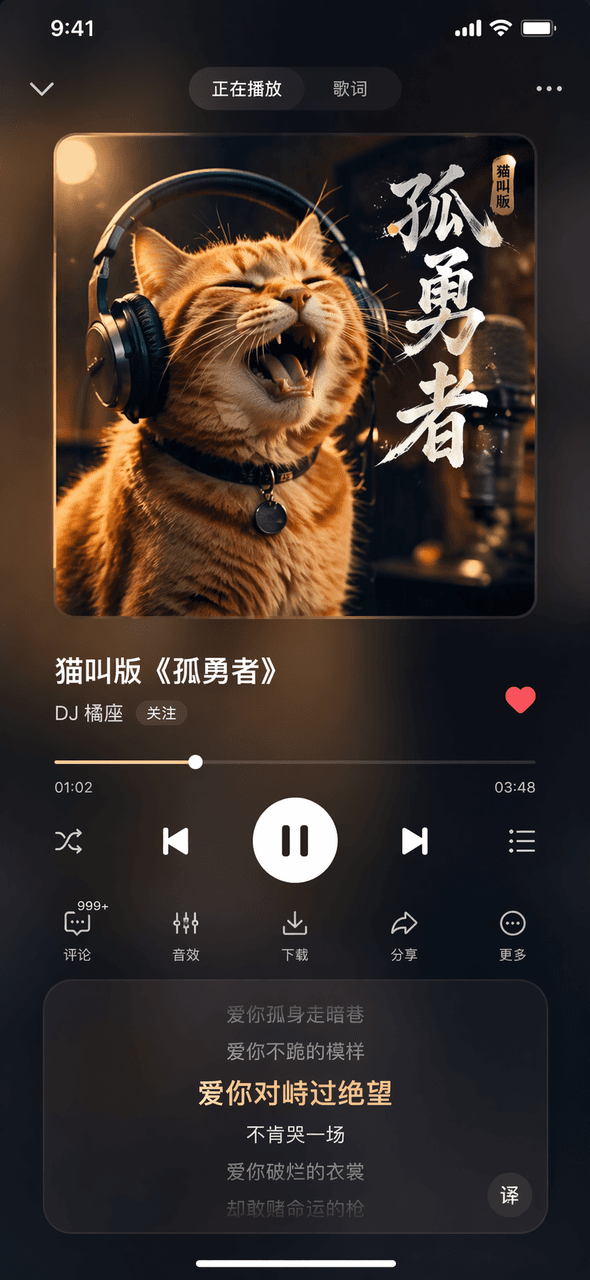
Create a dark mode music player interface with custom cover art and frosted glass effects, suitable for UI design portfolios and mobile app mockups.
Source:GPT-Image-2 全量上线,100+全行业通用生图提示词大全
Prompt
Prompt Words Draw a picture of the Now Playing page of a fictional music app. The album cover picture at the top shows an orange cat wearing headphones. The song title in the middle is "Cat Meowing Version of "Lonely Brave"" and the singer's name is "DJ Orange Seat". The progress bar and control buttons at the bottom, the lyrics scrolling area at the bottom, and the overall dark blurred glass effect.
What you can customize
Swap these parts of the prompt for your own subject or wording before you generate.
“Cat Meowing Version of”quoted wording“and the singer's name is”quoted wording
Prompt details
- Category
- UI / UX Design
- Model
- GPT IMAGE 2
- Cost per image
- 1K: 43 credits · 2K: 86 credits · 4K: 143 credits
- Aspect ratio
- 1:1
- Added
- Updated