
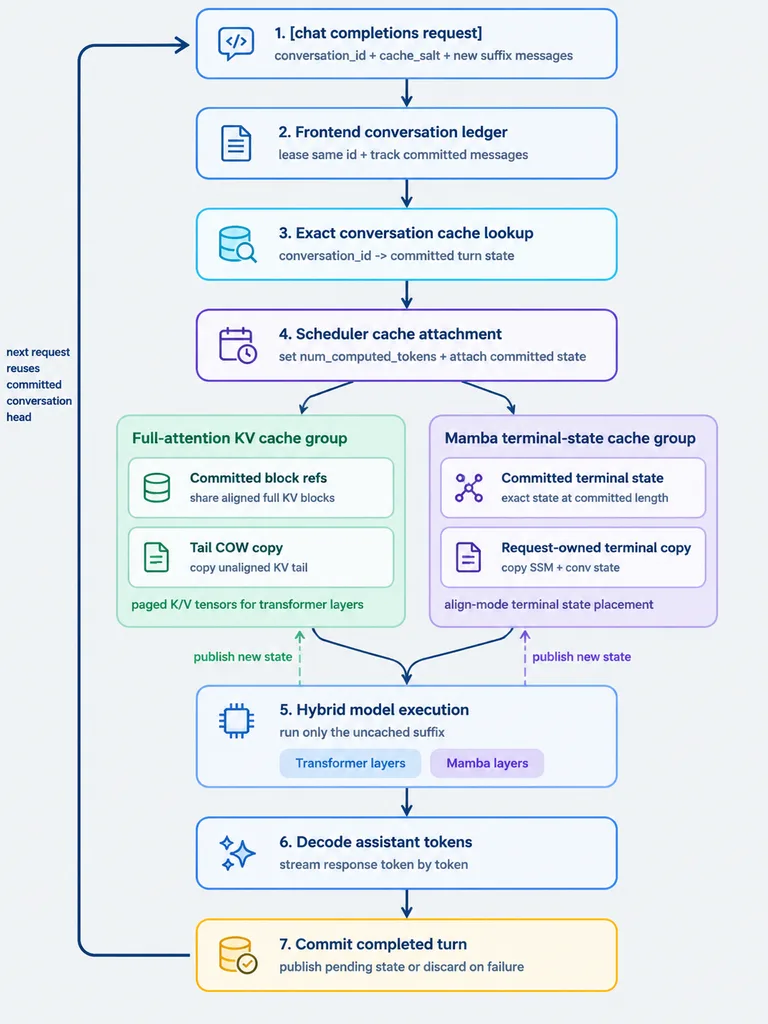
Hybrid Architecture Cache Flowchart Infographic
Generates a clean, modern systems-architecture flowchart with parallel caching branches. Modify the bracketed step title and subsystem labels to illustrate any multi-stage software engineering pipeline.
Prompt
A clean vertical technical workflow infographic on a light gray background, designed in a minimalist modern product-diagram style with rounded white cards, thin colored outlines, simple vector line icons, dark navy text, and navy connector arrows. The layout is a centered top-to-bottom flowchart with 7 numbered main steps, two parallel cache-group panels branching between step 4 and step 5, and a thick dark navy loop arrow on the far left running from bottom back to top. Crisp sans-serif typography, generous spacing, subtle pastel accents, flat design with no gradients or drop shadows. - Step 1 (top center, blue outline, code/chat icon): Title "1. [chat completions request]", subtitle "conversation_id + cache_salt + new suffix messages". - Step 2 (blue outline, document icon): Title "2. Frontend conversation ledger", subtitle "lease same id + track committed messages". - Step 3 (cyan outline, database with magnifier icon): Title "3. Exact conversation cache lookup", subtitle "conversation_id -> committed turn state". - Step 4 (purple outline, scheduler icon): Title "4. Scheduler cache attachment", subtitle "set num_computed_tokens + attach committed state". Branching from Step 4 into two side-by-side rounded panels: - Left panel (pale green container, title "Full-attention KV cache group"): Contains two stacked cards: "Committed block refs" (subtitle "share aligned full KV blocks") and "Tail COW copy" (subtitle "copy unaligned KV tail"). Footer text: "paged K/V tensors for transformer layers". - Right panel (pale purple container, title "Mamba terminal-state cache group"): Contains two stacked cards: "Committed terminal state" (subtitle "exact state at committed length") and "Request-owned terminal copy" (subtitle "copy SSM + conv state"). Footer text: "align-mode terminal state placement". Merging from both panels into: - Step 5 (blue outline, microchip icon): Title "5. Hybrid model execution", subtitle "run only the uncached suffix", containing two pill tags: "Transformer layers" and "Mamba layers". - Step 6 (blue outline, sparkle icon): Title "6. Decode assistant tokens", subtitle "stream response token by token". - Step 7 (warm yellow-orange outline, database check icon): Title "7. Commit completed turn", subtitle "publish pending state or discard on failure". Left side: thick dark navy loop arrow running from step 7 back up to step 1, annotated with "next request reuses committed conversation head". Two dashed upward arrows from Step 7: a green dashed arrow pointing to the green cache panel labeled "publish new state", and a purple dashed arrow pointing to the purple cache panel labeled "publish new state".
What you can customize
Swap these parts of the prompt for your own subject or wording before you generate.
[chat completions request]placeholder“1. [chat completions request]”quoted wording“conversation_id + cache_salt + new suffix messages”quoted wording“2. Frontend conversation ledger”quoted wording“lease same id + track committed messages”quoted wording“3. Exact conversation cache lookup”quoted wording“conversation_id -> committed turn state”quoted wording“4. Scheduler cache attachment”quoted wording
Prompt details
- Category
- Infographic / Education
- Model
- GPT IMAGE 2
- Cost per image
- 1K: 43 credits · 2K: 86 credits · 4K: 143 credits
- Aspect ratio
- 3:4
- Added