
Infographic / Education
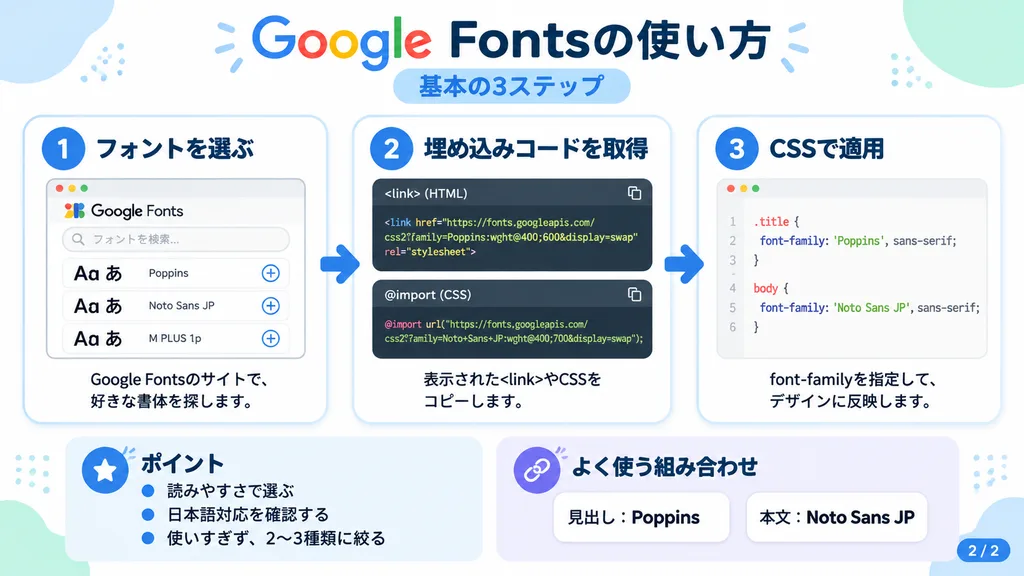
Google Fonts Tutorial Japanese Infographic
Generate a clean 3-step Japanese tutorial slide with code snippets and cards. Customize the text, code examples, color palette, or step count in the bracketed fields.
infographicgoogle fontstutorialjapanese textflat designweb developmentui layout
Browse similar promptsInfographic AI prompts
Prompt
{
  "type": "Japanese infographic",
  "topic": "[How to use Google Fonts]",
  "style": "clean modern flat design, pure white background, soft pastel blue and mint corner decorative blobs, rounded cards with subtle drop shadows, tech tutorial aesthetic, crisp vector typography and UI illustrations",
  "canvas": {
    "aspect_ratio": "16:9"
  },
  "headline": {
    "main": "[Google Fontsの使い方]",
    "sub": "[基本の3ステップ]"
  },
  "layout": {
    "sections": [
      {
        "title": "[1. フォントを選ぶ]",
        "position": "left",
        "count": 1,
        "labels": [
          "[1. フォントを選ぶ]"
        ],
        "card_style": "rounded white panel with light blue border and soft shadow",
        "icon": "blue numbered circle with 1",
        "illustration": "browser window displaying font search UI with 3 preview rows of large 'Aa あ' samples, top search bar, small window control buttons, and clean UI accent lines",
        "body_text": "[Google Fontsのサイトで、好きな書体を探します。]"
      },
      {
        "title": "[2. 埋め込みコードを取得]",
        "position": "center",
        "count": 1,
        "labels": [
          "[2. 埋め込みコードを取得]"
        ],
        "card_style": "rounded white panel with light blue border and soft shadow",
        "icon": "blue numbered circle with 2",
        "illustration": "dark code editor panel featuring two labeled snippet boxes separated by a thin rule",
        "code_blocks": {
          "count": 2,
          "labels": [
            "<link> (HTML)",
            "@import (CSS)"
          ],
          "content": [
            "<link href=\"https://fonts.googleapis.com/css2?family=Poppins:wght@400;600&display=swap\" rel=\"stylesheet\">",
            "@import url('https://fonts.googleapis.com/css2?family=Noto+Sans+JP:wght@400;700&display=swap');"
          ]
        },
        "body_text": "[表示された<link>やCSSをコピーします。]"
      },
      {
        "title": "[3. CSSで適用]",
        "position": "right",
        "count": 1,
        "labels": [
          "[3. CSSで適用]"
        ],
        "card_style": "rounded white panel with light blue border and soft shadow",
        "icon": "blue numbered circle with 3",
        "illustration": "clean white code card showing CSS declaration syntax with two selectors and font-family rules",
        "code_blocks": {
          "count": 2,
          "labels": [
            ".title",
            "body"
          ],
          "content": [
            ".title { font-family: 'Poppins', sans-serif; }",
            "body { font-family: 'Noto Sans JP', sans-serif; }"
          ]
        },
        "body_text": "[font-familyを指定して、デザインに反映します。]"
      },
      {
        "title": "[ポイント]",
        "position": "bottom-left",
        "count": 3,
        "labels": [
          "[読みやすさで選ぶ]",
          "[日本語対応を確認する]",
          "[使いすぎず、2〜3種類に絞る]"
        ],
        "card_style": "rounded white panel with pale blue tint",
        "icon": "blue star in a circle",
        "body_format": "bullet list"
      },
      {
        "title": "[よく使う組み合わせ]",
        "position": "bottom-center-right",
        "count": 2,
        "labels": [
          "[見出し: Poppins]",
          "[本文: Noto Sans JP]"
        ],
        "card_style": "rounded white panel with pale lavender tint",
        "icon": "purple linked-rings symbol",
        "body_format": "two pill-shaped example boxes"
      }
    ],
    "connectors": {
      "count": 2,
      "style": "large blue right-pointing arrows connecting the 3 main process cards"
    },
    "pagination": {
      "text": "[2 / 2]",
      "position": "bottom-right",
      "style": "blue rounded corner tab"
    }
  },
  "text_language": "Japanese",
  "color_palette": {
    "primary_blue": "#2f80ff",
    "navy": "#0f2b5b",
    "google_colors": [
      "#4285F4",
      "#DB4437",
      "#F4B400",
      "#0F9D58"
    ],
    "lavender": "#8b6cff",
    "background": "#ffffff"
  }
}What you can customize
Swap these parts of the prompt for your own subject or wording before you generate.
[How to use Google Fonts]placeholder[1. フォントを選ぶ]placeholder[Google Fontsのサイトで、好きな書体を探します。]placeholder[2. 埋め込みコードを取得]placeholder[表示された<link>やCSSをコピーします。]placeholder[3. CSSで適用]placeholder[font-familyを指定して、デザインに反映します。]placeholder[ポイント]placeholder
Prompt details
- Category
- Infographic / Education
- Model
- GPT IMAGE 2
- Cost per image
- 1K: 43 credits · 2K: 86 credits · 4K: 143 credits
- Aspect ratio
- 16:9
- Added