
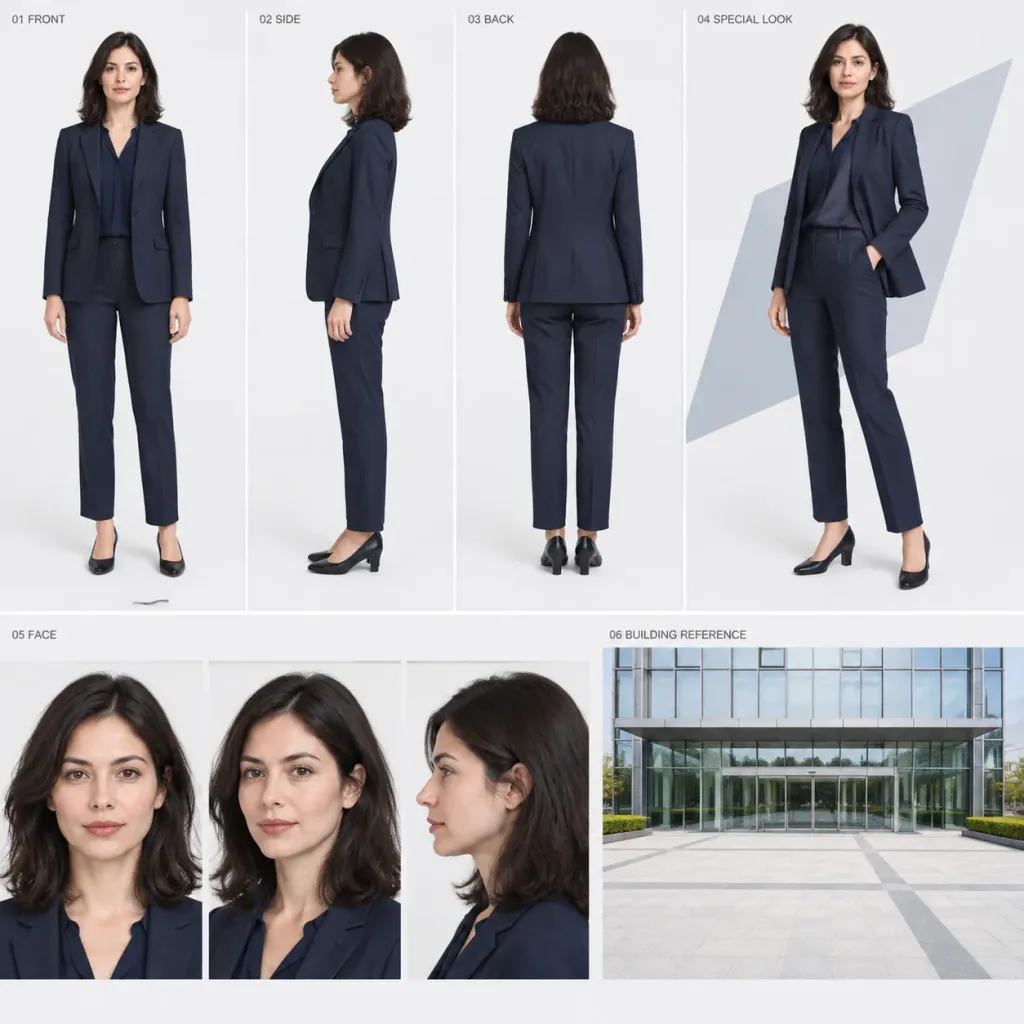
Full Body Character Model Sheet with Architecture
Generates a clean character turnaround sheet with multiple views, face close-ups, and a building exterior reference. Swap the clothing style and theme color to customize the wardrobe.
Prompt
Using the reference photo as the sole subject reference, create a 1:1 square high-quality live-action character model sheet. Maintain the subject's exact facial features, hairstyle, hair color, age, skin tone, gender, height, proportions, and body type without beautifying, aging, or altering their identity. Modify only their clothing and footwear to match the specifications below. Clothing Style: [Business] (A modern, clean, practical outdoor business outfit including a jacket) Color Palette: [Navy] (Centered on deep navy, with minimal white, ivory, gray, or black accents) Overall Layout: Two horizontal tiers (Upper tier: ~58% height, Lower tier: ~42% height) on a clean white to light-gray background with subtle thin divider lines. Upper Tier (58%): - "01 FRONT" (22% width): Full-body front view, standing upright, head to toes visible at identical scale and camera distance. - "02 SIDE" (22% width): Full-body side profile view at identical scale. - "03 BACK" (22% width): Full-body rear view at identical scale. - "04 SPECIAL LOOK" (34% width): Larger full-body 3/4 view of the same person in the same outfit, in a relaxed, natural standing pose with subtle movement and expressive charm, framed against a faint geometric shape in the theme color. Lower Tier (42%): - "05 FACE" (62% width): Three close-up headshots side by side at identical scale—front, 3/4 angle, and profile—showing neutral, natural facial expressions. - "06 BUILDING REFERENCE" (38% width): A single wide-angle daytime exterior photograph of a clean, modern building facade with an automatic glass sliding entrance and a wide open outdoor plaza in the foreground. Unaffected by the clothing color theme, strictly neutral daytime lighting, no people or vehicles. Typography: Small, clean English labels placed in the upper-left of each respective panel: "01 FRONT", "02 SIDE", "03 BACK", "04 SPECIAL LOOK", "05 FACE", and "06 BUILDING REFERENCE".
What you can customize
Swap these parts of the prompt for your own subject or wording before you generate.
[Business]placeholder[Navy]placeholder“01 FRONT”quoted wording“02 SIDE”quoted wording“03 BACK”quoted wording“04 SPECIAL LOOK”quoted wording“05 FACE”quoted wording“06 BUILDING REFERENCE”quoted wording
Prompt details
- Category
- Character Design
- Model
- GPT IMAGE 2
- Cost per image
- 1K: 43 credits · 2K: 86 credits · 4K: 143 credits
- Aspect ratio
- 1:1
- Added