
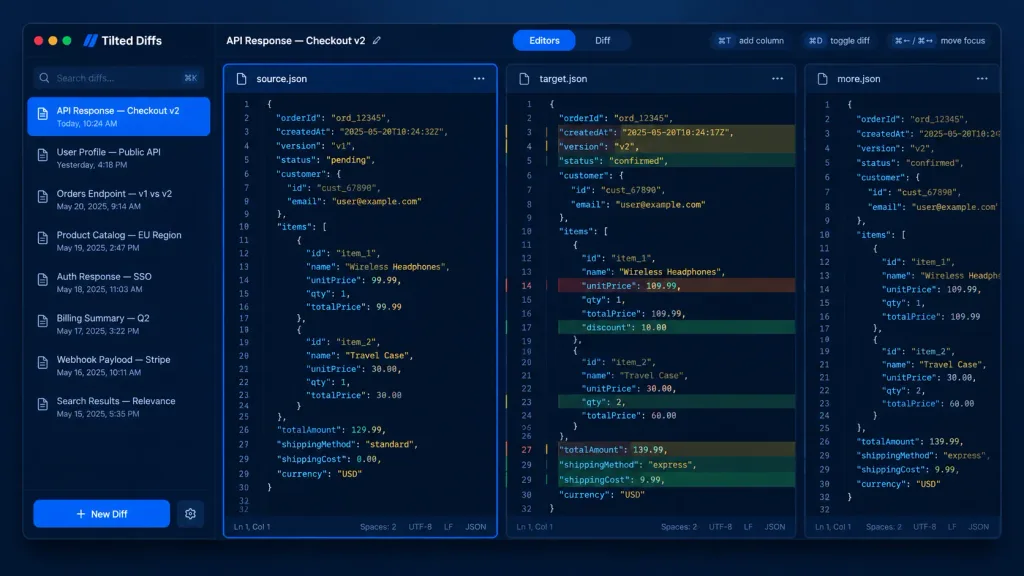
Dark Mode Developer JSON Diff Tool UI
Renders a sleek macOS desktop UI mockup for a multi-column JSON comparison app in dark mode. Customize the app name, diff title, or code content in the brackets.
Prompt
A dark-mode desktop app UI mockup for a JSON diff tool named [Tilted Diffs], displaying an API response comparison titled [API Response — Checkout v2]. Canvas & Style: 16:10 desktop screenshot with a macOS-style app window floating on a dark bluish gradient background. Features subtle soft drop shadows, rounded corners, thin borders, and a polished developer-tool SaaS aesthetic. Crisp vector-like UI rendering with cobalt-blue accents, dark navy backgrounds, muted gray text, and perfectly aligned typography. No people, no watermarks, no external browser chrome. Layout: Divided into four main areas: a left sidebar, a top toolbar, and three vertical code editor panes side-by-side. The leftmost editor pane is selected with a glowing bright blue focus border. The middle pane displays inline colored diff highlights. The rightmost pane is narrow and partially visible, representing an extra comparison column. Left Sidebar: Top left features macOS traffic-light window controls (red, yellow, green circles). Below the app name is a search field with placeholder "Search diffs…" and a keyboard shortcut hint. Below that, an active list of 8 saved diff items with small document icons and timestamps: 1) "API Response — Checkout v2" with "Today, 10:24 AM" (highlighted in blue as active), 2) "User Profile — Public API" with "Yesterday, 4:18 PM", 3) "Orders Endpoint — v1 vs v2" with "May 20, 2025, 9:14 AM", 4) "Product Catalog — EU Region" with "May 19, 2025, 2:47 PM", 5) "Auth Response — SSO" with "May 18, 2025, 11:03 AM", 6) "Billing Summary — Q2" with "May 17, 2025, 3:22 PM", 7) "Webhook Payload — Stripe" with "May 16, 2025, 10:11 AM", 8) "Search Results — Relevance" with "May 15, 2025, 5:35 PM". At the bottom is a prominent blue "+ New Diff" button and a settings gear icon. Top Toolbar: Left side shows "API Response — Checkout v2" with an edit pencil icon. Center features a segmented tab control: active "Editors" tab in blue and inactive "Diff" tab. Right side includes compact shortcut pills: "⌘T add column", "⌘D toggle diff", and "⌘← / ⌘→ move focus". Editor Panes: Monospaced code font, line numbers (around 32 lines visible), JSON syntax highlighting, dark navy editor background, and thin borders. Pane tabs: left "source.json" with icon and menu; middle "target.json" with icon and menu; right "more.json" partially clipped. Each full pane has a bottom status bar showing "Ln 1, Col 1", "Spaces: 2", "UTF-8", "LF", and "JSON". Code Content: Shows order checkout JSON data. Left source has status "pending", totalAmount 129.99, Wireless Headphones unitPrice 99.99, Travel Case qty 1 at 30.00, standard shipping. Middle target shows diff row highlights with red removed lines, green added lines, and yellow modified lines: timestamp changed, version v2, status "confirmed", totalAmount 139.99, Wireless Headphones unitPrice 109.99 with 10.00 discount, Travel Case qty 2, and express shipping.
What you can customize
Swap these parts of the prompt for your own subject or wording before you generate.
[Tilted Diffs]placeholder[API Response — Checkout v2]placeholder“Search diffs…”quoted wording“API Response — Checkout v2”quoted wording“Today, 10:24 AM”quoted wording“User Profile — Public API”quoted wording“Yesterday, 4:18 PM”quoted wording“Orders Endpoint — v1 vs v2”quoted wording
Prompt details
- Category
- UI / UX Design
- Model
- GPT IMAGE 2
- Cost per image
- 1K: 43 credits · 2K: 86 credits · 4K: 143 credits
- Aspect ratio
- 16:9
- Added