
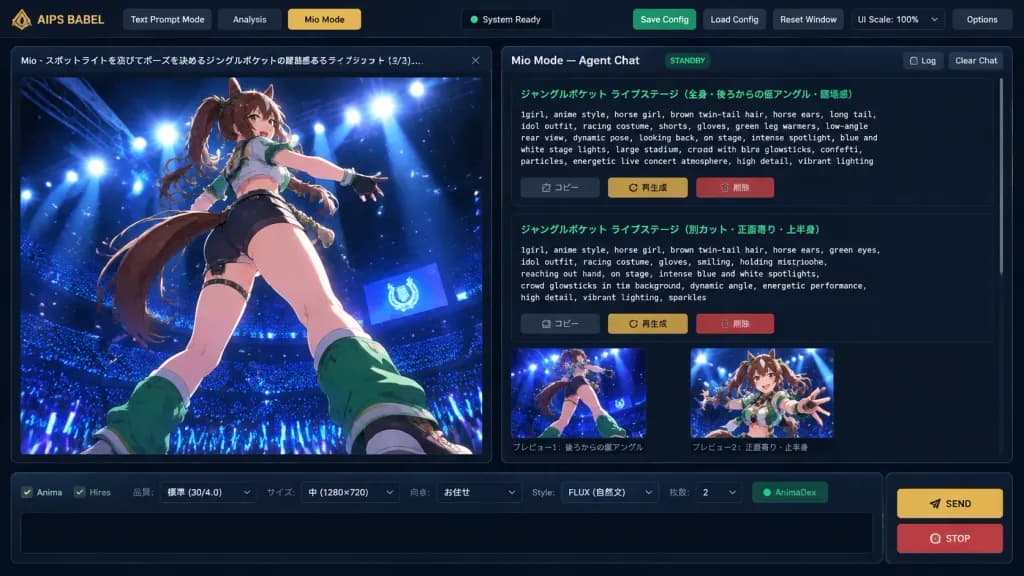
Dark Mode Anime Prompt Generator Interface
Generate a detailed desktop UI mockup of a dark-themed AI prompt engineering workspace with anime art preview. Customize the application title, character details, and UI color accents to suit your project.
Prompt
A crisp, detailed 16:9 digital UI concept mockup of an AI creative workspace application named "[AIPS BABEL // Prompt Foundry]", featuring a dark charcoal futuristic interface theme with thin blue-gray borders, subtle drop shadows, and gold accent buttons. Layout: - Top Navigation Bar: Application label "AIPS BABEL" on the left; three navigation tabs: "Text Prompt Mode", "Analysis", and an active gold-highlighted "Mio Mode"; a centered dark status indicator; right-side utility buttons: green "Save Config", gray "Load Config", gray "Reset Window", a "UI Scale: 100%" selector with a small gold arrow, and gray "Options". - Two-Column Main Workspace: 1. Left Column (1/3 width): Large vertical image preview panel with a tab header reading "Mio - スポットライトを浴びてポーズを決めるジャングルポケットの躍動感あるライブショット (3/3)..." and a close button. Inside the preview is high-quality anime key art showing [a dynamic anime horse-girl idol with brown twin-tail hair, animal ears, long tail, racing-idol outfit, shorts, gloves, and green leg warmers] captured from a dramatic low rear-angle pose on a glossy stage under intense blue and white spotlights, overlooking a dark stadium filled with blue glowsticks and glowing particles. 2. Right Column (2/3 width): Agent chat workspace titled "Mio Mode — Agent Chat" with "STANDBY" badge and "Log" and "Clear Chat" buttons. Below, a scrollable chat area displays two structured prompt cards with green Japanese titles and monospaced English prompt text describing the live concert scene, followed by Japanese action buttons: "コピー", "再生成", and a red "削除". Beneath the chat cards are two small preview thumbnails with Japanese captions. - Bottom Dock: A horizontal parameter bar with checkboxes ("Anima", "Hires"), dropdowns ("品質: 標準 (30/4.0)", "サイズ: 中 (1280×720)", "向き: お任せ", "Style: FLUX (自然文)", "枚数: 2"), a green "AnimaDex" indicator, an empty black text input box, and two stacked buttons on the right: a gold "SEND" button and a red "STOP" button.
What you can customize
Swap these parts of the prompt for your own subject or wording before you generate.
[AIPS BABEL // Prompt Foundry]placeholder“AIPS BABEL”quoted wording“Text Prompt Mode”quoted wording“Analysis”quoted wording“Mio Mode”quoted wording“Save Config”quoted wording“Load Config”quoted wording“Reset Window”quoted wording
Prompt details
- Category
- UI / UX Design
- Model
- GPT IMAGE 2
- Cost per image
- 1K: 43 credits · 2K: 86 credits · 4K: 143 credits
- Aspect ratio
- 16:9
- Added