
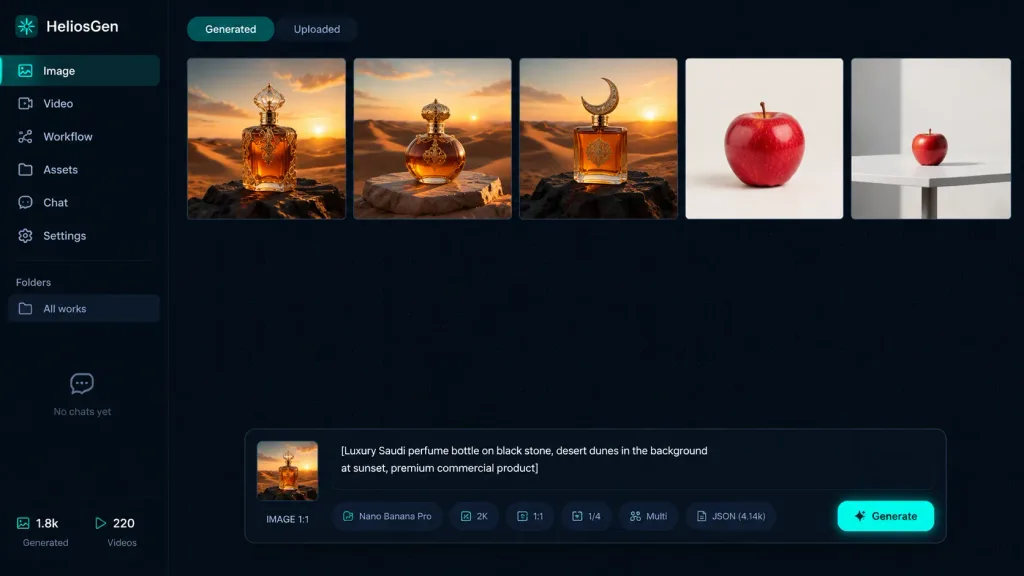
Dark Mode AI Image Generator Dashboard
A high-fidelity SaaS dashboard mockup for an AI image generation workspace featuring generated thumbnails and prompt controls. Customize the app name, navigation items, and prompt bar text to match your product design.
Prompt
A crisp dark-mode desktop web app screenshot for [HeliosGen], an AI image and video generation dashboard, presented in a clean 16:9 canvas with no browser chrome. The interface uses a very dark navy and black palette with a subtle dotted grid texture across the workspace, thin dividers, muted gray typography, and vibrant teal accent highlights. Layout and Sidebar: A narrow left sidebar covers roughly 10% of the canvas width. At the top left, display the logo text "HeliosGen" accompanied by a small teal emblem. Beneath it, include six vertical navigation items with icons: 1) "Image" (active/selected state), 2) "Video", 3) "Workflow", 4) "Assets", 5) "Chat", 6) "Settings". Further down, a "Folders" section shows a single row labeled "All works", followed by an empty state area displaying "No chats yet". At the bottom left, display two compact metadata stats labeled "1.8k" and "220". Main Workspace: At the top, show two small tab buttons: "Generated" (active) and "Uploaded" (inactive). Below the tabs, display a horizontal row of exactly five generated image thumbnails separated by thin borders: 1) An ornate amber luxury perfume bottle standing on dark rock in a golden desert at sunset. 2) A rounded amber perfume bottle with an ornate gold cap resting on a stone slab amid desert dunes at sunset. 3) A square amber perfume bottle with a crescent-shaped cap on a black rock in desert dunes at sunset. 4) A single crisp red apple centered against a clean off-white studio backdrop. 5) A smaller red apple placed on a white table in a minimalist studio environment. Floating Control Panel: Centered near the bottom of the workspace is a floating prompt panel with rounded corners. On its left side sits a square preview thumbnail marked "IMAGE 1:1". The central text prompt box contains: "[Luxury Saudi perfume bottle on black stone, desert dunes in the background at sunset, premium commercial product]". Along the lower edge of this panel, include compact pill badges and labels showing "Nano Banana Pro", "2K", "1:1", "1/4", "Multi", and "JSON (4.14k)", finished with a glowing teal generate button on the far right. Visual Style: Sharp UI graphic design, high contrast, clean typography, realistic render thumbnails, minimalist SaaS aesthetic, no people, no watermarks.
What you can customize
Swap these parts of the prompt for your own subject or wording before you generate.
[HeliosGen]placeholder“HeliosGen”quoted wording“Image”quoted wording“Video”quoted wording“Workflow”quoted wording“Assets”quoted wording“Chat”quoted wording“Settings”quoted wording
Prompt details
- Category
- UI / UX Design
- Model
- GPT IMAGE 2
- Cost per image
- 1K: 43 credits · 2K: 86 credits · 4K: 143 credits
- Aspect ratio
- 16:9
- Added