
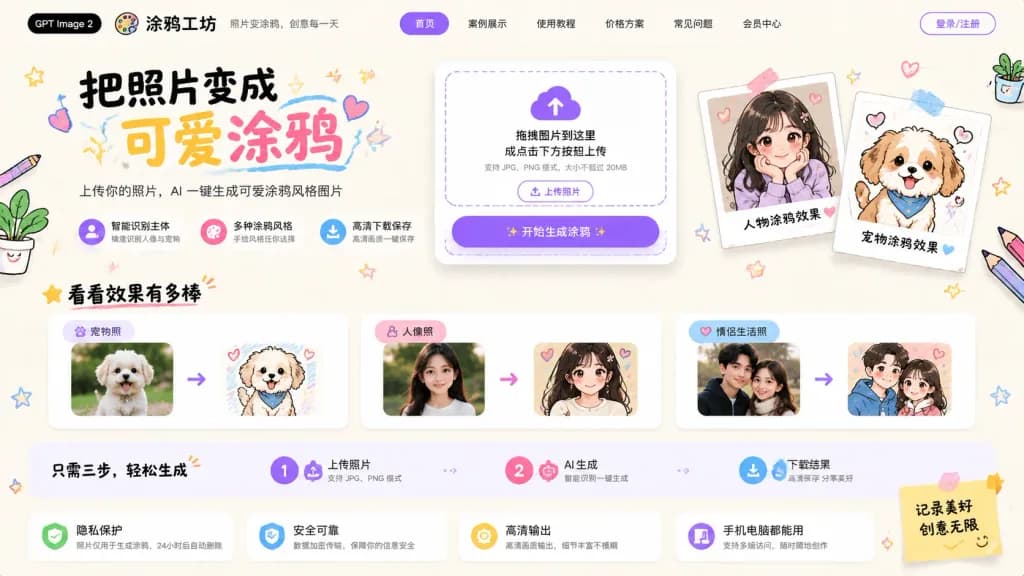
Cute Photo to Doodle AI Landing Page
A delightful Chinese landing page mockup for an AI tool converting photos into hand-drawn doodles. Customize the brand name, headline, and sticky note text to fit your product.
Prompt
UI/UX mockup of a playful, cute Chinese landing page for an AI web app that converts photos into hand-drawn doodle illustrations, branded as "[涂鸦工坊]" with a black pill tag reading "[GPT Image 2]". Wide 16:9 hero layout on a warm off-white paper texture background with soft shadows, pastel purple, pink, yellow, and sky-blue accents, surrounded by kawaii stationery doodles including hearts, stars, tape, scribbles, colored pencils, and potted plants. Header: At top left, black pill badge "[GPT Image 2]", palette icon logo, site title "[涂鸦工坊]", and subtitle "照片变涂鸦,创意每一天". Navigation menu with 6 items: "首页" in a purple pill, "案例展示", "使用教程", "价格方案", "常见问题", "会员中心". Far right purple outline button "登录/注册". Hero Section: - Left side: Large brush-lettering headline "[把照片变成 可爱涂鸦]" with "可爱" in yellow and "涂鸦" in pink, surrounded by doodle underlines and hearts. Subheading: "上传你的照片,AI 一键生成可爱涂鸦风格图片". Exactly 3 feature chips below: 1) purple icon "智能识别主体 / 精准识别人像与宠物", 2) pink icon "多种涂鸦风格 / 手绘风格任你选择", 3) blue download icon "高清下载保存 / 高清画质一键保存". - Center-right: Rounded white upload card with dashed drop zone, purple cloud upload icon, text "拖拽图片到这里 或点击下方按钮上传" and "支持 JPG、PNG 格式,大小不超过 20MB", small outlined button "上传照片", and large purple gradient primary CTA button "开始生成涂鸦" with sparkles. - Right showcase: 2 taped polaroid cards showing before/after results: cute anime girl portrait labeled "人物涂鸦效果" with a pink heart, and fluffy puppy doodle labeled "宠物涂鸦效果" with a blue heart. Gallery Section: Heading "看看效果有多棒" with star and red underline. Exactly 3 before-to-after comparison cards connected by purple arrows: 1) "宠物照" fluffy puppy photo to hand-drawn doodle, 2) "人像照" woman portrait to soft anime girl illustration, 3) "情侣生活照" couple photo to romantic doodle art. Process Strip: Horizontal guide "只需三步,轻松生成" with 3 numbered steps: 1 "上传照片 / 支持 JPG、PNG 格式", 2 "AI 生成 / 智能识别一键生成", 3 "下载结果 / 高清保存 分享美好". Bottom Assurance Bar: 4 feature cards: 1) green shield "隐私保护 / 照片仅用于生成涂鸦,24小时后自动删除", 2) blue shield "安全可靠 / 数据加密传输,保障你的信息安全", 3) yellow badge "高清输出 / 高清画质输出,细节丰富不模糊", 4) purple device "手机电脑都能用 / 支持多端访问,随时随地创作". Sticky note on the right reading "[记录美好 创意无限]" with a doodle smiley face.
What you can customize
Swap these parts of the prompt for your own subject or wording before you generate.
[涂鸦工坊]placeholder[GPT Image 2]placeholder[把照片变成 可爱涂鸦]placeholder[记录美好 创意无限]placeholder“照片变涂鸦,创意每一天”quoted wording“首页”quoted wording“案例展示”quoted wording“使用教程”quoted wording
Prompt details
- Category
- UI / UX Design
- Model
- GPT IMAGE 2
- Cost per image
- 1K: 43 credits · 2K: 86 credits · 4K: 143 credits
- Aspect ratio
- 16:9
- Added