
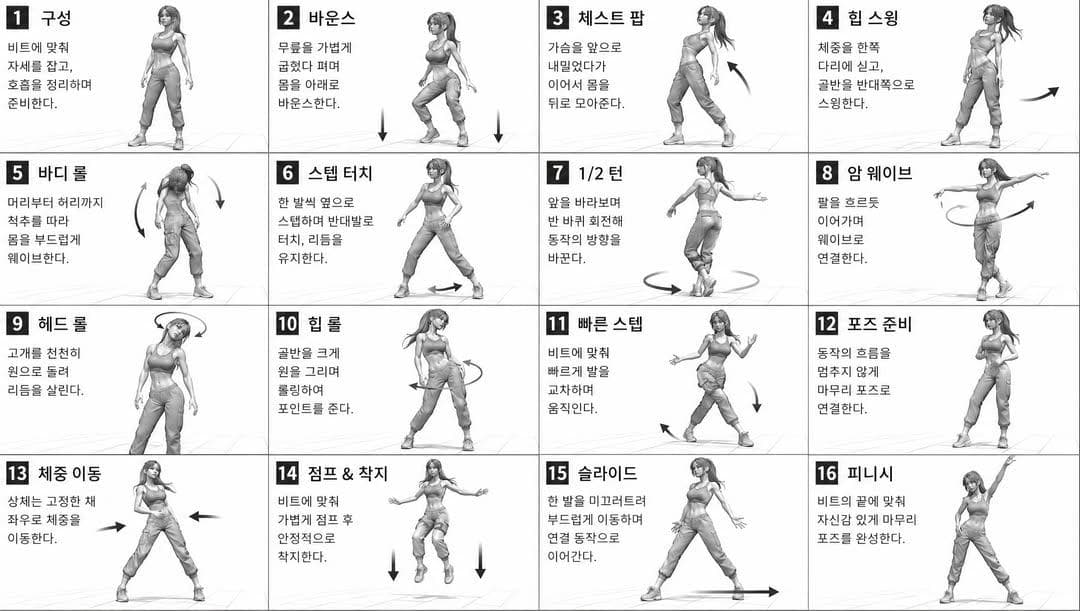
Dance Movement Reference Sheet
A sixteen-panel grayscale instruction sheet that repeats one 3D-styled dancer across a numbered 4x4 grid with arrows and short captions. It excels at choreography breakdowns, fitness tutorials and any pose chart where panel-to-panel consistency matters more than color.
Prompt
[STYLE] monochromatic grayscale illustration, 3D rendered character, clean instructional reference sheet, white background, comic-style cell grid layout, technical diagram aesthetic [LAYOUT] 4x4 grid layout, 16 panels total, each panel separated by thin black border lines, numbered cells from 1 to 16, consistent panel size [CHARACTER] {argument name="character" default="young female dancer, athletic build, ponytail hairstyle, crop top and baggy pants, sneakers"}, same character in all panels [PANEL STRUCTURE - per cell] top-left: bold number badge + {argument name="title" default="Korean title text"} center: full-body character pose illustration bottom-left: {argument name="description" default="Korean description text (3-4 lines)"} overlay: directional arrows indicating movement direction [ARROWS / MOTION INDICATORS] curved arrows, straight arrows, circular rotation indicators, placed around the character to show movement flow and direction [RENDERING STYLE] high detail 3D sculpt style, soft studio lighting, subtle shadows, no color, grayscale shading, clean linework, game concept art quality [NEGATIVE] no background scenery, no color tones, no extra characters, no cluttered backgrounds
Usage guide
A sixteen-panel grayscale instruction sheet that repeats one 3D-styled dancer across a numbered 4x4 grid with arrows and short captions. It excels at choreography breakdowns, fitness tutorials and any pose chart where panel-to-panel consistency matters more than color.
When to use
Dance-class handouts, motion-study reference for animators, storyboard-like tutorial graphics and onboarding screens for movement apps. Give every cell the same size and park the figure in the same spot of each cell so the eye can scan the grid row by row.
What the existing cover image shows
The existing cover illustration is a wide 4x4 grid with thin black borders, bold numbered badges from 1 to 16, Korean titles such as 구성 and 바운스, and three-to-four-line Korean captions. The dancer with a ponytail, crop top, baggy pants and sneakers stays recognizable through all sixteen cells, which is the hardest thing this prompt asks for. Each panel sets the caption on the left and the figure on the right instead of centering the figure, the curved and circular arrows are present but small in several cells, and a faint floor shadow is the only hint of a ground plane.
Suggested setup
- Aspect ratio
- 16:9 · The cover is 16:9, so each cell is itself wide and the caption lands beside the figure; a 1:1 canvas would yield squarer cells with the figure centered as the prompt describes. Ask for the complete grid inside the frame, an even outer margin and no cropped badges.
- Reference images
- Not required for a generic dancer. If the sheet must show a specific person or a team uniform, attach a full-body reference you are permitted to use, and keep caption language and numbering in the prompt text.
What to customize
- CharacterAdult male breakdancer, stocky build, buzz cut, hooded sweatshirt and track pants, high-top sneakers
- This is a built-in argument. Describe silhouette-level features only (hair shape, top, trousers, shoes); fine details such as logos or patterns will not survive sixteen repetitions.
- Caption language and titlesEnglish titles like Step Touch with three-line English descriptions
- Title and description are built-in arguments. Keep titles to one or two words and captions to three lines; longer text pushes the figure off center or out of the cell.
- Grid size3x3 grid, 9 panels numbered 1 to 9
- Fewer, larger cells make hands and feet readable; if you keep 16 cells, request a 1:1 canvas so each cell stays roughly square.
View a complete adaptation
Nine-panel boxing footwork sheet
Swaps the dancer for a boxer, shrinks the grid to 3x3 on a square canvas, and switches captions to English footwork notes while keeping the grayscale 3D style, number badges and arrow overlays.
This adaptation has not been generated. The existing cover image comes from the original prompt collection and is not a result of this adaptation.
Style: grayscale illustration, 3D rendered character, clean instructional reference sheet, white background, comic-style cell grid, technical diagram look.

Layout: 3x3 grid, 9 panels, thin black borders between panels, cells numbered 1 to 9, equal panel size, square canvas.

Character: adult male boxer, stocky build, buzz cut, sleeveless hooded top, loose track pants, high-top boxing shoes, taped hands, same character in every panel.

Per cell: top-left a bold number badge plus a short English title such as Guard Stance, Pivot Left or Double Jab; center a full-body pose; bottom-left a three-line English footwork note; overlaid directional arrows.

Motion indicators: curved and straight arrows plus rotation marks under the feet, showing weight shift and foot travel.

Rendering: high detail 3D sculpt style, soft studio lighting, subtle shadows, grayscale shading, clean linework, game concept art quality.

Exclude: background scenery, color, extra characters, logos, clutter.
Troubleshooting
- The dancer changes outfit or hairstyle between cells
- Write the character line as a short fixed list and add that outfit, hair and body are identical in every cell; place it before the panel structure so it is read as a global constraint.
- Numbers skip or repeat and captions become pseudo-text
- State the numbering range twice, once in the layout and once in the panel structure, and provide three or four real caption examples; the model copies the pattern of the examples instead of inventing glyphs.
Editorial notes and generation record
AI-assisted editorial analysis of the source prompt and existing illustration. Settings are starting suggestions; the new adaptation is not a model test.
No new illustration was generated for this guide. The observations refer to the prompt's existing cover image from its source collection; its generation details are not recorded.
Prompt details
- Category
- Character Design
- Model
- GPT IMAGE 2
- Cost per image
- 1K: 43 credits · 2K: 86 credits · 4K: 143 credits
- Aspect ratio
- 1:1
- Creator
- @Ciri
- License
- CC BY 4.0
- Added
- Updated