
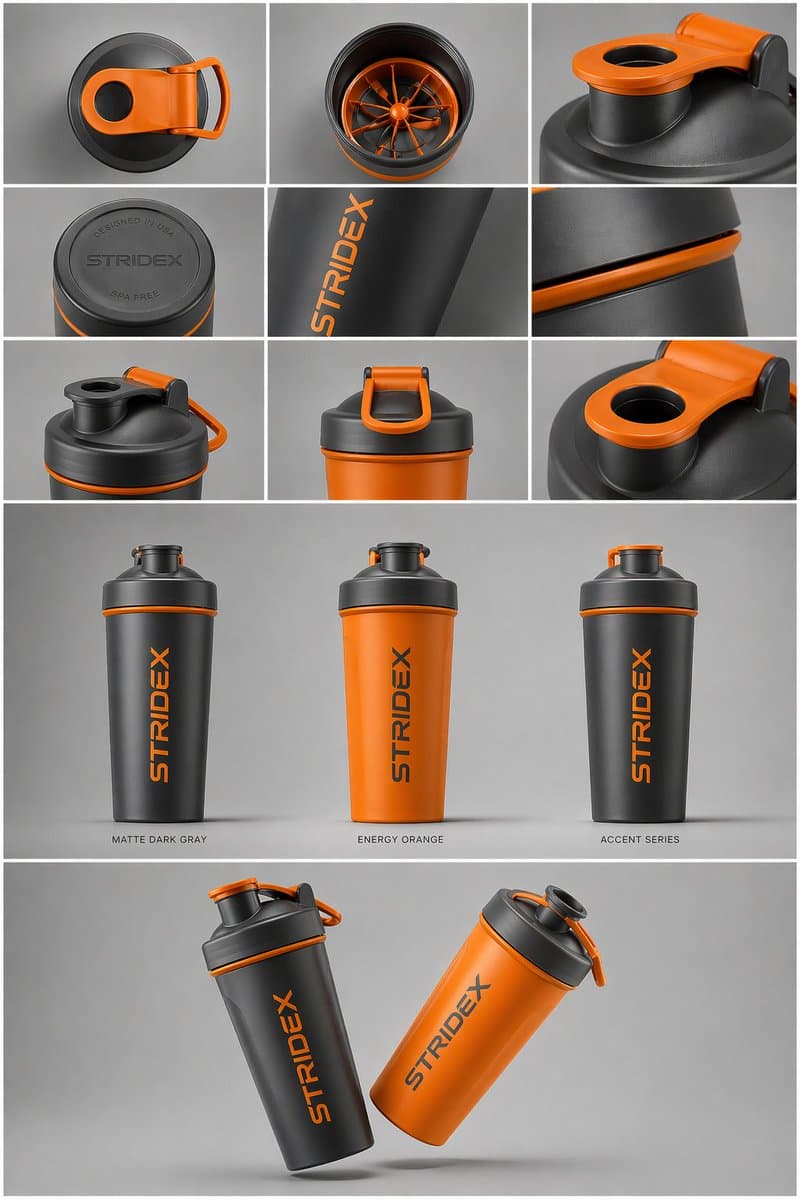
Industrial Design Presentation Sheet
A one-page industrial design board that turns a single product reference into a nine-cell detail grid, three colorway hero shots and a floating two-unit composition. Best when you need a portfolio-ready presentation of an object you have already designed, not a new product invented from scratch.
Prompt
Core Subject: [{argument name="reference" default="use the uploaded image"}, keep the details, typography and structure locked 100%] Layout & Composition: A {argument name="presentation type" default="professional industrial design presentation sheet"}. The image should be organized into a clean grid system. Top Row: A 3x3 layout showing top-down flat lay views and close-up macro details of materials. Middle Section: Three hero shots of the product standing upright in different color ways (Matte Black, Arctic White, and accented variants). The products should be slightly tilted to show depth and form. Bottom Section: A dynamic "floating" composition featuring two products overlapping at opposing angles to showcase the front and side profiles simultaneously. Environment & Lighting: Set against a minimalist, neutral studio gray background. Soft top-down lighting with realistic contact shadows. High-end product photography aesthetic. Style & Finish: Matte textures, clean silhouettes, and sharp edges. Leave designated blank areas on the product surfaces for "Placeholder Branding" and "Graphic Mockups." 4k resolution, Unreal Engine 5 render style, hyper-realistic, clean aesthetic.
Usage guide
A one-page industrial design board that turns a single product reference into a nine-cell detail grid, three colorway hero shots and a floating two-unit composition. Best when you need a portfolio-ready presentation of an object you have already designed, not a new product invented from scratch.
When to use
Design-school project boards, client colorway reviews, crowdfunding or catalog teaser pages, and accessory mock-ups that need front, side and material close-ups together. Keep all three bands on one neutral backdrop and limit the sheet to a single product family so the grid stays readable at thumbnail size.
What the existing cover image shows
The existing cover illustration is a 2:3 vertical board on mid-gray. The top band is a 3x3 grid of close-ups of a shaker bottle: the lid from above, the inner mixing wheel, the latch loop, an embossed base, a side wordmark and a lid seam, with thin white gutters between cells. The middle band shows three upright bottles with small captions beneath, in dark gray, orange and an accent mix; the bottom band floats two bottles overlapping at opposing angles with soft shadows. Surfaces look matte and edges are crisp. It departs from the prompt in two places: the colorways are not the black and white named in the text, and a finished placeholder wordmark is applied instead of blank branding areas. Several top-row cells repeat the lid rather than showing distinct material macros.
Suggested setup
- Aspect ratio
- 2:3 · The record lists 1:1, but the cover is 2:3 and the three stacked bands (nine-cell grid, three heroes, floating pair) need vertical room. Ask for a 2:3 or 3:4 portrait sheet with white gutters of equal width and roughly a third of the height per band; in a square frame the grid cells become too small to read.
- Reference images
- Required. The prompt is built around an uploaded product image whose shape, details and typography are to be kept locked. Use front and side photos or renders of your own design on a plain background; do not feed in another maker's product shots, since the sheet will reproduce their form and branding.
What to customize
- Product referenceA compact insulated travel mug with a flip lid and a textured silicone grip band
- Pick an object whose front and side silhouettes differ clearly; a plain cylinder without a handle or lid feature makes the overlapping pair at the bottom hard to tell apart.
- Colorway names and captionsForest Green, Sand, Graphite
- Keep exactly three names of two words at most, and ask for them printed as small captions under the middle row so the model has a reason to vary the finish.
- Backdrop and shadowWarm off-white seamless with soft top light and faint contact shadows
- Stay with a neutral, low-saturation ground; a colored backdrop tints the product and makes the colorways read false.
View a complete adaptation
Desk lamp design board in three colorways
The same nine-cell, three-hero, floating-pair sheet applied to a compact desk lamp on a warm off-white studio ground, with sage, sand and graphite colorways.
This adaptation has not been generated. The existing cover image comes from the original prompt collection and is not a result of this adaptation.
Core subject: the compact desk lamp from the uploaded reference, proportions, switch and edge radii locked.

Layout: a 2:3 portrait industrial design presentation sheet on a clean grid with equal white gutters.

Top band: a 3x3 grid of top-down flat lay views and macro details: dimmer dial, hinge, fabric cable, underside of the weighted base, powder-coat texture, shade rim.

Middle band: three hero shots of the lamp standing upright, slightly turned to show depth, in Sage Green, Sand and Graphite, each with a small caption beneath.

Bottom band: two lamps floating and overlapping at opposing angles so the front and side profiles read at once.

Environment: minimalist warm off-white studio ground, soft top-down light, realistic contact shadows, premium product photography look.

Style: matte powder-coat finish, clean silhouettes, sharp edges. Leave blank panels on the shade and base for placeholder branding and graphic mockups. 4k, hyper-realistic 3D render, clean aesthetic.
Troubleshooting
- The product changes shape from cell to cell
- Name the one or two features that must appear identically everywhere (the latch loop, the dial) and state that every panel shows the same single object from the reference; regenerate any band that drifts with the reference attached again.
- Grid cells bleed together or captions misspell
- Ask for thin white gutters of equal width and a count of nine cells, give the three caption words in quotes, and keep captions to two words so there is little to garble.
Editorial notes and generation record
AI-assisted editorial analysis of the source prompt and existing illustration. Settings are starting suggestions; the new adaptation is not a model test.
No new illustration was generated for this guide. The observations refer to the prompt's existing cover image from its source collection; its generation details are not recorded.
Prompt details
- Category
- Product & E-commerce
- Model
- GPT IMAGE 2
- Cost per image
- 1K: 43 credits · 2K: 86 credits · 4K: 143 credits
- Aspect ratio
- 1:1
- Creator
- @Shams
- License
- CC BY 4.0
- Added
- Updated