
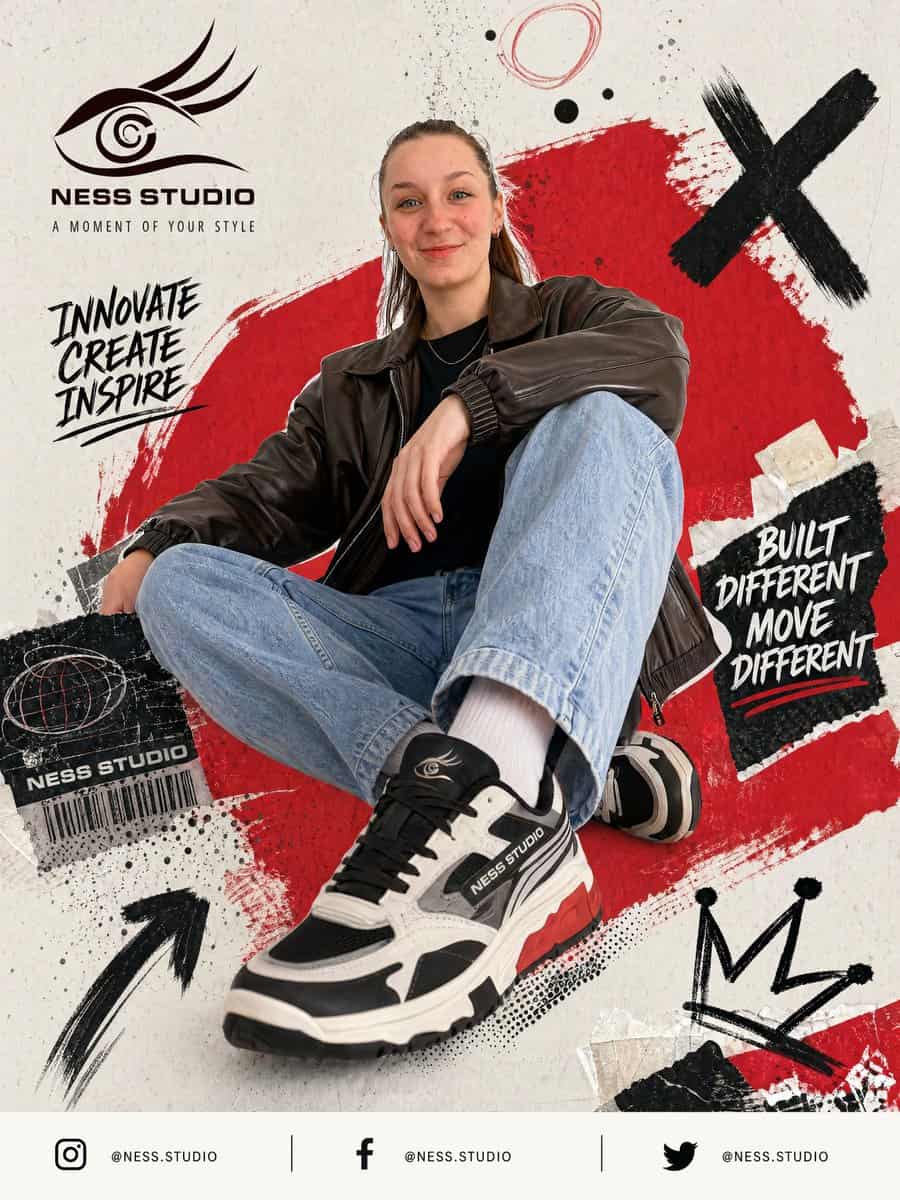
街头运动鞋海报广告
为 {argument name="brand name" default="NESS STUDIO"} 创建一张醒目的街头服饰海报广告,展示一位年轻成年模特随意坐在地面上,低角度时尚姿势,一膝抬起,一条腿伸向镜头,使前方运动鞋显得巨大而占主导。模特穿深棕色宽大皮革飞行夹克、黑色衬衫、浅蓝宽松牛仔裤、白袜和厚底黑白灰运动鞋,鞋底有红色点缀,鞋侧和鞋舌可见 {argument name="brand name" default="NES…
提示词
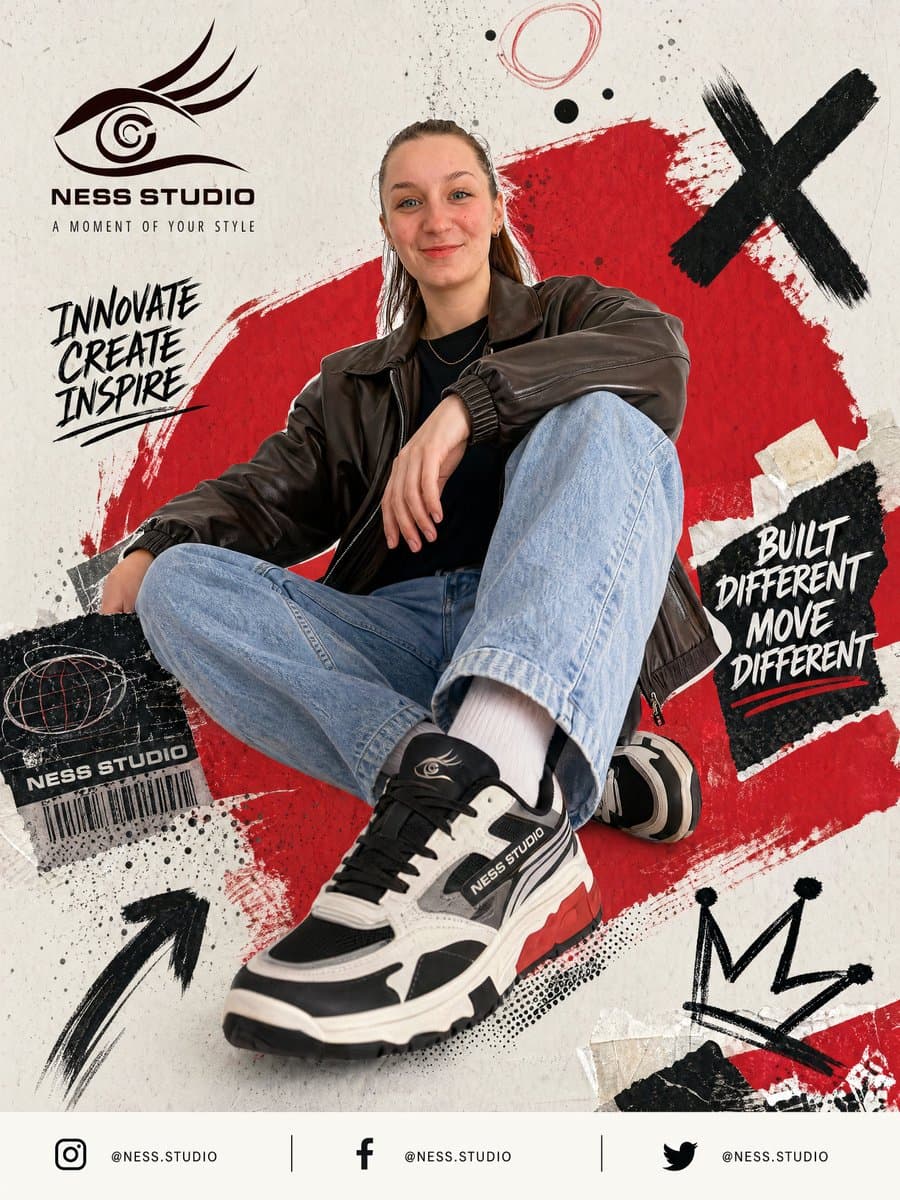
为 {argument name="brand name" default="NESS STUDIO"} 创建一张醒目的街头服饰海报广告,展示一位年轻成年模特随意坐在地面上,低角度时尚姿势,一膝抬起,一条腿伸向镜头,使前方运动鞋显得巨大而占主导。模特穿深棕色宽大皮革飞行夹克、黑色衬衫、浅蓝宽松牛仔裤、白袜和厚底黑白灰运动鞋,鞋底有红色点缀,鞋侧和鞋舌可见 {argument name="brand name" default="NESS STUDIO"} 标志。脸部被居中的柔和矩形模糊块有意遮挡。使用米白色纹理纸背景,带做旧 grunge 设计元素和拼贴分层。模特背后放置一个大号粗糙红色油漆笔触形状,斜向跨过画面中央。加入黑色墨水飞溅、草图圆圈、撕纸碎片和手绘涂鸦点缀。包含 4 个主要图形涂鸦:右上一个大黑色 X,左下一个手绘上箭头,右下一个粗糙皇冠草图,顶部中央附近一个圆形乱涂线。在左上放置风格化眼形标志,下方文字“{argument name="brand name" default="NESS STUDIO"}”,再下方较小标语“A MOMENT OF YOUR STYLE”。左侧中部加入手写口号“INNOVATE CREATE INSPIRE”,黑色笔刷字堆叠。右侧中部放置一块撕裂黑纸贴片,上面是白色手写口号“BUILT DIFFERENT MOVE DIFFERENT”和红色下划线笔触。左下靠近鞋的位置加入黑色做旧标签贴纸,包含地球乱涂图案、文字“{argument name="brand name" default="NESS STUDIO"}”和条形码。底部页脚创建干净横向条,包含 3 个社交媒体图标和账号,用细竖线分隔:Instagram、Facebook 和 Twitter,每个后面都跟“@NESS.STUDIO”。整体风格应锋利、都市、年轻、高对比、编辑街头时尚,把产品广告摄影与涂鸦海报设计、拼贴纹理和动态品牌视觉混合。
如何使用此提示
在生成之前阅读完整的 街头运动鞋海报广告 提示并确定主题、风格、相机、灯光和构图要求。
将括号或参数式占位符替换为您的产品、角色、品牌、场景、调色板或宽高比要求。
打开 https://www.gptimagehub.com/zh-CN/generate?promptId=cmogx50bb00exzpdyud84fkyh,生成图像,然后根据需要使用更具体的主题、文本、布局或负面约束来优化提示。
提示常见问题解答
街头运动鞋海报广告 提示符最适合用来做什么?
此提示最适用于您需要可重用结构、详细视觉方向和一致输出质量的 海报与插画 图像。
我可以在生成之前编辑提示吗?
是的。完整的提示文本在此页面上可见,因此您可以在生成之前更改主题、产品名称、颜色、构图、相机术语、长宽比和样式注释。
出现此提示时我应该使用哪种型号?
使用提示元数据中显示的模型作为默认起点。如果另一个图像模型支持相同的宽高比和指令风格,您可以调整提示并比较结果。