
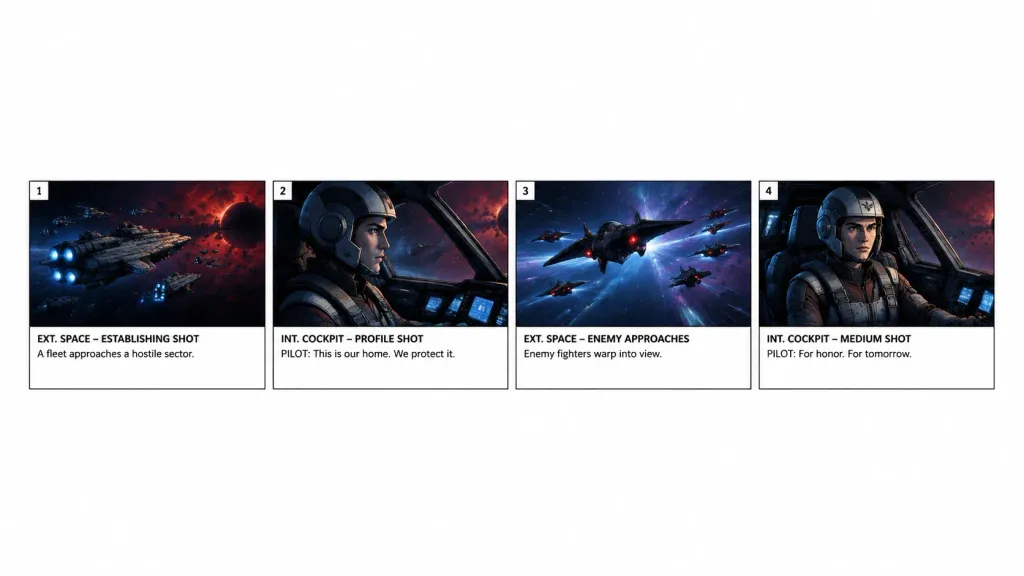
Storyboard Row Scene Extraction
Extracts the first four panels of an existing storyboard into a clean horizontal strip on a white canvas. Modify the panel range or scene description to isolate any sequence.
Prompt
Using the reference photo as the source storyboard, extract only panels [1–4] for a [15-second scene] and regenerate them as a standalone horizontal storyboard strip. Keep exactly 4 panels arranged in a single row across the lower-middle of a wide white canvas, surrounded by generous blank white space. Faithfully preserve the original artwork, panel borders, numbering, shot labels, and text: 1) “EXT. SPACE – ESTABLISHING SHOT” with “A fleet approaches a hostile sector.” 2) “INT. COCKPIT – PROFILE SHOT” with “PILOT: This is our home. We protect it.” 3) “EXT. SPACE – ENEMY APPROACHES” with “Enemy fighters warp into view.” 4) “INT. COCKPIT – MEDIUM SHOT” with “PILOT: For honor. For tomorrow.” Remove the overall project header, metadata, and all subsequent panels. Do not add new graphics, titles, or watermarks.
What you can customize
Swap these parts of the prompt for your own subject or wording before you generate.
[1–4]placeholder[15-second scene]placeholder“EXT. SPACE – ESTABLISHING SHOT”quoted wording“A fleet approaches a hostile sector.”quoted wording“INT. COCKPIT – PROFILE SHOT”quoted wording“PILOT: This is our home. We protect it.”quoted wording“EXT. SPACE – ENEMY APPROACHES”quoted wording“Enemy fighters warp into view.”quoted wording
Prompt details
- Category
- Cinematic / Film Still
- Model
- GPT IMAGE 2
- Cost per image
- 1K: 43 credits · 2K: 86 credits · 4K: 143 credits
- Aspect ratio
- 16:9
- Added