
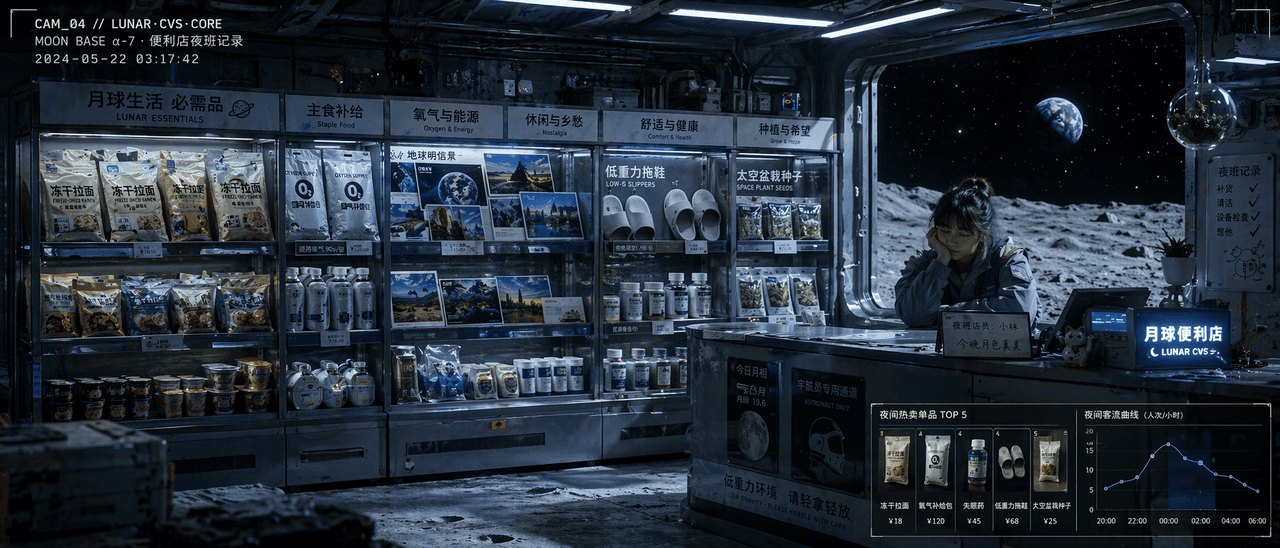
Moon Convenience Store Night Log
Layers a surveillance-style documentary frame over a retail-space rendering to produce a widescreen night-shift scene inside a lunar convenience store: shelves, a clerk, the Earth outside the window, and small data modules in the corners. It works for everyday science fiction rather than space epics.
Prompt
"Night shift record of a community convenience store on the moon" is a fusion of documentary-style illustrations and product display photography. The shelves in the store are arranged according to the needs of life on the moon: freeze-dried ramen, oxygen supply packs, earth postcards, low-gravity slippers, insomnia medicine, and space pot seeds. Behind the checkout counter is a tired but A gentle shop assistant, the black universe and the earth in the distance can be seen outside the glass window. The upper left corner of the picture looks like a surveillance video with time code superimposed on it. The lower right corner uses a small module to display hot-selling items and nighttime passenger flow curves. The light is cold white fluorescence intertwined with the blue shadow of the moon, like a combination of movie stills and commercial space design drawings. The proportions 21:9.
Usage guide
Layers a surveillance-style documentary frame over a retail-space rendering to produce a widescreen night-shift scene inside a lunar convenience store: shelves, a clerk, the Earth outside the window, and small data modules in the corners. It works for everyday science fiction rather than space epics.
When to use
Scene concepts for science-fiction shorts, future-themed retail space proposals, and worldbuilding book inserts. Shelves should take at least the left two thirds, the counter and clerk stay on the right, and the window belongs behind the clerk, not above the shelves, or the Earth will compete with the product labels.
What the existing cover image shows
The existing cover is a 21:9 panorama: six glass shelf sections with bilingual section headers fill the left and center, and freeze-dried ramen, oxygen canisters, Earth-landscape postcards, white slippers, pill bottles and seed packets are all identifiable. On the right a young clerk in a grey work jacket rests her chin on her hand at the counter, with a large window behind her showing grey lunar ground, a black starry sky and a blue Earth. A monospace camera label and timestamp sit top left, and a top-sellers thumbnail panel sits beside a customer-flow line chart bottom right, with a glowing blue shop sign and a beckoning-cat figurine on the counter. The mix of cold white ceiling light and blue window shadow is well handled, but the small shelf labels and chart ticks blur at thumbnail size, and the whole reads as a photorealistic film still; the hand-drawn documentary-illustration feel is barely present.
Suggested setup
- Aspect ratio
- 21:9 · Both the prompt and the cover are 21:9, so the 1:1 in the listing does not apply; 16:9 also works if you accept fewer shelf sections. Ask for a full interior view from an eye-level camera slightly above the counter, shelves on the left, counter and window on the right, and corner overlays kept flush to the edges with a safe margin.
- Reference images
- No reference is required. To reproduce a real store's layout or branded packaging you need the rights to it; otherwise describe shelf categories rather than specific products.
What to customize
- Shelf inventoryPressure-safe snacks, dehumidifier packs, daylight lamp sheets, sky postcards, moisture-proof socks, seaweed seedling kits
- Keep six categories, give each one a line of everyday logic for why it is needed here, and assign each a shelf position so items do not pile onto one tier.
- View outside the windowBlack deep sea with drifting glowing jellyfish beyond a porthole
- The window must be on the wall behind the clerk and show one dominant distant object (Earth, jellyfish, a sandstorm) that becomes the only saturated color in a cold scene.
- Corner data overlaysCamera ID and timecode top left; a restock list and a humidity curve bottom right
- At most two modules, each with a one-line title and three to five short words; state that they are flat UI overlays on top of the image, not physical screens in the room.
View a complete adaptation
Night shift log of a deep-sea station grocery
Swaps the moon for a deep-sea research station, rearranges the shelves for underwater life, and puts black water and glowing creatures outside the porthole while keeping the timecode, data modules and 21:9 frame.
This adaptation has not been generated. The existing cover image comes from the original prompt collection and is not a result of this adaptation.
'Night shift log of a community grocery inside a deep-sea research station', documentary illustration fused with a retail interior rendering, 21:9 ratio. Glass shelves are arranged by the needs of long-term underwater life: pressure-safe snacks, dehumidifier packs, simulated-daylight lamp sheets, postcards of blue skies, moisture-proof socks, seaweed seedling kits, each section with a short header. The checkout counter sits at the right of the frame, where a tired but kind middle-aged clerk leans on it; behind him a round porthole shows pitch-black deep water and a drifting swarm of glowing jellyfish whose teal glow is the only saturated color. A monospace camera ID and timecode are overlaid top left; bottom right, two small flat UI modules show tonight's restock list and a humidity curve. Warm yellow damp-proof lamps intertwine with cold teal light from the porthole, like a film still crossed with an interior design drawing, rich detail, eye-level camera slightly above the counter.
Troubleshooting
- The corner data modules turn into physical screens in the room or into garbled text
- Write explicitly that they are flat UI overlays in the image corners, give each a short title and no more than five words, and keep it to two modules; the less text, the less it smears.
- The wide ratio is ignored and the clerk ends up cropped or shrunk to a dot
- Put 21:9 once at the start and once at the end of the prompt, and lock the three-part layout with position phrases such as shelves left, counter and clerk right, window behind the clerk.
Editorial notes and generation record
AI-assisted editorial analysis of the source prompt and existing illustration. Settings are starting suggestions; the new adaptation is not a model test.
No new illustration was generated for this guide. The observations refer to the prompt's existing cover image from its source collection; its generation details are not recorded.
Prompt details
- Category
- Concept Art
- Model
- GPT IMAGE 2
- Cost per image
- 1K: 43 credits · 2K: 86 credits · 4K: 143 credits
- Aspect ratio
- 1:1
- Added
- Updated