
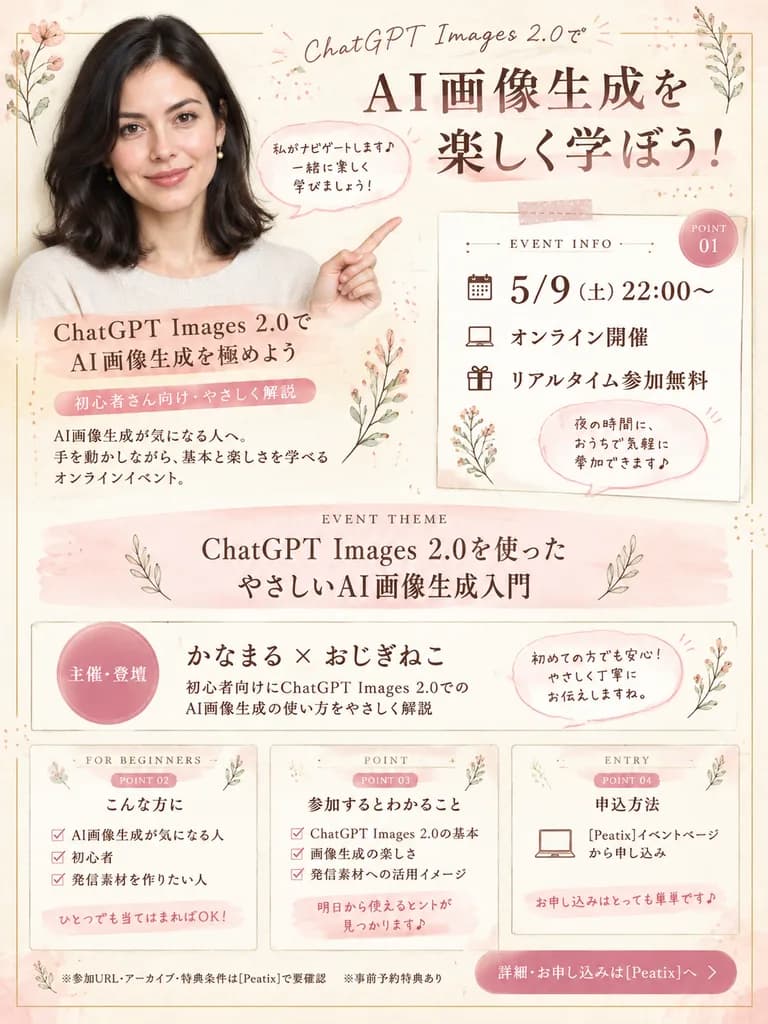
Japanese Watercolor Style Seminar Flyer
Generate an elegant Japanese online event flyer in soft watercolor stationery tones using a presenter photo. Adjust titles, dates, host names, and ticket links in brackets to fit any webinar.
Prompt
Using the reference photo as the presenter, create a soft, elegant Japanese online seminar flyer in a warm beige and pastel pink watercolor stationery aesthetic. Keep the presenter's hair, outfit, earrings, and anonymized face block consistent with the reference photo, cropped onto the left side with her upper body extended, smiling toward the viewer with one arm raised and pointing toward the event details on the right. Background and style: Off-white textured paper with delicate botanical line art, subtle washi-tape accents, thin decorative framing lines, dotted elements, and pastel blush and gold highlights. Layout and content sections: - Top headline section: includes text “ChatGPT Images 2.0で” and a large bold title “[AI画像生成を楽しく学ぼう!]”. - Near presenter: text “ChatGPT Images 2.0でAI画像生成を極めよう”, “初心者さん向け・やさしく解説”, “AI画像生成が気になる人へ。手を動かしながら、基本と楽しさを学べるオンラインイベント。”, and a speech bubble reading “私がナビゲートします♪ 一緒に楽しく学びましょう!”. - Right event info card labeled “EVENT INFO” and “POINT 01”: date and time “[5/9(土)22:00〜]”, “オンライン開催”, “リアルタイム参加無料”, and a speech bubble “夜の時間に、おうちで気軽に参加できます♪”. - Event theme horizontal banner labeled “EVENT THEME”: “[ChatGPT Images 2.0を使った やさしいAI画像生成入門]”. - Host banner: circular badge “主催・登壇”, presenter names “[かなまる × おじぎねこ]”, subtext “初心者向けにChatGPT Images 2.0での AI画像生成の使い方をやさしく解説”, and speech bubble “初めての方でも安心!やさしく丁寧にお伝えしますね。”. - Three bottom cards: 1. “FOR BEGINNERS / POINT 02 / こんな方に” with checklist items “AI画像生成が気になる人”, “初心者”, “発信素材を作りたい人”, and note “ひとつでも当てはまればOK!”. 2. “POINT / POINT 03 / 参加するとわかること” with points “ChatGPT Images 2.0の基本”, “画像生成の楽しさ”, “発信素材への活用イメージ”, and note “明日から使えるヒントが見つかります♪”. 3. “ENTRY / POINT 04 / 申込方法” with “[Peatix]イベントページから申し込み” and note “お申し込みはとっても簡単です♪”. - Footer notes: “※参加URL・アーカイブ・特典条件は[Peatix]で要確認”, “※事前予約特典あり”, and call-to-action “詳細・お申し込みは[Peatix]へ”. Typography: Elegant Japanese Mincho serif typography paired with light handwritten script styling for accent titles.
What you can customize
Swap these parts of the prompt for your own subject or wording before you generate.
[AI画像生成を楽しく学ぼう!]placeholder[ChatGPT Images 2.0を使った やさしいAI画像生成入門]placeholder[かなまる × おじぎねこ]placeholder[Peatix]placeholder“ChatGPT Images 2.0で”quoted wording“ChatGPT Images 2.0でAI画像生成を極めよう”quoted wording“初心者さん向け・やさしく解説”quoted wording“AI画像生成が気になる人へ。手を動かしながら、基本と楽しさを学べるオンラインイベント。”quoted wording
Prompt details
- Category
- Poster & Illustration
- Model
- GPT IMAGE 2
- Cost per image
- 1K: 43 credits · 2K: 86 credits · 4K: 143 credits
- Aspect ratio
- 3:4
- Added