
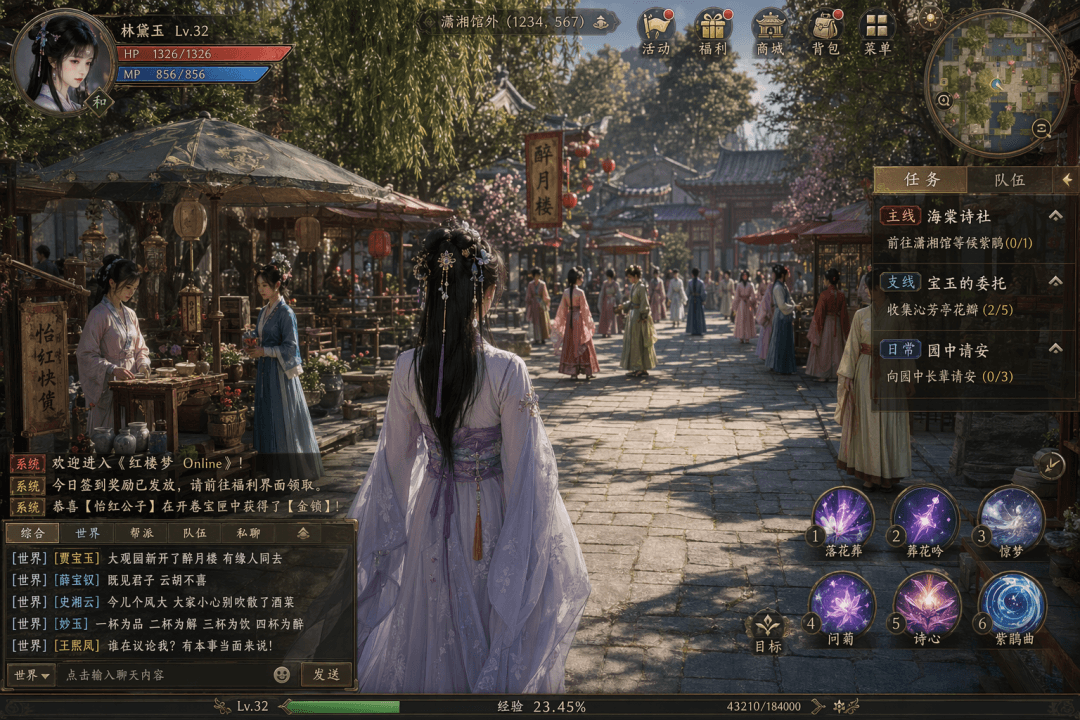
Software Interface #40
Generate an ancient Chinese MMORPG screenshot complete with detailed gameplay UI elements, useful for game design mockups and worldbuilding concepts.
Prompt
Tip: Draw a screenshot of the fictional open world MMO game "Dream of Red Mansions Online". The graphics are exquisite and close to the level of a AAA masterpiece. The protagonist is a woman in ancient costume standing in the middle ground, with a market scene in the Grand View Garden, and multiple NPC maids and servants coming and going in the distance. The blue bar on the character's avatar health bar in the upper left corner shows "Lin Daiyu Lv.32 HP 1326/1326 MP 856/856". The top shows the location "Outside Xiaoxiang Pavilion (1234, 567)" and a row of activity, welfare, shopping mall, backpack, and menu icons. Minimap in the upper right corner. The task panel on the right is listed as "Main line: Haitang Poetry Society, go to Xiaoxiang Pavilion and wait for the Rhododendron (0/1)", "Branch line: Baoyu's commission, collect Qinfang Pavilion petals (2/5)", "Daily greetings in the garden (0/3)". The system messages on the lower left and the world channel chat records include "[World] [Jia Baoyu] Newly opened Zuiyue Tower in Grand View Garden, people who are destined to go together". There are six skill icons in the skill bar on the lower right. Bottom experience bar 23.45%. The overall density of Chinese UI elements is extremely high.
What you can customize
Swap these parts of the prompt for your own subject or wording before you generate.
[World]placeholder[Jia Baoyu]placeholder“Dream of Red Mansions Online”quoted wording“Lin Daiyu Lv.32 HP 1326/1326 MP 856/856”quoted wording“Outside Xiaoxiang Pavilion (1234, 567)”quoted wording“,”quoted wording
Prompt details
- Category
- Game Asset
- Model
- GPT IMAGE 2
- Cost per image
- 1K: 43 credits · 2K: 86 credits · 4K: 143 credits
- Aspect ratio
- 1:1
- Added
- Updated