Limited-time deal: GPT Image 2 from $0.007 per image
Try it now
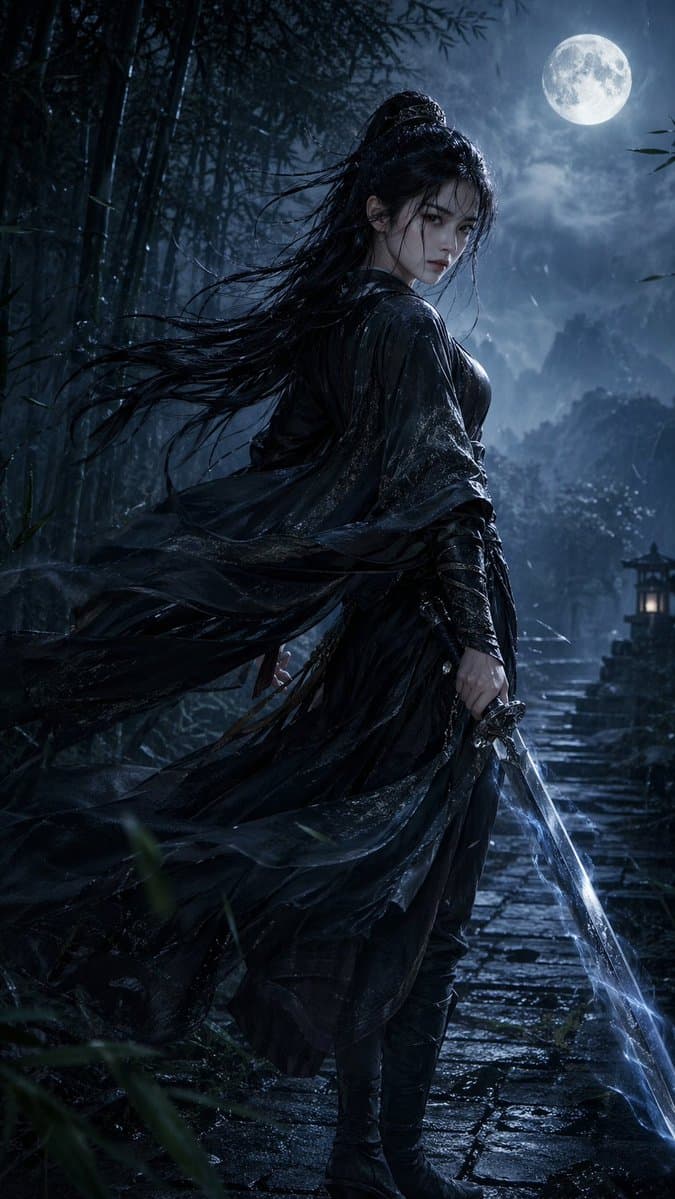
Vertical Wuxia Heroine Portrait
Portrait & Photography

Vertical Wuxia Heroine Portrait

GPT Image 2 vertical wuxia heroine portrait sample

Prompt

9:16 vertical, ultimate wuxia style, a stunning young Eastern swordswoman, cold and sharp phoenix eyes, porcelain skin, long straight black hair wet and windswept. Wearing a soaked dark black martial arts outfit with a wide-sleeved dark robe, blown dramatically by the wind. A soft sword belt at the waist, long boots, right hand holding an ancient sword emitting a faint blue sword qi glow. Dynamic pose: body slightly turned, looking back over shoulder, robes billowing. Background: moonlit rain-mist-covered bamboo forest path, giant full moon, stone path, ancient lanterns, thin mist and rain. Dramatic cold moonlight combined with blue sword qi, wet-surface water reflections, ultra-dynamic feel with detailed fabric folds, hair strand movement, and realistic water droplet reflections. Cinematic lighting, 8K, masterpiece, ultra realistic, dramatic atmosphere.

How to use this prompt

1
Review the full prompt

Read the complete Vertical Wuxia Heroine Portrait prompt and identify the subject, style, camera, lighting, and composition requirements before generating.

2
Customize variables

Replace bracketed or argument-style placeholders with your product, character, brand, scene, color palette, or aspect ratio requirements.

3
Generate and iterate

Open https://www.gptimagehub.com/generate?promptId=cmqf0qsrb001h13a7s3kn50yi, generate the image, then refine the prompt with more specific subject, text, layout, or negative constraints if needed.

Prompt FAQ

What is the Vertical Wuxia Heroine Portrait prompt best used for?

This prompt is best used for portrait & photography images where you want a reusable structure, detailed visual direction, and consistent output quality.

Can I edit the prompt before generating?

Yes. The full prompt text is visible on this page so you can change subjects, product names, colors, composition, camera terms, aspect ratio, and style notes before generation.

Which model should I use with this prompt?

Use the model shown in the prompt metadata as the default starting point. If another image model supports the same aspect ratio and instruction style, you can adapt the prompt and compare results.

Other templates