
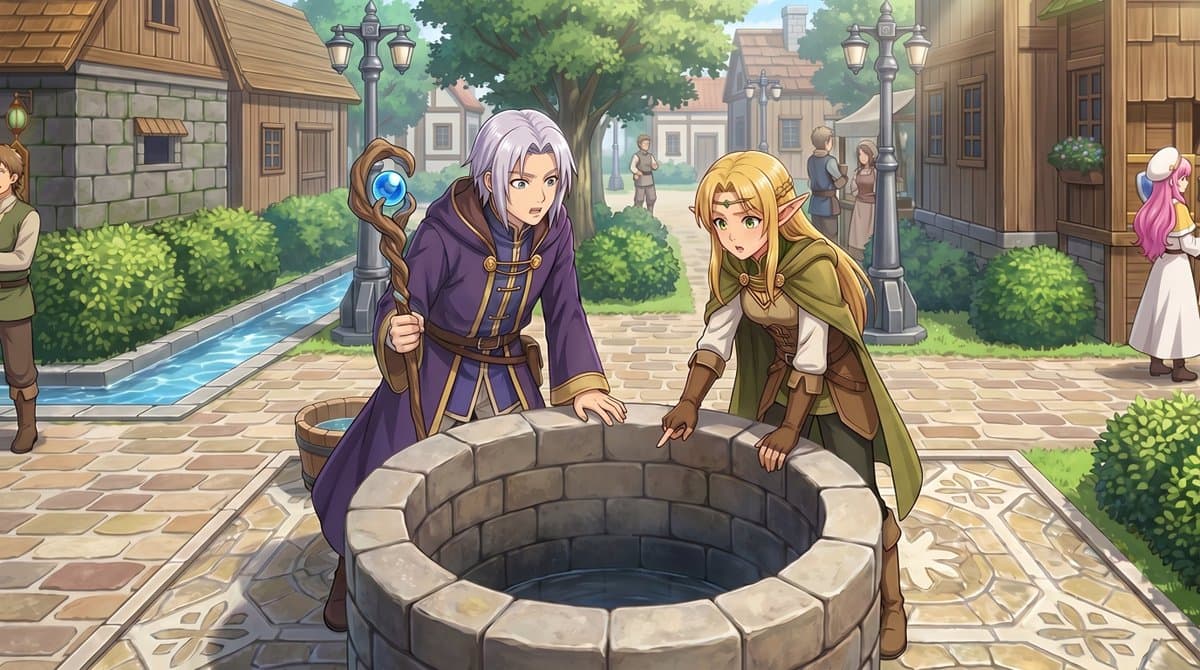
RPG Map to Anime Event Scene
Converts a top-down RPG town map into an eye-level anime event illustration while keeping the same landmarks in the same places. Best when you already have a map asset and want a cutscene that players will recognize as the same square.
Prompt
Using the provided reference image, transform the top-down RPG town map into a polished anime-style event illustration from a human eye-level perspective. Keep the same village location and layout cues: the central stone well, the path network, the hedges, the wooden houses, and the narrow water canal on the left. Convert the 2 small sprite characters by the well into 2 full-size fantasy characters in the foreground: a silver-haired mage in a purple robe holding a staff, and a blonde elf in green-and-brown adventurer clothing, both leaning over and looking into the well. Add a cinematic JRPG feel with soft daylight, detailed painterly rendering, clean line art, and gentle depth of field. Preserve the sense that this scene is taking place in the same town square, but enrich it with natural perspective, more environmental detail, and 5 background villagers: 1 man cropped at the far left edge, 2 small figures standing on the center path in the distance, and 2 townspeople talking near the right-side buildings.
Usage guide
Converts a top-down RPG town map into an eye-level anime event illustration while keeping the same landmarks in the same places. Best when you already have a map asset and want a cutscene that players will recognize as the same square.
When to use
Visual-novel event CGs, RPG cutscene stills, pitch art for a tile-based game, or a key visual for a town hub. The composition needs one central anchor object in the foreground with both characters interacting with it, and the map's left and right features must stay on the same sides.
What the existing cover image shows
The existing cover shows a round stone well in the foreground with a silver-haired mage in a purple robe holding a blue-orb staff on the left and a blonde elf in a green cloak and brown leather on the right, both bending toward the well with startled expressions. Cobblestone paving, trimmed hedges, iron lamp posts, timber-and-stone houses, a large tree and a narrow canal at the far left all read clearly. The extras only partly match the brief: a man cropped at the left edge is there, the center path holds one distant figure rather than two, a couple talks at right under an awning, and a pink-haired woman is cut by the right edge. Because the source map is not shown, layout fidelity cannot be judged from the cover alone, and although water is visible inside the well there is no hint of what the two are reacting to.
Suggested setup
- Aspect ratio
- 16:9 · A 16:9 landscape frame leaves room for the well, both characters and the village behind them; the listing marks 1:1 but the cover is widescreen. Ask for a human eye-level camera with the well slightly below center, the characters cut at the thighs by the rim, and a gentle depth of field that keeps the houses readable.
- Reference images
- Required: the top-down map image you want converted. Use your own tile map or assets you are licensed to reinterpret; a map lifted from a commercial game will carry its art into the result.
What to customize
- Layout anchors kept from the mapA lighthouse at the far end, a wooden pier network, a stone breakwater on the right, fish-market stalls, a cliff path on the left
- List four to six landmarks with their side of the frame; with fewer the model invents a generic village, with more it starts rearranging them.
- The two foreground charactersA red-haired knight in blue-and-silver armor and a dark-haired healer in a white-and-gold robe
- Describe hair, outfit colors and one held item per character, plus a single shared action toward the anchor object so they are not posed independently.
- Background extrasAn old fisherman cropped at the left edge, two children on the distant pier, two merchants talking by the market stalls
- Give exact counts and positions, keep them small, and state that no other people appear; extras easily multiply or steal focus.
View a complete adaptation
Harbor map to anime dawn scene
The same map-to-illustration conversion applied to a harbor town, with a knight and a healer examining a washed-up net at the pier and five positioned townspeople.
This adaptation has not been generated. The existing cover image comes from the original prompt collection and is not a result of this adaptation.
Using the provided reference image, transform the top-down RPG harbor-town map into a polished anime-style event illustration at human eye level. Keep the same location and layout cues: the lighthouse at the far end, the wooden pier network, the fish-market stalls, the cliff path on the left, and the stone breakwater on the right. Convert the 2 small sprite characters on the pier into 2 full-size fantasy characters in the foreground: a red-haired knight in blue-and-silver armor holding a lantern, and a dark-haired healer in a white-and-gold robe, both crouching over a torn fishing net full of glowing shells. Cinematic JRPG feel: pale dawn light, painterly rendering, clean line art, gentle depth of field. Keep it recognizably the same harbor square, with natural perspective, richer environment, and 5 background townspeople: 1 old fisherman cropped at the far left edge, 2 small children on the distant pier, and 2 merchants talking by the market stalls on the right. No other people.
Troubleshooting
- The result ignores the map and produces a generic fantasy village
- Name four to six specific landmarks with their left, center or right placement, repeat 'same town, same layout, eye-level' once, and keep the reference map as the only attachment.
- The crowd count drifts: extra villagers, missing ones, or a second copy of a hero
- State the number of extras and their positions as a short numbered list, keep them small and distant, and end the prompt with 'no other people'.
Editorial notes and generation record
AI-assisted editorial analysis of the source prompt and existing illustration. Settings are starting suggestions; the new adaptation is not a model test.
No new illustration was generated for this guide. The observations refer to the prompt's existing cover image from its source collection; its generation details are not recorded.
Prompt details
- Category
- Game Asset
- Model
- GPT IMAGE 2
- Cost per image
- 1K: 43 credits · 2K: 86 credits · 4K: 143 credits
- Aspect ratio
- 1:1
- Creator
- @無量光秀@アートゥルデザイン
- License
- CC BY 4.0
- Added
- Updated