
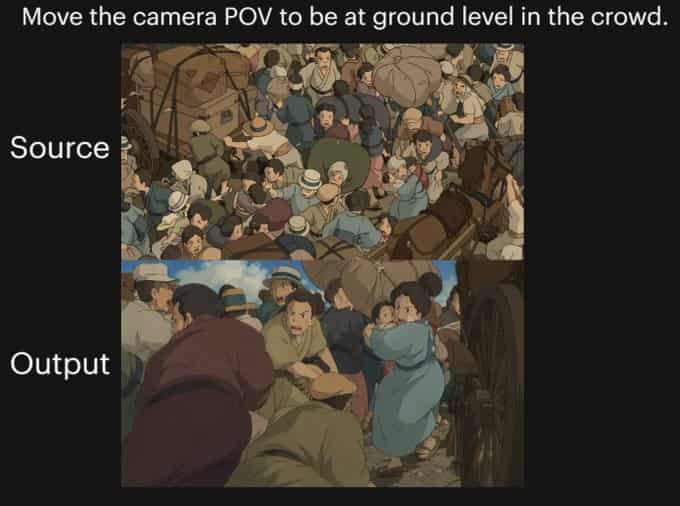
Anime Crowd POV Comparison
{"type":"comparison graphic","style":"anime cinematic demonstration image on a black presentation background","canvas":{"aspect_ratio":"4:3","background":"solid black"},"text_elements":[{"text":"{argument name=\"headlin…
Prompt
{"type":"comparison graphic","style":"anime cinematic demonstration image on a black presentation background","canvas":{"aspect_ratio":"4:3","background":"solid black"},"text_elements":[{"text":"{argument name=\"headline text\" default=\"Move the camera POV to be at ground level in the crowd.\"}","position":"top center","style":"large white sans-serif"},{"text":"Source","position":"left of upper image","style":"large white sans-serif"},{"text":"Output","position":"left of lower image","style":"large white sans-serif"}],"layout":{"sections":[{"title":"Source","position":"upper center","count":1,"labels":["overhead crowd scene"]},{"title":"Output","position":"lower center","count":1,"labels":["ground-level crowd POV scene"]}],"image_frames":2},"images":[{"role":"source image","composition":"busy top-down view of a densely packed historical street crowd, seen from above","scene":"a chaotic crowd gathered around a wagon and a horse-drawn carriage, people pressed shoulder to shoulder, many wearing caps and muted early-20th-century or old-European clothing, bundles and sacks visible, one brown horse at the right edge, wooden wagon wheel and cart structure partially visible","camera":"high overhead bird's-eye angle looking down into the crowd","lighting":"soft daylight","color_palette":"muted earthy browns, dusty blues, beige, olive, warm gray","rendering":"hand-painted anime film still, detailed crowd illustration, slightly soft shading"},{"role":"output image","composition":"the same crowded historical street reimagined from inside the mass of people at near-ground height","scene":"view from within the crowd beside a carriage wheel, bodies filling the foreground and midground, a person in dark maroon clothing bent forward at left, a crouched figure in green near the bottom center, a woman in a light blue dress at right-center turning back, tightly packed figures, horse and cart implied nearby, dramatic sense of compression and closeness","camera":"very low ground-level POV from inside the crowd, upward and forward through people, emphasizing complex occlusion and depth","lighting":"soft daylight with warm cinematic shadows","color_palette":"muted earthy browns, dusty blues, beige, olive, warm gray","rendering":"hand-painted anime film still, cinematic perspective shift, detailed character crowding, soft painterly shading"}],"overall_goal":"show a before-and-after camera angle transformation of the same anime crowd scene, with the output moving from an overhead view to a low immersive POV inside the crowd"}
How to use this prompt
Read the complete Anime Crowd POV Comparison prompt and identify the subject, style, camera, lighting, and composition requirements before generating.
Replace bracketed or argument-style placeholders with your product, character, brand, scene, color palette, or aspect ratio requirements.
Open https://www.gptimagehub.com/generate?promptId=cmogx289g00crzpdybkpbusju, generate the image, then refine the prompt with more specific subject, text, layout, or negative constraints if needed.
Prompt FAQ
What is the Anime Crowd POV Comparison prompt best used for?
This prompt is best used for social media images where you want a reusable structure, detailed visual direction, and consistent output quality.
Can I edit the prompt before generating?
Yes. The full prompt text is visible on this page so you can change subjects, product names, colors, composition, camera terms, aspect ratio, and style notes before generation.
Which model should I use with this prompt?
Use the model shown in the prompt metadata as the default starting point. If another image model supports the same aspect ratio and instruction style, you can adapt the prompt and compare results.