
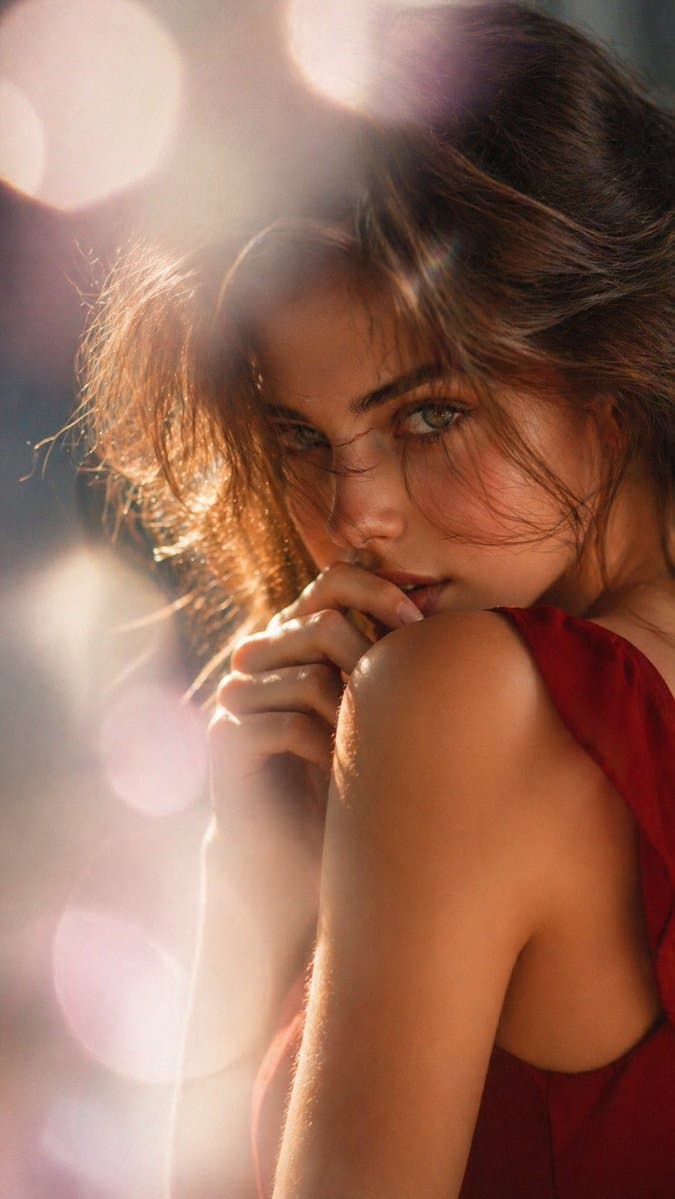
Dreamy Backlit Editorial Portrait
A backlit over-the-shoulder beauty portrait where glowing hair, a bare shoulder, and large circular bokeh matter more than the face. Choose it for warm, dreamy editorial covers and hair or skincare mood boards.
Prompt
A cinematic soft-focus portrait of a woman from behind and slightly in profile, framed from the upper torso up in a vertical composition. She has {argument name="hair color" default="dark brown"} hair styled in a loose messy updo with wispy strands catching the light. Her face is mostly hidden by her pose and hair, with only a small portion of one cheek visible. She wears a {argument name="dress color" default="deep red"} sleeveless dress with an open back or low-cut side, emphasizing her bare shoulder and upper back. One hand is raised delicately near her neck or shoulder, fingers relaxed. Use strong warm backlighting and rim light, with glowing golden highlights around the hair and skin, dreamy lens flare, and large circular bokeh in the blurred background. The image should feel intimate, elegant, and slightly sensual, like a high-end fashion or beauty editorial, with shallow depth of field, creamy blur, warm amber and rose tones, and a soft cinematic glow.
Usage guide
A backlit over-the-shoulder beauty portrait where glowing hair, a bare shoulder, and large circular bokeh matter more than the face. Choose it for warm, dreamy editorial covers and hair or skincare mood boards.
When to use
Beauty and hair-care campaign concepts, fragrance-style editorial spreads, or vertical cover art for a lifestyle feature. Build the frame around the shoulder line and the lit edge of the hair, and keep the background as pure bokeh with no readable objects.
What the existing cover image shows
The existing cover illustration shows a woman in a deep red sleeveless dress turning over her shoulder with one hand lifted to her lips, surrounded by soft pink circular bokeh and a warm rim light along the hair. The backlight, flare, and amber-rose palette match the prompt well. One clear departure: her eyes and most of her face are visible and meet the camera, whereas the prompt asks for the face to be mostly hidden with only part of a cheek showing.
Suggested setup
- Aspect ratio
- 9:16 · The prompt only specifies a vertical composition; the cover measures 675 × 1199, close to 9:16, which suits phone covers and story formats. Frame from the upper torso up with the head in the upper third, and say explicitly whether the face should be hidden or turned toward the lens.
- Reference images
- Not needed. If you want a particular updo or dress silhouette, a garment or hairstyle reference helps; using a real model's likeness requires her consent and image rights.
What to customize
- Hair color and styleSilver-blond hair in a loose braided crown
- Change color and style together and keep wispy strands at the edge so the rim light still has something to catch.
- Dress colorEmerald green silk
- Pick a saturated color that contrasts with the backlight; a dress close to the flare color (amber, rose) melts into the background.
- Backlight paletteCool blue-hour light with lavender and teal bokeh
- Name the light color, the bokeh color, and the skin tone you want preserved, so the glow does not drag the whole image into one hue.
View a complete adaptation
Blue-hour braided portrait from behind
Same over-the-shoulder, face-hidden structure, moved to cool blue-hour backlight with an emerald dress, a silver-blond braid, and lavender-teal bokeh.
This adaptation has not been generated. The existing cover image comes from the original prompt collection and is not a result of this adaptation.
A cinematic soft-focus portrait of a woman from behind and slightly in profile, framed from the upper torso up in a 9:16 vertical composition. She has silver-blond hair in a loose braided crown with fine strands catching the light. Her face is mostly hidden by her turned head and hair, with only the curve of one cheek and the tip of an earring visible. She wears an emerald green sleeveless silk dress with a modest open back, showing one bare shoulder and upper back. One hand is raised near the nape of her neck as if adjusting the braid, fingers relaxed. Use cool blue-hour backlighting and a silvery rim light, pale highlights along the hair and shoulder, gentle lens flare, and large circular bokeh in lavender and teal in the blurred background. The image should feel quiet, elegant, and editorial, like a high-end fashion spread: shallow depth of field, creamy blur, natural skin tones kept intact under the cool light, soft cinematic glow. No text, no props beyond the earring.
Troubleshooting
- The model turns fully toward the camera and the face takes over
- Write the pose as a sequence: back to camera, head turned a quarter, no eye contact, only the cheek contour and jawline visible; ask that the hair, not the face, be the sharpest element.
- Flare and bokeh bleach the skin into one flat tone
- Place the light source behind the shoulder rather than behind the head, cap the flare at the frame edge, and request visible skin texture and shadow on the near side of the back.
Editorial notes and generation record
AI-assisted editorial analysis of the source prompt and existing illustration. Settings are starting suggestions; the new adaptation is not a model test.
No new illustration was generated for this guide. The observations refer to the prompt's existing cover image from its source collection; its generation details are not recorded.
Prompt details
- Category
- Portrait & Photography
- Model
- GPT IMAGE 2
- Cost per image
- 1K: 43 credits · 2K: 86 credits · 4K: 143 credits
- Aspect ratio
- 1:1
- Creator
- @ToroJushiAi
- License
- CC BY 4.0
- Added
- Updated