
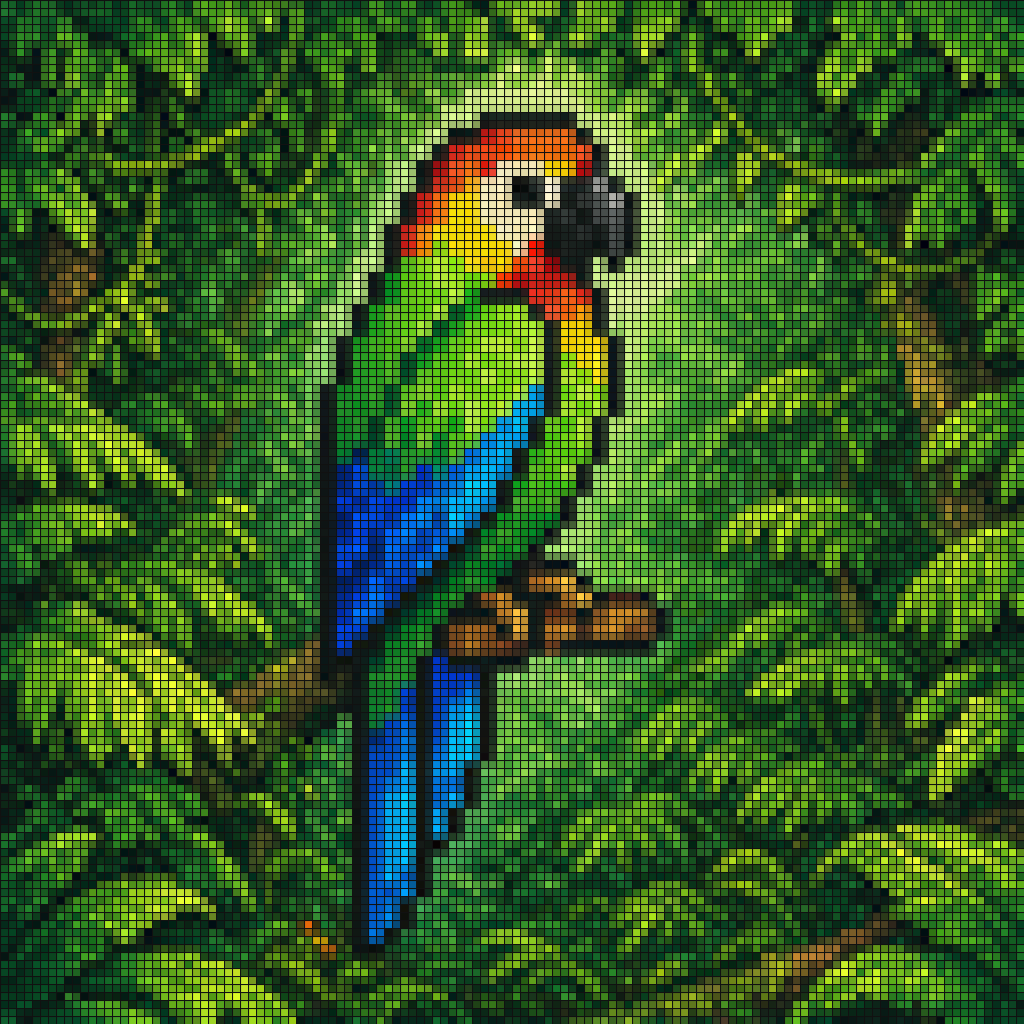
Tropical Parrot Pixel Mosaic
A tile-mosaic illustration of a parrot built from a uniform grid of small outlined squares, so the picture reads like a bead board or an LED wall. It works best for subjects with bold, zoned colors and a single clean silhouette.
Prompt
A vibrant pixel-art style mosaic of a tropical parrot perched on a small brown branch in the middle of dense rainforest foliage. The entire image is rendered as a tight grid of tiny square tiles with visible black outlines, creating a stained-glass or LED-screen effect. The bird is shown in side profile facing right, with a large curved black beak, a pale cream face, a bright red-orange forehead and throat, vivid green upper body, and long wings and tail in saturated blue and cyan. The surrounding jungle is filled edge to edge with layered green leaves in many shades, with a soft light green glow behind the parrot to separate it from the background. High color contrast, rich tropical palette, crisp tile pattern, centered composition, decorative digital mosaic aesthetic.
Usage guide
A tile-mosaic illustration of a parrot built from a uniform grid of small outlined squares, so the picture reads like a bead board or an LED wall. It works best for subjects with bold, zoned colors and a single clean silhouette.
When to use
Social avatars and banner art, starting points for cross-stitch or fuse-bead patterns, retro game-style decor, and print-on-demand graphics. Keep one subject centered with a contrasting halo; crowded scenes lose their shapes once everything is quantized into tiles.
What the existing cover image shows
The existing cover illustration is square and covered edge to edge with small tiles separated by thin dark seams. The parrot faces right in profile: a black hooked beak, a pale yellow cheek, a red-orange crown and throat, a green body, and blue-to-cyan wings with a long tail hanging below the branch. A soft light-green halo separates the bird from layered foliage in many greens with brown vine lines. The bird's tiles are flat and crisp; the background tiles carry softened photographic color, so the mosaic effect is weaker there. The branch is short, the feet are large and blocky, and the cheek reads more yellow than the cream the prompt describes.
Suggested setup
- Aspect ratio
- 1:1 · Square is the natural frame, and the record and cover agree on it. Center the bird with the tail reaching into the lower third, let foliage fill every edge, and ask that the tile grid run uniformly to the borders without cropping half tiles.
- Reference images
- None needed; the prompt fully specifies pose and color zones. A bird photo can lock a particular pose, but describe the colors in words anyway, since the reference's gradients will be flattened into tiles.
What to customize
- Subject and color zonesA kingfisher facing left: teal crown, orange chest, white throat patch, cobalt wings
- Give each body region one named color; the mosaic cannot hold subtle gradients, so a subject with four or five distinct zones holds up best.
- Tile densityMedium tiles, roughly forty-eight across the frame
- Fewer, larger tiles simplify the silhouette; if you go coarser, keep the subject at least a third of the frame height so the beak and eye survive.
- Halo and background familyPale amber glow behind the bird, surroundings in warm browns and golds
- The halo must contrast with both subject and backdrop, and the backdrop should stay within one hue family so the subject's colors are the only strong accents.
View a complete adaptation
Red fox in a snowy birch wood, tile mosaic
The same uniform outlined-tile mosaic and centered profile, but a fox in a winter birch forest with a cool white-blue halo and a rust, charcoal, cream and ice-blue palette.
This adaptation has not been generated. The existing cover image comes from the original prompt collection and is not a result of this adaptation.
A vibrant pixel-art style mosaic of a red fox sitting on a snow-covered log in the middle of a dense winter birch forest. The entire image is rendered as a tight grid of tiny square tiles with visible dark outlines, giving a stained-glass or LED-wall effect. The fox is shown in side profile facing left, with a pointed black nose, a cream muzzle and chest, a rust-orange back and head, black lower legs, and a thick tail with a white tip curled around its paws. The surrounding woodland fills the frame edge to edge with white and gray birch trunks, dark bare branches and pale blue snow, with a soft blue-white glow behind the fox to separate it from the background. High color contrast, a rust, charcoal, cream and ice-blue palette, a crisp tile pattern of uniform size across the whole frame, centered composition, decorative digital mosaic aesthetic, 1:1 square.
Troubleshooting
- The grid is uneven, or parts of the picture look like a smooth photo instead of tiles
- State that every tile is the same size and a single flat color, background included, and that no region may be rendered smoothly; mention the approximate tile count across the frame.
- The subject blends into similarly colored surroundings
- Keep the glow behind the subject, ask for a continuous line of darker outline tiles around its silhouette, and shift the background one step duller or cooler than the subject's colors.
Editorial notes and generation record
AI-assisted editorial analysis of the source prompt and existing illustration. Settings are starting suggestions; the new adaptation is not a model test.
No new illustration was generated for this guide. The observations refer to the prompt's existing cover image from its source collection; its generation details are not recorded.
Prompt details
- Category
- Social Media
- Model
- GPT IMAGE 2
- Cost per image
- 1K: 43 credits · 2K: 86 credits · 4K: 143 credits
- Aspect ratio
- 1:1
- Creator
- @Erik MacKinnon
- License
- CC BY 4.0
- Added
- Updated