
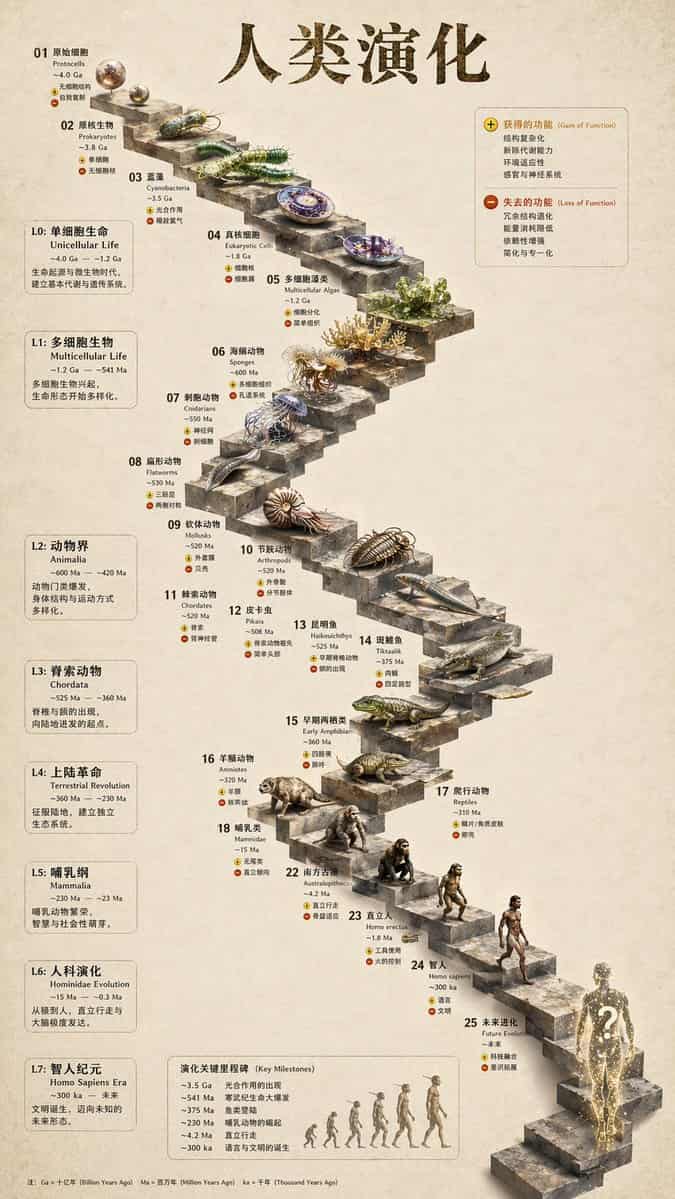
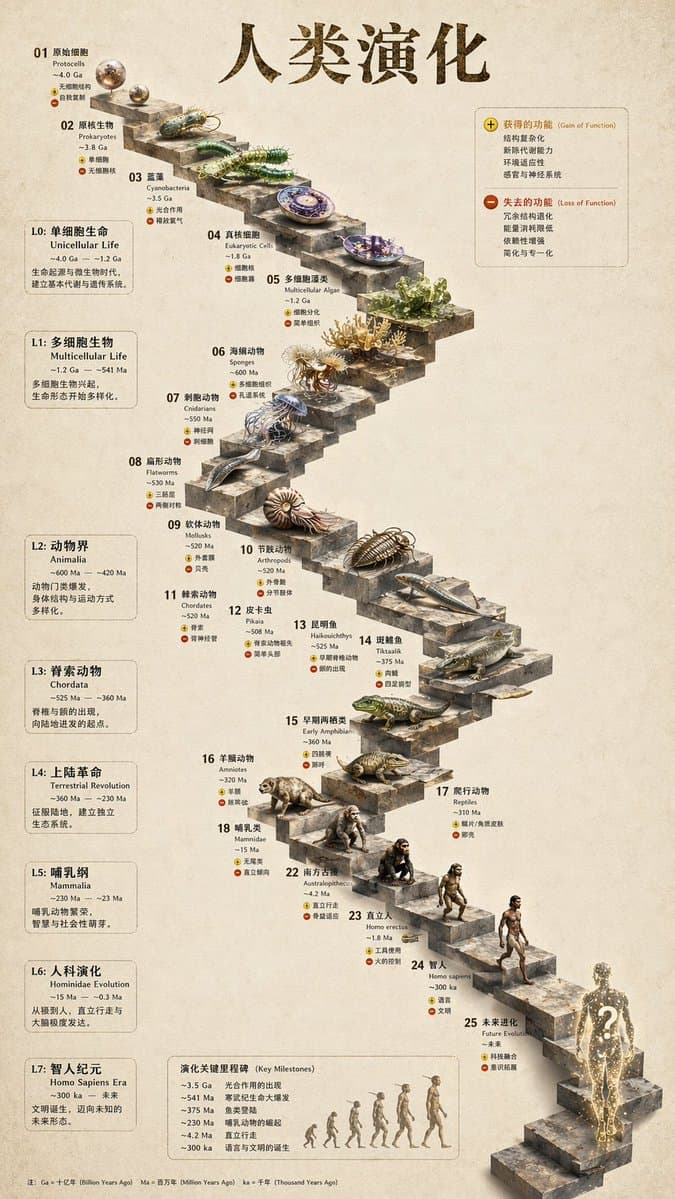
Infografik zur 3D-Steintreppenentwicklung
{ „type“: „Infografik zur evolutionären Zeitleiste“, „Anweisung“: „Verwandeln Sie das flache Vektordesign mithilfe von REFERENCE_0 als strukturelle Basis in eine äußerst realistische 3D-Infografik. Ersetzen Sie die glat…
Prompt
{ „type“: „Infografik zur evolutionären Zeitleiste“, „Anweisung“: „Verwandeln Sie das flache Vektordesign mithilfe von REFERENCE_0 als strukturelle Basis in eine äußerst realistische 3D-Infografik. Ersetzen Sie die glatten Rampen durch deutliche Steinstufen und werten Sie alle Organismen in fotorealistische 3D-Modelle auf.“, "Stil": { „Hintergrund“: „{argument name=\"background style\" default=\"vintage textured parchment paper\"}“, „staircase“: „{argument name=\"staircase material\" default=\"realistic textured stone blocks\"}“, „subjects“: „{argument name=\"organism style\" default=\"highly detailed photorealistic 3D renders\"}“ }, „Layout“: { „main_title“: „{argument name=\"main title\" default=\"人类演化\"}“, "Abschnitte": [ { „position“: „linke Seitenleiste“, "Anzahl": 8, „labels“: [„L0: Einzelliges Leben“, „L1: Mehrzellige Organismen“, „L2: Animalia“, „L3: Chordata“, „L4: Terrestrische Revolution“, „L5: Mammalia“, „L6: Hominin-Evolution“, „L7: Ära des Homo sapiens“] }, { „Position“: „oben rechts“, „title“: „Funktion gewonnen / Funktion verloren“, „description“: „Legende mit Plus- und Minus-Symbolen“ }, { „position“: „unten in der Mitte“, „title“: „Wichtige Meilensteine der Evolution“, "Anzahl": 6, „description“: „Zeitleiste mit einer Silhouettengrafik aus 6 Figuren, die die Evolution vom Affen zum Menschen zeigt“ } ], „Herzstück“: { „Beschreibung“: „Wendeltreppe aus Stein mit 25 nummerierten Stufen, auf der bestimmte Organismen abgebildet sind.“, „Anzahl“: 25, „notable_elements“: [ „Schritt 07: Qualle“, „Schritt 09: Ammonit“, „Schritt 10: Trilobit“, „Schritt 24: Gehender Mensch“, „Schritt 25: {argument name=\"future evolution concept\" default=\"glowing cosmic silhouette with a question mark\"}“ ] } } }
So verwenden Sie diese Eingabeaufforderung
Lesen Sie die vollständige Infografik zur 3D-Steintreppenentwicklung-Eingabeaufforderung und ermitteln Sie die Anforderungen an Thema, Stil, Kamera, Beleuchtung und Komposition, bevor Sie sie erstellen.
Ersetzen Sie Platzhalter in Klammern oder im Argumentstil durch Ihre Anforderungen an Produkt, Charakter, Marke, Szene, Farbpalette oder Seitenverhältnis.
Öffnen Sie https://www.gptimagehub.com/de/generate?promptId=cmogwy3me009lzpdyd0vcxqra, generieren Sie das Bild und verfeinern Sie die Eingabeaufforderung bei Bedarf mit spezifischeren Betreff-, Text-, Layout- oder negativen Einschränkungen.
Schnelle FAQ
Wofür eignet sich die Eingabeaufforderung Infografik zur 3D-Steintreppenentwicklung am besten?
Diese Eingabeaufforderung eignet sich am besten für infografik / bildung-Bilder, bei denen Sie eine wiederverwendbare Struktur, eine detaillierte visuelle Ausrichtung und eine konsistente Ausgabequalität wünschen.
Kann ich die Eingabeaufforderung vor dem Generieren bearbeiten?
Ja. Der vollständige Aufforderungstext ist auf dieser Seite sichtbar, sodass Sie Betreff, Produktnamen, Farben, Komposition, Kamerabegriffe, Seitenverhältnis und Stilhinweise vor der Generierung ändern können.
Welches Modell soll ich mit dieser Aufforderung verwenden?
Verwenden Sie das in den Metadaten der Eingabeaufforderung angezeigte Modell als Standardstartpunkt. Wenn ein anderes Bildmodell dasselbe Seitenverhältnis und denselben Anweisungsstil unterstützt, können Sie die Eingabeaufforderung anpassen und die Ergebnisse vergleichen.