
Infographic / Giáo dục
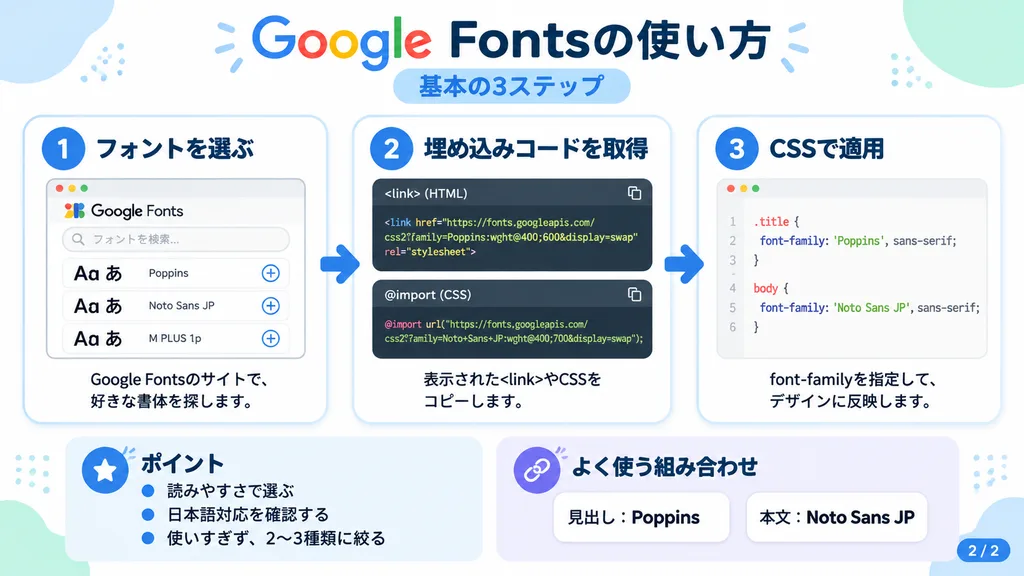
Infographic Hướng Dẫn Google Fonts Tiếng Nhật
Tạo infographic hướng dẫn 3 bước kiểu Nhật với đoạn mã và thẻ UI. Tùy chỉnh nội dung văn bản và mã nguồn trong dấu ngoặc vuông.
infographicgoogle fontshướng dẫntiếng nhậtthiết kế phẳngphát triển webgiao diện ui
Xem các prompt tương tựPrompt AI về Đồ họa thông tin
Prompt
{
  "type": "Japanese infographic",
  "topic": "[How to use Google Fonts]",
  "style": "clean modern flat design, pure white background, soft pastel blue and mint corner decorative blobs, rounded cards with subtle drop shadows, tech tutorial aesthetic, crisp vector typography and UI illustrations",
  "canvas": {
    "aspect_ratio": "16:9"
  },
  "headline": {
    "main": "[Google Fontsの使い方]",
    "sub": "[基本の3ステップ]"
  },
  "layout": {
    "sections": [
      {
        "title": "[1. フォントを選ぶ]",
        "position": "left",
        "count": 1,
        "labels": [
          "[1. フォントを選ぶ]"
        ],
        "card_style": "rounded white panel with light blue border and soft shadow",
        "icon": "blue numbered circle with 1",
        "illustration": "browser window displaying font search UI with 3 preview rows of large 'Aa あ' samples, top search bar, small window control buttons, and clean UI accent lines",
        "body_text": "[Google Fontsのサイトで、好きな書体を探します。]"
      },
      {
        "title": "[2. 埋め込みコードを取得]",
        "position": "center",
        "count": 1,
        "labels": [
          "[2. 埋め込みコードを取得]"
        ],
        "card_style": "rounded white panel with light blue border and soft shadow",
        "icon": "blue numbered circle with 2",
        "illustration": "dark code editor panel featuring two labeled snippet boxes separated by a thin rule",
        "code_blocks": {
          "count": 2,
          "labels": [
            "<link> (HTML)",
            "@import (CSS)"
          ],
          "content": [
            "<link href=\"https://fonts.googleapis.com/css2?family=Poppins:wght@400;600&display=swap\" rel=\"stylesheet\">",
            "@import url('https://fonts.googleapis.com/css2?family=Noto+Sans+JP:wght@400;700&display=swap');"
          ]
        },
        "body_text": "[表示された<link>やCSSをコピーします。]"
      },
      {
        "title": "[3. CSSで適用]",
        "position": "right",
        "count": 1,
        "labels": [
          "[3. CSSで適用]"
        ],
        "card_style": "rounded white panel with light blue border and soft shadow",
        "icon": "blue numbered circle with 3",
        "illustration": "clean white code card showing CSS declaration syntax with two selectors and font-family rules",
        "code_blocks": {
          "count": 2,
          "labels": [
            ".title",
            "body"
          ],
          "content": [
            ".title { font-family: 'Poppins', sans-serif; }",
            "body { font-family: 'Noto Sans JP', sans-serif; }"
          ]
        },
        "body_text": "[font-familyを指定して、デザインに反映します。]"
      },
      {
        "title": "[ポイント]",
        "position": "bottom-left",
        "count": 3,
        "labels": [
          "[読みやすさで選ぶ]",
          "[日本語対応を確認する]",
          "[使いすぎず、2〜3種類に絞る]"
        ],
        "card_style": "rounded white panel with pale blue tint",
        "icon": "blue star in a circle",
        "body_format": "bullet list"
      },
      {
        "title": "[よく使う組み合わせ]",
        "position": "bottom-center-right",
        "count": 2,
        "labels": [
          "[見出し: Poppins]",
          "[本文: Noto Sans JP]"
        ],
        "card_style": "rounded white panel with pale lavender tint",
        "icon": "purple linked-rings symbol",
        "body_format": "two pill-shaped example boxes"
      }
    ],
    "connectors": {
      "count": 2,
      "style": "large blue right-pointing arrows connecting the 3 main process cards"
    },
    "pagination": {
      "text": "[2 / 2]",
      "position": "bottom-right",
      "style": "blue rounded corner tab"
    }
  },
  "text_language": "Japanese",
  "color_palette": {
    "primary_blue": "#2f80ff",
    "navy": "#0f2b5b",
    "google_colors": [
      "#4285F4",
      "#DB4437",
      "#F4B400",
      "#0F9D58"
    ],
    "lavender": "#8b6cff",
    "background": "#ffffff"
  }
}Những phần bạn có thể tùy chỉnh
Trước khi tạo ảnh, hãy thay các phần này của prompt bằng chủ đề hoặc nội dung của bạn.
[How to use Google Fonts]chỗ giữ chỗ[1. フォントを選ぶ]chỗ giữ chỗ[Google Fontsのサイトで、好きな書体を探します。]chỗ giữ chỗ[2. 埋め込みコードを取得]chỗ giữ chỗ[表示された<link>やCSSをコピーします。]chỗ giữ chỗ[3. CSSで適用]chỗ giữ chỗ[font-familyを指定して、デザインに反映します。]chỗ giữ chỗ[ポイント]chỗ giữ chỗ
Chi tiết prompt
- Danh mục
- Infographic / Giáo dục
- Mô hình
- GPT IMAGE 2
- Chi phí mỗi ảnh
- 1K: 43 tín dụng · 2K: 86 tín dụng · 4K: 143 tín dụng
- Tỷ lệ khung hình
- 16:9
- Ngày thêm