
Hướng Dẫn Định Tuyến Email Catch-All Cloudflare
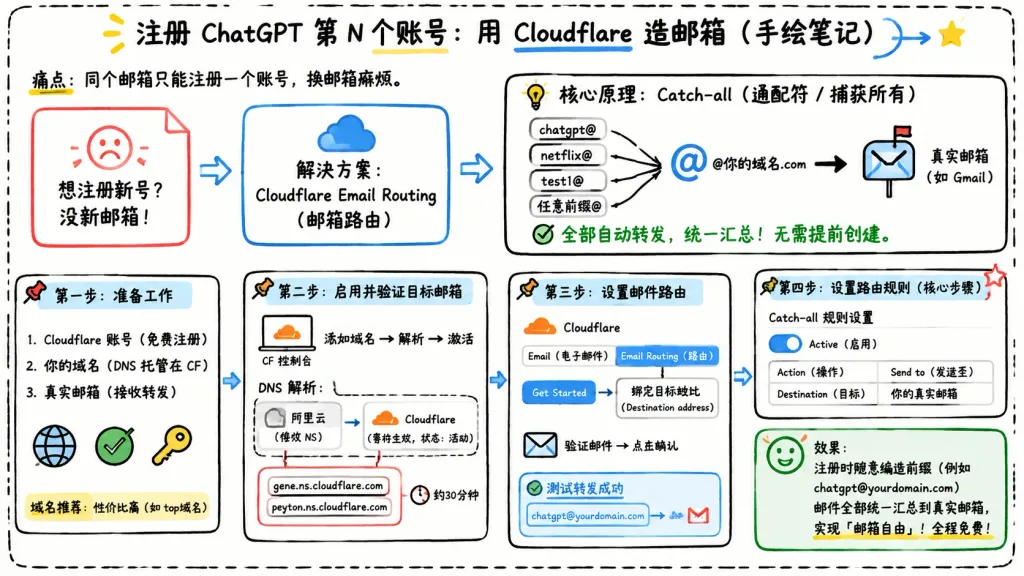
Infographic bảng trắng vẽ tay bằng tiếng Trung giải thích cách thiết lập bí danh email Cloudflare. Thay đổi tiêu đề trong ngoặc vuông để tùy chỉnh hướng dẫn.
Prompt
Landscape 16:9 hand-drawn whiteboard-style Chinese infographic explaining how to register multiple accounts using Cloudflare Email Routing catch-all aliases. Clean off-white background framed with a thick black dashed rounded border, informal classroom notebook feel, marker and pen sketch style with slightly imperfect lines, doodle arrows, stars, pins, and simple icons. Top center title: bold handwritten Chinese text "[注册 ChatGPT 第 N 个账号:用 Cloudflare 造邮箱(手绘笔记)]" with "Cloudflare" underlined in blue, accompanied by a small curved doodle arrow and a yellow star. Directly below to the left, smaller text: "痛点:同个邮箱只能注册一个账号,换邮箱麻烦。" Layout contains 7 main cards arranged left-to-right connected by bold directional arrows, plus a final result callout: 1. Card 1 (Pain Card, top left): Red outlined folded-corner sticky note with a sad red face icon. Text: "想注册新号?没新邮箱!" 2. Card 2 (Solution Card, top middle): Blue rounded rectangle with a blue cloud icon. Text: "解决方案:Cloudflare Email Routing(邮箱路由)", with a blue arrow pointing rightward. 3. Card 3 (Core Principle Card, top right): Large black-outlined rounded box with header "核心原理:Catch-all(通配符 / 捕获所有)" and a funnel icon. On the left, 4 incoming aliases: "chatgpt@", "netflix@", "test1@", and "任意前缀@", each pointing into a large "@" and "@你的域名.com", which points via a thick black arrow into a mailbox icon labeled "真实邮箱(如 Gmail)". Bottom text with green checkmark: "全部自动转发,统一汇总!无需提前创建。" 4. Step 1 Card (bottom left): Box titled "第一步:准备工作". Three checklist items: "1. Cloudflare 账号(免费注册)", "2. 你的域名(DNS 托管在 CF)", "3. 真实邮箱(接收转发)". Globe icon, green checkmark, yellow key icon. Small note below: "域名推荐:性价比高(如 top域名)". 5. Step 2 Card (bottom center-left): Box titled "第二步:启用并验证目标邮箱". Computer icon labeled "CF 控制台", text flow "添加域名 → 解析 → 激活". Below, a mini DNS panel showing "阿里云(修改 NS)" on the left and "Cloudflare(等待生效,状态:活动)" on the right. Below, a red circled box listing "gene.ns.cloudflare.com" and "peyton.ns.cloudflare.com", with a clock icon and "约30分钟". 6. Step 3 Card (bottom center-right): Box titled "第三步:设置邮件路由". Mini CF UI mockup with tabs "Email(电子邮件)" and "Email Routing(路由)", pointing via a "Get Started" button to "绑定目标地址(Destination address)". Bottom envelope icon with "验证邮件 → 点击确认". Below, a blue status box labeled "测试转发成功" showing alias forwarding to Gmail. 7. Step 4 Card (bottom right): Box titled "第四步:设置路由规则(核心步骤)". UI panel titled "Catch-all 规则设置", blue active toggle switch labeled "Active(启用)", and a 2-row table: Row 1 "Action(操作)" to "Send to(发送至)"; Row 2 "Destination(目标)" to "你的真实邮箱". Red star in corner. Final Result Box (bottom right under Step 4): Green rounded rectangle with smiling face icon. Text: "效果:注册时随意编造前缀(例如 chatgpt@yourdomain.com)邮件全部统一汇总到真实邮箱,实现「邮箱自由」!全程免费!" Style: Legible handwritten Chinese typography, black marker outlines, accent colors in blue, red, green, and yellow, 2D vector doodle aesthetic, strictly non-photorealistic, no 3D elements, no watermarks.
Những phần bạn có thể tùy chỉnh
Trước khi tạo ảnh, hãy thay các phần này của prompt bằng chủ đề hoặc nội dung của bạn.
[注册 ChatGPT 第 N 个账号:用 Cloudflare 造邮箱(手绘笔记)]chỗ giữ chỗ“Cloudflare”văn bản trong ngoặc kép“痛点:同个邮箱只能注册一个账号,换邮箱麻烦。”văn bản trong ngoặc kép“想注册新号?没新邮箱!”văn bản trong ngoặc kép“解决方案:Cloudflare Email Routing(邮箱路由)”văn bản trong ngoặc kép“核心原理:Catch-all(通配符 / 捕获所有)”văn bản trong ngoặc kép“chatgpt@”văn bản trong ngoặc kép“netflix@”văn bản trong ngoặc kép
Chi tiết prompt
- Danh mục
- Infographic / Giáo dục
- Mô hình
- GPT IMAGE 2
- Chi phí mỗi ảnh
- 1K: 43 tín dụng · 2K: 86 tín dụng · 4K: 143 tín dụng
- Tỷ lệ khung hình
- 16:9
- Ngày thêm