
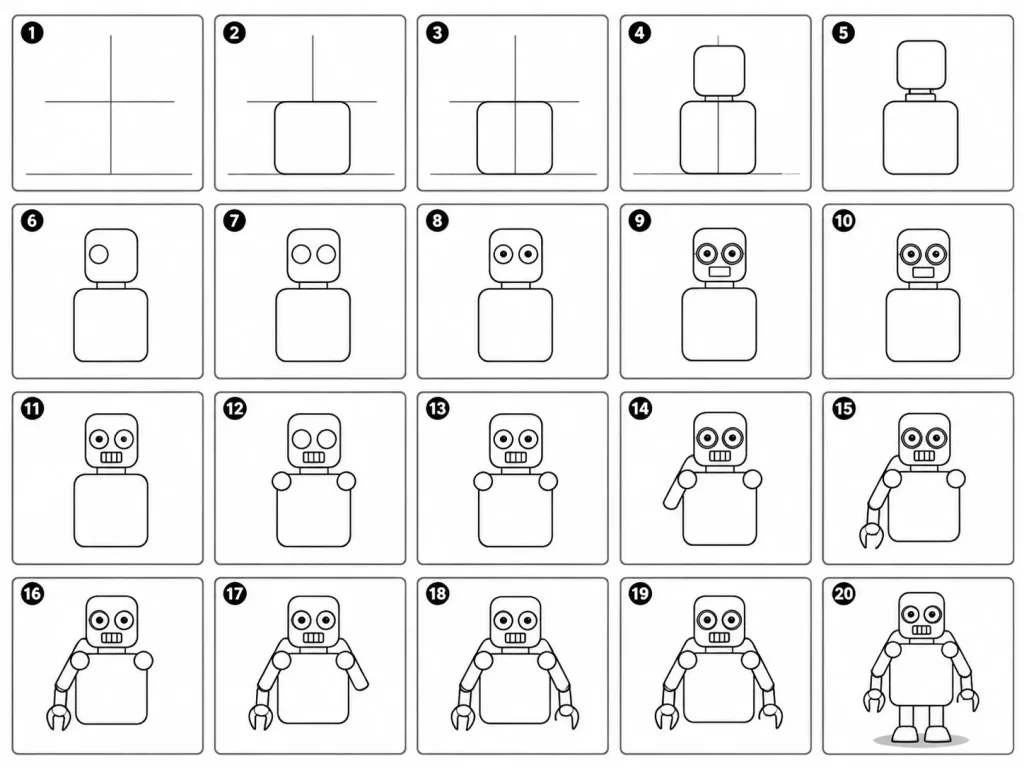
Hướng Dẫn Từng Bước Vẽ Robot Hoạt Hình
Prompt này tạo hướng dẫn 20 khung hình để vẽ robot hoạt hình từ các đường dựng hình cơ bản đến chi tiết hoàn thiện. Thay đổi nhân vật hoặc các bước để vẽ đồ vật khác.
Prompt
A 20-panel sequential drawing guide layout showing step-by-step instructions for drawing a cute cartoon robot on a white background. Each numbered panel retains all previous drawing steps and adds exactly one clear new line or shape: 1. Light construction guide lines: vertical center, horizontal center, and a ground line. 2. Add torso: rounded rectangle positioned above the ground line. 3. Add torso vertical centerline. 4. Add head: smaller rounded square placed directly above the torso. 5. Add neck connector: short rounded rectangular block. 6. Add left eye circle. 7. Add right eye circle. 8. Add pupils inside both eyes. 9. Add thin rim rings around both eyes. 10. Add rectangular mouth below the eyes. 11. Add evenly spaced vertical grille slats inside the mouth. 12. Add left shoulder joint circle on the side of the torso. 13. Add right shoulder joint circle. 14. Add left upper arm cylinder extending from the left shoulder. 15. Add left elbow joint circle and left forearm cylinder. 16. Add left claw hand with a base curve and two prongs. 17. Add right upper arm cylinder extending from the right shoulder. 18. Add right elbow joint circle and right forearm cylinder. 19. Add right claw hand matching the left hand. 20. Add two short blocky legs from the torso base, two rounded trapezoid feet, and a small soft ground shadow. Clean black-and-white line art infographic style, clear grid arrangement, instructional illustration.
Chi tiết prompt
- Danh mục
- Infographic / Giáo dục
- Mô hình
- Nano Banana Pro
- Chi phí mỗi ảnh
- 1K: 108 tín dụng · 2K: 108 tín dụng · 4K: 193 tín dụng
- Tỷ lệ khung hình
- 4:3
- Ngày thêm