
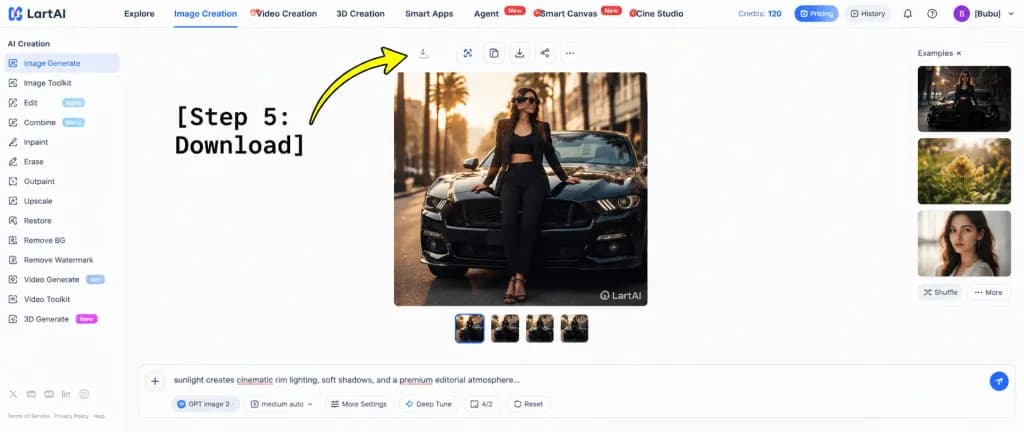
Tutorial de Download no Painel LartAI
Gera um mockup de interface de aplicativo web SaaS com anotação indicando o botão de download. Personalize a imagem central, nome de usuário e texto da etapa.
Prompt
A wide tutorial screenshot graphic showing the LartAI image generation web application interface with an instructional overlay for downloading a generated image. High-key bright white UI layout, clean SaaS dashboard aesthetics, thin light gray dividers, crisp typography, and balanced negative space. Composition & Layout: - Full browser web app interface without browser chrome. - Left sidebar (approx. 12% width): Under the header "AI Creation", exactly 14 navigation items: "Image Generate" (selected with a blue indicator), "Image Toolkit", "Edit" with a "Nano" badge, "Combine" with a "Nano" badge, "Inpaint", "Erase", "Outpaint", "Upscale", "Restore", "Remove BG", "Remove Watermark", "Video Generate" with a "Veo" badge, "Video Toolkit", and "3D Generate" with a "New" badge. Bottom footer shows tiny legal and policy text links with miniature social icons. - Top navigation bar: Full width, showing the "LartAI" logo at far left. Seven navigation tabs: "Explore", "Image Creation" (active with a blue underline), "Video Creation", "3D Creation", "Smart Apps", "Agent" (with red "New" tag), "Smart Canvas" (with red "New" tag), and "Cine Studio". Far right displays "Credits: 120", pill buttons for "Pricing" and "History", subtle utility icons, and a purple circular avatar with initial "B" beside the username "[Bubu]". - Central canvas: A large square fashion editorial photo showing [a stylish woman wearing sunglasses, a black blazer, black crop top, black trousers, and strappy heels] leaning against the front hood of [a glossy black Ford Mustang] on a city street at golden hour, palm trees and architecture softly blurred in the background with warm cinematic rim lighting. A subtle "LartAI" watermark appears in the bottom right corner of the picture. Above the image is a toolbar of small square action buttons (including a download icon); below the image are four small square variant thumbnails, the first highlighted with a blue border. - Right panel: Labeled "Examples ×", featuring three vertically stacked preview thumbnails (dark automotive fashion, yellow flowers, woman's portrait) with "Shuffle" and "More" text buttons below. - Bottom input dock: A wide prompt bar with a plus button on the left, displaying prompt text starting with "sunlight creates cinematic rim lighting, soft shadows, and a premium editorial atmosphere..." with red squiggly spellcheck underlines on select words. Underneath are control tags: "GPT Image 2", "medium auto", "More Settings", "Deep Tune", "4/2", "Reset", and a circular blue submit button. - Graphic Annotation Overlay: At the left-center, bold large black typewriter monospace text reading "[Step 5: Download]" with a thick, curved bright yellow arrow with a black outline sweeping upward and pointing directly at the small download icon in the top toolbar above the square generated image.
O que você pode personalizar
Antes de gerar, troque estas partes do prompt pelo seu próprio tema ou texto.
[Bubu]espaço reservado[a glossy black Ford Mustang]espaço reservado“AI Creation”texto entre aspas“Image Generate”texto entre aspas“Image Toolkit”texto entre aspas“Edit”texto entre aspas“Nano”texto entre aspas“Combine”texto entre aspas
Detalhes do prompt
- Categoria
- Design UI / UX
- Modelo
- GPT IMAGE 2
- Custo por imagem
- 1K: 43 créditos · 2K: 86 créditos · 4K: 143 créditos
- Proporção
- 21:9
- Adicionado em